14 minutes
UChat
Posted by
AI Appointment Setter Guide: Build One with UChat and Cal.com
14 minutes
Posted by
UChat

An AI appointment setter is a conversational system that understands a booking request, collects the information required to qualify it and uses a scheduling system to offer or reserve a real time. A reliable one does not invent availability or claim a meeting is booked before the calendar confirms it.
With UChat and Cal.com, the responsibilities are clear: UChat manages the conversation, AI reasoning, qualification, workflow and human handoff; Cal.com manages event types, available times and booking records. That separation turns a pleasant chat into an operational booking process.
Reviewed August 31, 2026. Cal.com APIs, channel policies and UChat settings can change. Verify the linked official documentation before deploying a production workflow.
What is an AI appointment setter?
An AI appointment setter is an automated agent designed to move a qualified person from an initial conversation to a confirmed appointment. Depending on the business, it may work in a website chat, WhatsApp, Instagram or another supported channel. Some products focus on outbound voice calls. Others focus on inbound chat, lead qualification and scheduling.
Those are different operating models. An outbound voice setter must manage calling permission, answer detection, call scripts and phone operations. An inbound scheduling assistant usually starts when a person messages the business and asks for a demo, consultation or service time.
This guide focuses on the second model: an AI appointment setter built around UChat conversations and Cal.com scheduling. It can qualify a lead, retrieve real availability, create or manage a booking and transfer exceptions to a human team. It is not a claim that every appointment-setting product or voice workflow works the same way.
The essential rule: AI can interpret what the person wants. Cal.com must supply the available times and confirm the booking. The workflow controls every state change between them.
Static booking link vs appointment chatbot vs AI appointment setter
Start with the smallest system that completes the job reliably.
Option | Best fit | What it does well | What to test |
|---|---|---|---|
Static Cal.com link | The service and audience are already clear | Lets a person choose from configured availability with minimal setup | Whether people need help choosing an event, explaining needs or recovering from errors |
Rules-based appointment chatbot | The booking journey follows predictable questions | Collects fields, routes by answers and sends the correct booking link | Whether free-text questions and unusual requests create too many dead ends |
AI appointment setter | Qualification and scheduling require a natural conversation | Understands open requests, asks relevant follow-ups and calls approved scheduling actions | Guardrails, data quality, confirmation logic, cost and human exception handling |
Human appointment team | Every request is high value, sensitive or highly variable | Applies judgment and handles negotiation or complex constraints | Response speed, coverage hours, consistency and cost |
A static link is often enough when every visitor needs the same event and can self-schedule. Adding AI is useful when the system must understand intent, choose between services, collect qualification data, answer approved questions, continue in a messaging channel or route special cases.
The goal is not to remove people from every booking. It is to automate the repeatable path and give a human the right context when judgment is needed.
A reliable AI appointment setter architecture
A production workflow should separate six stages:
Understand the request. Identify whether the person wants a demo, consultation, service appointment, reschedule, cancellation or human help.
Qualify and route. Collect only the information needed to choose the right event type, team or next step.
Retrieve real availability. Ask Cal.com for open slots for the selected event type and date range.
Confirm the exact choice. Repeat the date, local time, timezone, duration and meeting purpose before creating the booking.
Create and read back the booking. Run the booking action, store the returned UID and tell the user it is confirmed only after a successful result.
Manage the lifecycle. Handle reminders, rescheduling, cancellation, no response and human exceptions with explicit workflow states.
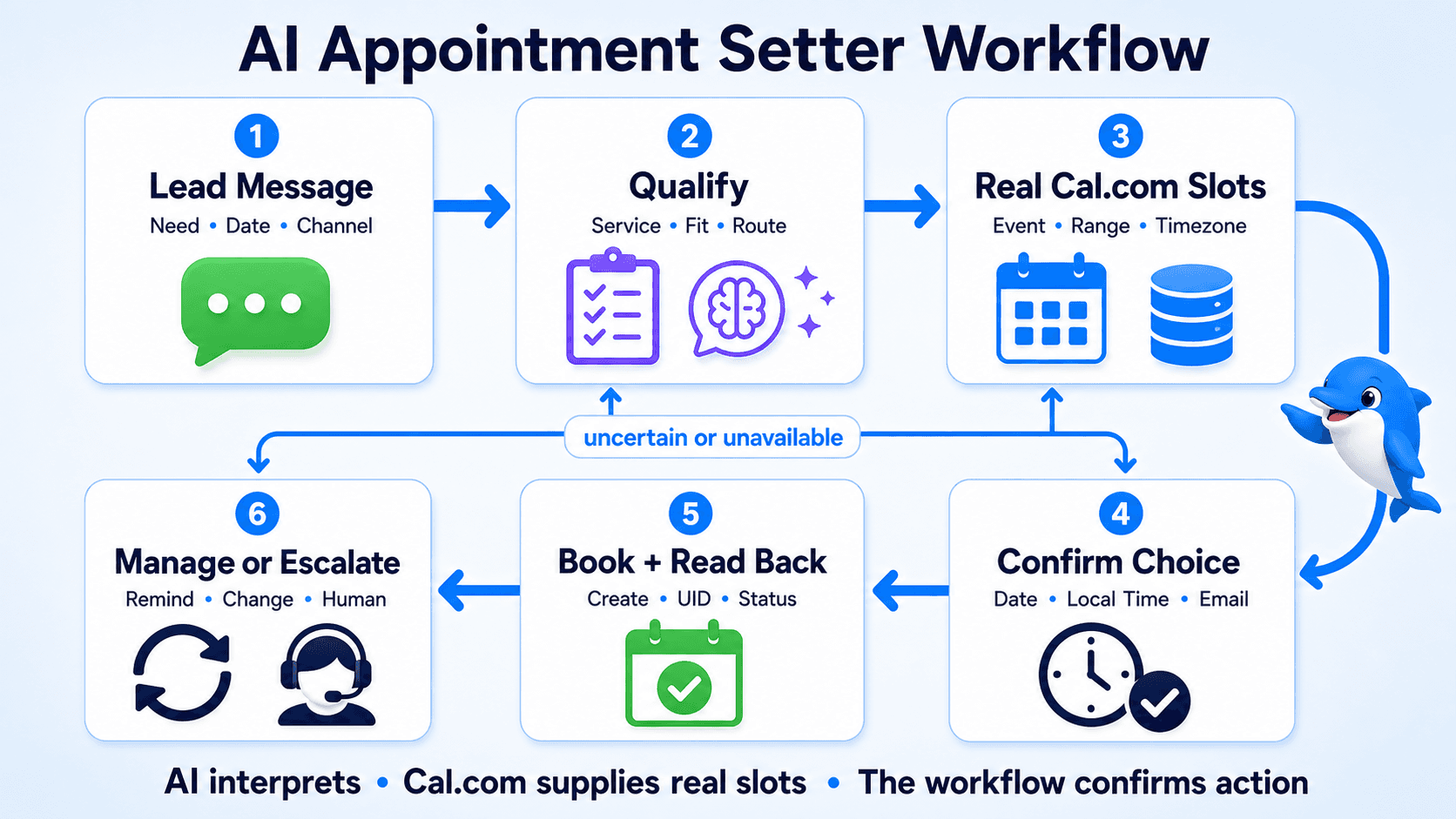
Cal.com's official available-slots endpoint and create-booking endpoint illustrate why availability and booking are separate steps. The first finds valid options. The second changes calendar state and returns a booking record.
Do not merge those steps into one optimistic AI response. A time that was available when the conversation started may be taken before the user confirms it. Fetch again when needed, create the booking once and read the actual result.
How UChat and Cal.com work together
UChat connects the customer conversation to Cal.com actions and the rest of the business workflow.
UChat manages the conversational journey
An UChat AI Agent can use approved knowledge, instructions, custom fields and AI Functions. In an appointment workflow, that means the agent can interpret “I need a product demo next week in the afternoon,” ask a necessary follow-up and pass structured values into a defined action.
The UChat Flow Builder then controls what happens around that AI step: conditions, data capture, Cal.com actions, success and failure branches, notifications and transfer rules.
Keep the model's authority narrow. It may decide which approved function to call or how to explain the result. It should not create a time from memory, bypass required fields or promise an exception that the workflow has not approved.
Cal.com manages scheduling truth
Cal.com stores the event types, schedules and booking state. Its API documents actions for retrieving slots, creating a booking and managing the booking by UID. The booking request includes attendee details and a timezone, while the start value is represented in UTC.
That makes timezone handling an operational requirement, not a cosmetic detail. Capture the person's timezone, display the proposed appointment in their local time and store the normalized value used by the booking action.
The integration supports two booking experiences
UChat's public Cal.com integration overview demonstrates two patterns:
Generate a booking link. The conversation determines the right event and sends a self-scheduling URL, with known user details added where the integration supports them.
Book directly in the conversation. The workflow retrieves slots, lets the user choose and creates the booking with attendee and event information.
Use a booking link for simpler implementation and a familiar calendar interface. Use direct conversational booking when staying in the channel materially improves the experience and the workflow can handle timezones, competing slot changes and failure states correctly.
Watch UChat's official Cal.com integration walkthrough for the event-type, availability, booking-link, direct-booking and booking-management actions.
How to build an AI appointment setter with UChat and Cal.com
Build the narrowest end-to-end path first. A complete “book one event type correctly” flow is more valuable than a broad agent with unclear states.
1. Define the appointment job
Choose one appointment type and write its operational contract:
who is eligible to book;
what information is required;
which event type and host or team should be used;
how far ahead a person can schedule;
what happens when no time is suitable;
which cases require a person.
For a sales demo, qualification might require company name, use case and team size. For a salon appointment, the service, location and staff preference may matter more. Do not copy the same qualification script into every business.
2. Configure Cal.com before adding AI
Create and test the event type, schedule, duration, buffer, location and meeting provider in Cal.com. Connect the calendar that owns availability.
UChat's Cal.com connection lesson shows the current product setup and event-type identification flow. Cal.com's current API documentation supports both OAuth and API-key authentication and recommends OAuth for integrations. When an API key is used, treat it as a privileged secret: keep it out of public repositories, browser code, screenshots and prompts.
Test a booking directly in Cal.com before introducing the conversational layer. If the event itself is misconfigured, AI will only hide the problem until a customer hits it.
3. Capture and normalize the minimum data
A basic direct-booking flow commonly needs:
event or service choice;
preferred date range;
name and email;
timezone;
any required booking fields;
a channel-specific user identifier for conversation continuity.
Ask one relevant question at a time. Reuse trusted profile data when appropriate, but let the person correct it. Do not collect a large set of lead fields merely because the chatbot can.
If the user says “Friday afternoon,” convert that phrase into a date range only after resolving location and timezone. Then pass the structured range to the Cal.com availability action.
4. Present a small set of real slots
Fetch current availability for the correct event type. Show a short list in the person's local time, with the date and timezone label visible.
Avoid dumping dozens of timestamps into the conversation. Offer two or three useful options, plus a path to see another day. If no slots are returned, say so accurately and let the person widen the range, choose another event type or speak to the team.
5. Confirm before changing calendar state
Before the booking action runs, repeat the important facts:
event or service;
date and local time;
timezone;
duration;
attendee name and email;
meeting location when known.
Use an explicit confirmation such as “Book this time.” This reduces errors caused by a model treating exploratory language as final intent.
6. Create once, then verify the response
Submit the structured values to the Cal.com booking action. On success, store the booking UID and relevant status. Return the confirmed details from the result rather than reconstructing them from earlier conversation text.
On timeout or an uncertain result, do not immediately submit the same booking again. First look for an existing booking using the available identifiers. This prevents a network retry from becoming a duplicate appointment.
7. Add reschedule, cancel and reminder paths
Cal.com documents dedicated reschedule and cancel operations based on the booking UID. Keep that identifier with the conversation or customer record so a later request can target the correct booking.
Cal.com also documents webhooks for events such as booking created, rescheduled and cancelled. A lifecycle event can trigger a UChat workflow, but it does not automatically authorize a message on every channel. Resolve the recipient, check current channel rules and make each notification idempotent.
8. Design the human exception path
Use UChat Live Chat when the person asks for a human or the workflow encounters a case it should not decide.
Useful escalation conditions include:
no suitable slot after two searches;
uncertain service or event selection;
timezone ambiguity that cannot be resolved;
VIP, enterprise or high-value lead rules;
accessibility or special-location requirements;
payment, medical, legal or policy-sensitive questions;
repeated integration errors;
an explicit request for a person.
Send the human team a concise summary: the person's intent, answers, proposed event, slots already offered, booking status and reason for escalation. A transfer without context creates extra work for both sides.
Reliability and safety checks before launch
An appointment setter is changing a shared operational system. Test the failure modes, not only the happy path.
Availability and concurrency
Two people can see the same open time. Recheck availability before creation when the conversation has been idle, and treat the create-booking result as final. If the slot disappears, apologize plainly and offer fresh choices.
Timezones and daylight saving
Test users in at least three timezones and around a daylight-saving transition. Show the timezone next to every proposed time. Store a timezone identifier such as Australia/Brisbane, not only a numeric offset that may change seasonally elsewhere.
Duplicate actions
Give each logical booking attempt a stable workflow reference, store the Cal.com UID after success and check for an existing booking after uncertain network results. Apply the same discipline to reminders and cancellations.
Authentication and secrets
Cal.com says API keys carry substantial privileges. Keep credentials in UChat's integration settings or another protected server-side secret store. Rotate a key if it is exposed. Never place it in the AI prompt or send it to the user.
Consent and data minimization
A confirmed appointment is not blanket consent for future marketing. Separate service notifications from promotional messages, follow the current rules for the selected channel and retain only the customer data needed for the workflow.
AI limits
Define which event types the agent may select, which fields it may write and which promises it may make. Require tools for availability and booking. When a tool fails, the response should name the failure state and offer a retry or human help—not fabricate success.
How to evaluate an AI appointment setter
Evaluate the whole operating system, not only the quality of a demo conversation.
Qualification accuracy: Does the workflow select the right event type and team?
Booking accuracy: Do confirmed conversations match Cal.com records, local times and attendee details?
Completion rate: What share of eligible conversations reaches a confirmed appointment?
False confirmation rate: How often does the customer believe a booking exists when it does not? The acceptable target is zero.
Duplicate booking rate: Are retries or repeated messages creating more than one booking?
Reschedule and cancellation success: Can the system identify and update the intended booking?
Human handoff quality: Does the agent receive the reason and context needed to continue?
Time to resolution: How long does the customer spend from first scheduling intent to a confirmed or correctly escalated result?
No-show rate: Track it, but do not assume AI alone controls it; offer, reminder and lead-quality changes also matter.
Review failed searches and escalations every week at first. They reveal missing event types, confusing service language, bad qualification rules and integration errors more reliably than a generic chatbot satisfaction score.
When UChat plus Cal.com is the right fit
Consider this architecture when the business needs several of these capabilities together:
natural-language qualification before scheduling;
event selection based on customer answers;
booking inside a supported conversation channel;
a visual workflow around the AI step;
confirmation, reschedule and cancellation paths;
data capture for CRM or follow-up operations;
human takeover for exceptions;
one conversation journey that can connect multiple supported channels and integrations.
Use Cal.com on its own when a configured booking page already completes the customer job. Use a rules-based form or chatbot when the questions are fixed and open-ended language adds little value. Add AI only where interpretation improves the path enough to justify additional testing and monitoring.
Frequently asked questions
Can an AI appointment setter book directly inside chat?
Yes. UChat's Cal.com integration demonstrates retrieving available slots and creating a booking from the conversational workflow. A simpler alternative is to generate a Cal.com booking link and let the user select the time on the scheduling page.
Should the AI decide which times are available?
No. The AI may interpret a request such as “Tuesday afternoon,” but availability should come from Cal.com for the correct event type and date range. The booking should be described as confirmed only after the create action succeeds.
What is the difference between an AI appointment setter and an AI scheduling assistant?
The terms overlap. “Appointment setter” usually emphasizes qualifying a lead or customer and reaching a booked meeting. “Scheduling assistant” can also describe personal calendar tools that reorganize meetings or tasks. Define the required job before comparing products.
Can the workflow reschedule or cancel appointments?
Yes. UChat's training and Cal.com's API documentation cover retrieving a booking and using its UID to reschedule or cancel it. Store the identifier after creation and verify the final response.
Can it send appointment reminders on WhatsApp?
It can use an approved workflow to send a reminder through a properly configured channel, but creating a booking does not itself grant messaging permission. The recipient mapping, consent, templates and current WhatsApp rules still apply.
Do I need AI if I already use Cal.com?
Not necessarily. A Cal.com booking page may be the better solution for a straightforward event. AI becomes useful when the conversation must understand intent, qualify the person, choose an event, answer approved questions or route exceptions before the booking.
Where can I learn the UChat setup steps?
Use the free UChat Cal.com training course. It covers connection, AI Agent setup, user details, appointment creation, rescheduling, cancellation, testing and reminders. This guide supplies the architecture and decision model; the course owns the implementation sequence.
Build the smallest trustworthy booking flow first
The best first version does one thing end to end: it recognizes one booking intent, qualifies the person, retrieves real slots, confirms the local time, creates one appointment and handles failure honestly.
Once that path is reliable, add more event types, channels, reminders and AI flexibility. UChat can coordinate the conversation and operating workflow; Cal.com can remain the scheduling system of record; people can handle the cases that require judgment.
Start the UChat Cal.com course, review the live UChat pricing, or try UChat to build and test the first appointment flow.
An AI appointment setter is a conversational system that understands a booking request, collects the information required to qualify it and uses a scheduling system to offer or reserve a real time. A reliable one does not invent availability or claim a meeting is booked before the calendar confirms it.
With UChat and Cal.com, the responsibilities are clear: UChat manages the conversation, AI reasoning, qualification, workflow and human handoff; Cal.com manages event types, available times and booking records. That separation turns a pleasant chat into an operational booking process.
Reviewed August 31, 2026. Cal.com APIs, channel policies and UChat settings can change. Verify the linked official documentation before deploying a production workflow.
What is an AI appointment setter?
An AI appointment setter is an automated agent designed to move a qualified person from an initial conversation to a confirmed appointment. Depending on the business, it may work in a website chat, WhatsApp, Instagram or another supported channel. Some products focus on outbound voice calls. Others focus on inbound chat, lead qualification and scheduling.
Those are different operating models. An outbound voice setter must manage calling permission, answer detection, call scripts and phone operations. An inbound scheduling assistant usually starts when a person messages the business and asks for a demo, consultation or service time.
This guide focuses on the second model: an AI appointment setter built around UChat conversations and Cal.com scheduling. It can qualify a lead, retrieve real availability, create or manage a booking and transfer exceptions to a human team. It is not a claim that every appointment-setting product or voice workflow works the same way.
The essential rule: AI can interpret what the person wants. Cal.com must supply the available times and confirm the booking. The workflow controls every state change between them.
Static booking link vs appointment chatbot vs AI appointment setter
Start with the smallest system that completes the job reliably.
Option | Best fit | What it does well | What to test |
|---|---|---|---|
Static Cal.com link | The service and audience are already clear | Lets a person choose from configured availability with minimal setup | Whether people need help choosing an event, explaining needs or recovering from errors |
Rules-based appointment chatbot | The booking journey follows predictable questions | Collects fields, routes by answers and sends the correct booking link | Whether free-text questions and unusual requests create too many dead ends |
AI appointment setter | Qualification and scheduling require a natural conversation | Understands open requests, asks relevant follow-ups and calls approved scheduling actions | Guardrails, data quality, confirmation logic, cost and human exception handling |
Human appointment team | Every request is high value, sensitive or highly variable | Applies judgment and handles negotiation or complex constraints | Response speed, coverage hours, consistency and cost |
A static link is often enough when every visitor needs the same event and can self-schedule. Adding AI is useful when the system must understand intent, choose between services, collect qualification data, answer approved questions, continue in a messaging channel or route special cases.
The goal is not to remove people from every booking. It is to automate the repeatable path and give a human the right context when judgment is needed.
A reliable AI appointment setter architecture
A production workflow should separate six stages:
Understand the request. Identify whether the person wants a demo, consultation, service appointment, reschedule, cancellation or human help.
Qualify and route. Collect only the information needed to choose the right event type, team or next step.
Retrieve real availability. Ask Cal.com for open slots for the selected event type and date range.
Confirm the exact choice. Repeat the date, local time, timezone, duration and meeting purpose before creating the booking.
Create and read back the booking. Run the booking action, store the returned UID and tell the user it is confirmed only after a successful result.
Manage the lifecycle. Handle reminders, rescheduling, cancellation, no response and human exceptions with explicit workflow states.
Cal.com's official available-slots endpoint and create-booking endpoint illustrate why availability and booking are separate steps. The first finds valid options. The second changes calendar state and returns a booking record.
Do not merge those steps into one optimistic AI response. A time that was available when the conversation started may be taken before the user confirms it. Fetch again when needed, create the booking once and read the actual result.
How UChat and Cal.com work together
UChat connects the customer conversation to Cal.com actions and the rest of the business workflow.
UChat manages the conversational journey
An UChat AI Agent can use approved knowledge, instructions, custom fields and AI Functions. In an appointment workflow, that means the agent can interpret “I need a product demo next week in the afternoon,” ask a necessary follow-up and pass structured values into a defined action.
The UChat Flow Builder then controls what happens around that AI step: conditions, data capture, Cal.com actions, success and failure branches, notifications and transfer rules.
Keep the model's authority narrow. It may decide which approved function to call or how to explain the result. It should not create a time from memory, bypass required fields or promise an exception that the workflow has not approved.
Cal.com manages scheduling truth
Cal.com stores the event types, schedules and booking state. Its API documents actions for retrieving slots, creating a booking and managing the booking by UID. The booking request includes attendee details and a timezone, while the start value is represented in UTC.
That makes timezone handling an operational requirement, not a cosmetic detail. Capture the person's timezone, display the proposed appointment in their local time and store the normalized value used by the booking action.
The integration supports two booking experiences
UChat's public Cal.com integration overview demonstrates two patterns:
Generate a booking link. The conversation determines the right event and sends a self-scheduling URL, with known user details added where the integration supports them.
Book directly in the conversation. The workflow retrieves slots, lets the user choose and creates the booking with attendee and event information.
Use a booking link for simpler implementation and a familiar calendar interface. Use direct conversational booking when staying in the channel materially improves the experience and the workflow can handle timezones, competing slot changes and failure states correctly.
Watch UChat's official Cal.com integration walkthrough for the event-type, availability, booking-link, direct-booking and booking-management actions.
How to build an AI appointment setter with UChat and Cal.com
Build the narrowest end-to-end path first. A complete “book one event type correctly” flow is more valuable than a broad agent with unclear states.
1. Define the appointment job
Choose one appointment type and write its operational contract:
who is eligible to book;
what information is required;
which event type and host or team should be used;
how far ahead a person can schedule;
what happens when no time is suitable;
which cases require a person.
For a sales demo, qualification might require company name, use case and team size. For a salon appointment, the service, location and staff preference may matter more. Do not copy the same qualification script into every business.
2. Configure Cal.com before adding AI
Create and test the event type, schedule, duration, buffer, location and meeting provider in Cal.com. Connect the calendar that owns availability.
UChat's Cal.com connection lesson shows the current product setup and event-type identification flow. Cal.com's current API documentation supports both OAuth and API-key authentication and recommends OAuth for integrations. When an API key is used, treat it as a privileged secret: keep it out of public repositories, browser code, screenshots and prompts.
Test a booking directly in Cal.com before introducing the conversational layer. If the event itself is misconfigured, AI will only hide the problem until a customer hits it.
3. Capture and normalize the minimum data
A basic direct-booking flow commonly needs:
event or service choice;
preferred date range;
name and email;
timezone;
any required booking fields;
a channel-specific user identifier for conversation continuity.
Ask one relevant question at a time. Reuse trusted profile data when appropriate, but let the person correct it. Do not collect a large set of lead fields merely because the chatbot can.
If the user says “Friday afternoon,” convert that phrase into a date range only after resolving location and timezone. Then pass the structured range to the Cal.com availability action.
4. Present a small set of real slots
Fetch current availability for the correct event type. Show a short list in the person's local time, with the date and timezone label visible.
Avoid dumping dozens of timestamps into the conversation. Offer two or three useful options, plus a path to see another day. If no slots are returned, say so accurately and let the person widen the range, choose another event type or speak to the team.
5. Confirm before changing calendar state
Before the booking action runs, repeat the important facts:
event or service;
date and local time;
timezone;
duration;
attendee name and email;
meeting location when known.
Use an explicit confirmation such as “Book this time.” This reduces errors caused by a model treating exploratory language as final intent.
6. Create once, then verify the response
Submit the structured values to the Cal.com booking action. On success, store the booking UID and relevant status. Return the confirmed details from the result rather than reconstructing them from earlier conversation text.
On timeout or an uncertain result, do not immediately submit the same booking again. First look for an existing booking using the available identifiers. This prevents a network retry from becoming a duplicate appointment.
7. Add reschedule, cancel and reminder paths
Cal.com documents dedicated reschedule and cancel operations based on the booking UID. Keep that identifier with the conversation or customer record so a later request can target the correct booking.
Cal.com also documents webhooks for events such as booking created, rescheduled and cancelled. A lifecycle event can trigger a UChat workflow, but it does not automatically authorize a message on every channel. Resolve the recipient, check current channel rules and make each notification idempotent.
8. Design the human exception path
Use UChat Live Chat when the person asks for a human or the workflow encounters a case it should not decide.
Useful escalation conditions include:
no suitable slot after two searches;
uncertain service or event selection;
timezone ambiguity that cannot be resolved;
VIP, enterprise or high-value lead rules;
accessibility or special-location requirements;
payment, medical, legal or policy-sensitive questions;
repeated integration errors;
an explicit request for a person.
Send the human team a concise summary: the person's intent, answers, proposed event, slots already offered, booking status and reason for escalation. A transfer without context creates extra work for both sides.
Reliability and safety checks before launch
An appointment setter is changing a shared operational system. Test the failure modes, not only the happy path.
Availability and concurrency
Two people can see the same open time. Recheck availability before creation when the conversation has been idle, and treat the create-booking result as final. If the slot disappears, apologize plainly and offer fresh choices.
Timezones and daylight saving
Test users in at least three timezones and around a daylight-saving transition. Show the timezone next to every proposed time. Store a timezone identifier such as Australia/Brisbane, not only a numeric offset that may change seasonally elsewhere.
Duplicate actions
Give each logical booking attempt a stable workflow reference, store the Cal.com UID after success and check for an existing booking after uncertain network results. Apply the same discipline to reminders and cancellations.
Authentication and secrets
Cal.com says API keys carry substantial privileges. Keep credentials in UChat's integration settings or another protected server-side secret store. Rotate a key if it is exposed. Never place it in the AI prompt or send it to the user.
Consent and data minimization
A confirmed appointment is not blanket consent for future marketing. Separate service notifications from promotional messages, follow the current rules for the selected channel and retain only the customer data needed for the workflow.
AI limits
Define which event types the agent may select, which fields it may write and which promises it may make. Require tools for availability and booking. When a tool fails, the response should name the failure state and offer a retry or human help—not fabricate success.
How to evaluate an AI appointment setter
Evaluate the whole operating system, not only the quality of a demo conversation.
Qualification accuracy: Does the workflow select the right event type and team?
Booking accuracy: Do confirmed conversations match Cal.com records, local times and attendee details?
Completion rate: What share of eligible conversations reaches a confirmed appointment?
False confirmation rate: How often does the customer believe a booking exists when it does not? The acceptable target is zero.
Duplicate booking rate: Are retries or repeated messages creating more than one booking?
Reschedule and cancellation success: Can the system identify and update the intended booking?
Human handoff quality: Does the agent receive the reason and context needed to continue?
Time to resolution: How long does the customer spend from first scheduling intent to a confirmed or correctly escalated result?
No-show rate: Track it, but do not assume AI alone controls it; offer, reminder and lead-quality changes also matter.
Review failed searches and escalations every week at first. They reveal missing event types, confusing service language, bad qualification rules and integration errors more reliably than a generic chatbot satisfaction score.
When UChat plus Cal.com is the right fit
Consider this architecture when the business needs several of these capabilities together:
natural-language qualification before scheduling;
event selection based on customer answers;
booking inside a supported conversation channel;
a visual workflow around the AI step;
confirmation, reschedule and cancellation paths;
data capture for CRM or follow-up operations;
human takeover for exceptions;
one conversation journey that can connect multiple supported channels and integrations.
Use Cal.com on its own when a configured booking page already completes the customer job. Use a rules-based form or chatbot when the questions are fixed and open-ended language adds little value. Add AI only where interpretation improves the path enough to justify additional testing and monitoring.
Frequently asked questions
Can an AI appointment setter book directly inside chat?
Yes. UChat's Cal.com integration demonstrates retrieving available slots and creating a booking from the conversational workflow. A simpler alternative is to generate a Cal.com booking link and let the user select the time on the scheduling page.
Should the AI decide which times are available?
No. The AI may interpret a request such as “Tuesday afternoon,” but availability should come from Cal.com for the correct event type and date range. The booking should be described as confirmed only after the create action succeeds.
What is the difference between an AI appointment setter and an AI scheduling assistant?
The terms overlap. “Appointment setter” usually emphasizes qualifying a lead or customer and reaching a booked meeting. “Scheduling assistant” can also describe personal calendar tools that reorganize meetings or tasks. Define the required job before comparing products.
Can the workflow reschedule or cancel appointments?
Yes. UChat's training and Cal.com's API documentation cover retrieving a booking and using its UID to reschedule or cancel it. Store the identifier after creation and verify the final response.
Can it send appointment reminders on WhatsApp?
It can use an approved workflow to send a reminder through a properly configured channel, but creating a booking does not itself grant messaging permission. The recipient mapping, consent, templates and current WhatsApp rules still apply.
Do I need AI if I already use Cal.com?
Not necessarily. A Cal.com booking page may be the better solution for a straightforward event. AI becomes useful when the conversation must understand intent, qualify the person, choose an event, answer approved questions or route exceptions before the booking.
Where can I learn the UChat setup steps?
Use the free UChat Cal.com training course. It covers connection, AI Agent setup, user details, appointment creation, rescheduling, cancellation, testing and reminders. This guide supplies the architecture and decision model; the course owns the implementation sequence.
Build the smallest trustworthy booking flow first
The best first version does one thing end to end: it recognizes one booking intent, qualifies the person, retrieves real slots, confirms the local time, creates one appointment and handles failure honestly.
Once that path is reliable, add more event types, channels, reminders and AI flexibility. UChat can coordinate the conversation and operating workflow; Cal.com can remain the scheduling system of record; people can handle the cases that require judgment.
Start the UChat Cal.com course, review the live UChat pricing, or try UChat to build and test the first appointment flow.