14 minutes
UChat
Posted by
Shopify Chatbot Guide: AI Shopping, Customer Support and Automation
14 minutes
Posted by
UChat

A Shopify chatbot is a conversational interface connected to your store's product, cart, customer or order workflows. A useful one does more than generate answers: it retrieves current commerce data, performs approved actions, explains what happened and sends uncertain or sensitive cases to a person.
Choose the operating model by the job. Shopify Inbox may be enough for native store chat and staff conversations. A focused app may be right for one support or sales use case. UChat fits when product discovery, cart and checkout actions, AI, visual automation, supported messaging channels and human handoff need to work as one system.
Reviewed August 31, 2026. Shopify APIs, Inbox agent access, channel policies and UChat settings can change. Verify the linked official sources before deploying a production workflow.
What is a Shopify chatbot?
A Shopify chatbot is software that lets a shopper or customer use conversation to get information or complete part of a commerce journey. It may appear as a widget on the Shopify storefront, inside a messaging channel such as WhatsApp, or in another customer touchpoint connected to the store.
The strongest implementations have three layers:
Conversation: understand the request and present a useful answer or choice.
Commerce data and actions: retrieve products, variants, prices, cart state, checkout links or order status from a source system.
Operations: apply business rules, record context, monitor failures and route exceptions to a human team.
Shopify's Storefront API exposes commerce building blocks such as products, collections and cart actions. Its current developer guide also shows how a Storefront AI agent can use natural language for product search, recommendations, policy questions, cart management and checkout.
That distinction matters. A language model can understand “I need a waterproof backpack under $100,” but the answer should come from live catalog data. It should not guess which products are in stock or invent a checkout link.
Practical definition: the AI interprets and explains; Shopify or another source system supplies transaction facts; the workflow controls what happens next.
What should a Shopify chatbot actually do?
Start with the customer job, the data required and a safe failure path. “Add AI” is not a complete requirement.
Customer job | Data or action required | Useful chatbot response | Safe failure path |
|---|---|---|---|
Find a product | Current collections, products, variants and attributes | Show a small set of relevant options and explain the match | Ask one clarifying question or show a category |
Check a policy | Published shipping, returns, sizing or care information | Answer from an approved source and link to the full policy | Say the answer is uncertain and send it to support |
Build a cart | Product and variant ID, quantity and cart state | Confirm the exact item and updated cart | Keep the cart unchanged and explain the error |
Continue to checkout | Valid cart or draft-order state and checkout URL | Present a clear checkout button | Preserve context and offer a retry or human help |
Track an order | Verified customer identity and current order data | Return the latest available order or fulfillment status | Require verification or transfer account-sensitive cases |
Recover an unfinished purchase | A known customer or bot-user route, recoverable checkout state and channel permission | Send one relevant reminder with the correct checkout path | Do not message when identity or permission is missing |
Resolve an exception | Conversation, order context and escalation reason | Route to the right team with a concise summary | Give the customer an accurate response-time expectation |
This table also exposes the difference between an FAQ bot and a commerce workflow. An FAQ bot can explain a return policy. A commerce workflow can also identify the order, check its state, apply routing rules and involve an agent when the request is outside policy.
Shopify Inbox vs a chatbot app vs an omnichannel workflow platform
There is no single best Shopify chatbot for every store. The best choice is the smallest system that reliably completes the required job.
Option | Best fit | Strengths | Main limitation to test |
|---|---|---|---|
Shopify Inbox | Merchants who want native storefront chat and staff conversations | Shopify-native setup, product links, discount codes, instant answers and order tracking entry points | Whether its current AI access, channels and workflow depth cover the full use case |
Focused Shopify app | A narrow requirement such as onsite support, product recommendations or one messaging channel | Faster time to value and specialized features | Data access, human handoff, channel coverage, pricing at scale and workflow flexibility |
UChat | A connected shopping and support journey spanning commerce actions, AI functions, visual rules and human operations | Product and cart workflows, AI Agent tools, event-driven automation, supported channels and Live Chat | More design and testing than a single-purpose widget |
Custom build | A differentiated experience with engineering resources and strict product requirements | Maximum control over interface, data and behavior | Development, security, observability and long-term maintenance |
Shopify Inbox currently supports storefront conversations managed by staff, including product links, discount codes and images. Shopify also documents an Inbox agent that can answer from catalog, store policies, knowledge and published content, but labels that agent as early access for certain merchants. Check availability in the store rather than assuming it is enabled everywhere.
Use Shopify Inbox when the main need is store chat and the native feature set covers the operating model. Use a focused app when one capability is clearly more important than the rest.
UChat becomes relevant when the conversation must continue beyond a single answer. Its public Shopify training hub covers product browsing, carts and checkout, cart-recovery workflows, order events, WhatsApp selling, an AI shopping assistant and a storefront widget. UChat's integrations page also lists product recommendations, order tracking and cart recovery as Shopify use cases.
UChat is not automatically the best fit for a merchant who wants only a basic onsite chat box and no custom workflow. In that case, Shopify Inbox or a narrow app may be simpler to operate.
A reference architecture for a Shopify AI chatbot
A reliable Shopify AI chatbot separates natural-language interpretation from deterministic commerce actions.
Capture the customer's intent. Is the person browsing, comparing, buying, tracking an order or asking for help?
Retrieve live data. Query the catalog, policy source, cart or order system needed for that intent.
Use AI for matching and explanation. Convert an open question into a useful product match, summary or next question.
Use a defined action for the transaction. Add the selected variant to the cart, retrieve the updated cart or create the checkout path through the integration.
Listen for lifecycle events. Order confirmation and fulfillment events can start the next approved workflow when identity and channel rules are satisfied.
Escalate exceptions. Route refunds, payment problems, account-sensitive questions and uncertain policy cases to a person.
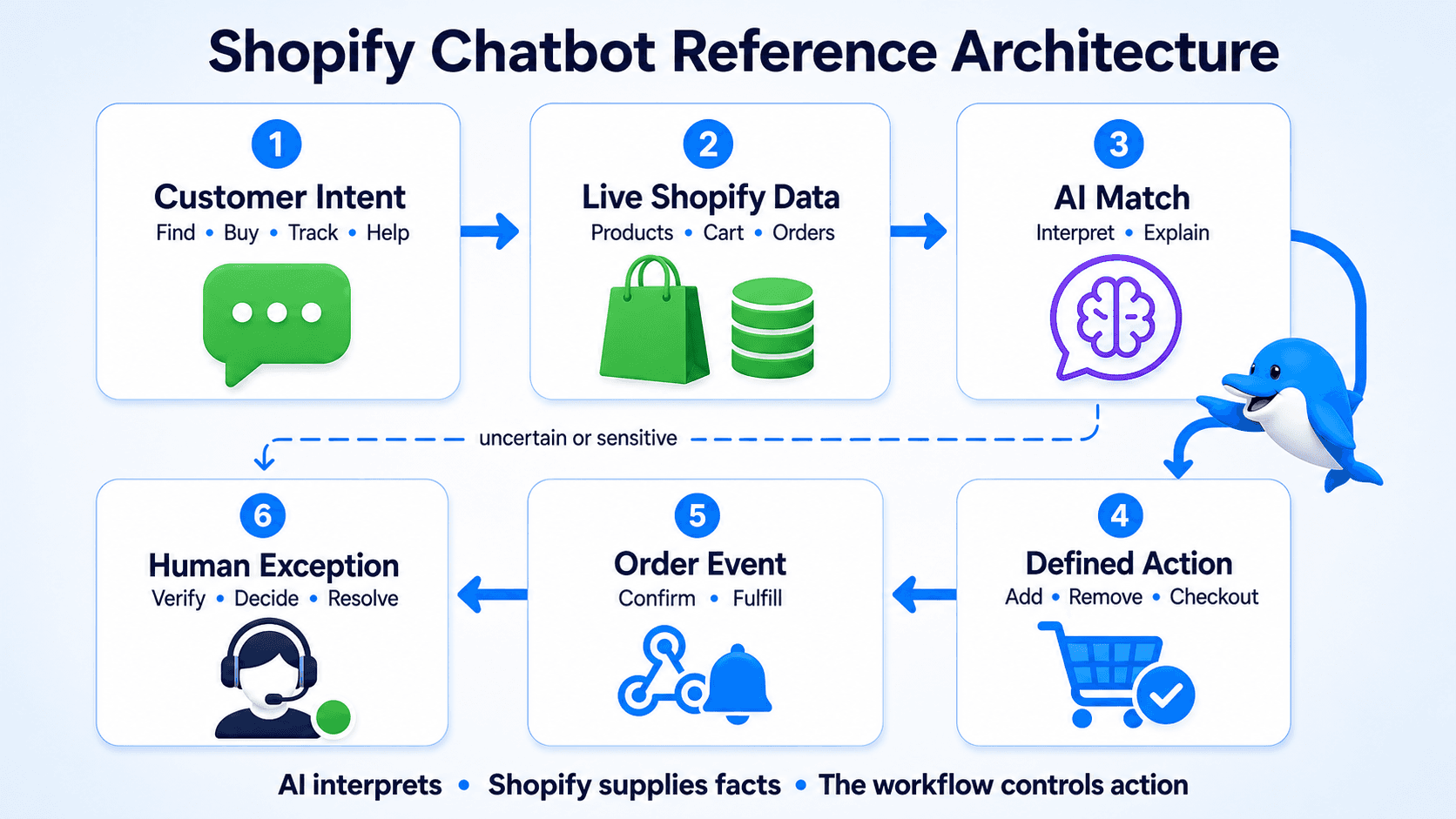
This architecture prevents a common failure: letting the AI speak confidently about a product or order without checking the system that owns the truth.
Shopify's official cart documentation shows why the transaction layer should remain explicit. A cart has line items, buyer identity, estimated costs and a checkout URL. Those values have operational meaning and should be created or retrieved by the appropriate commerce action.
How UChat connects the shopping journey
UChat's role is to connect the conversation, Shopify actions, AI reasoning, business rules and human operations. The exact implementation depends on the selected channel and store configuration.
Product discovery from live store data
The UChat Shopify shopping lesson demonstrates retrieving collections and products, handling variants and quantity, adding or removing cart items and producing a checkout URL through a Shopify draft order.
For a structured experience, a shopper can choose a category and product from a gallery. For an open question, an AI step can interpret the request and then call a defined function to fetch the relevant Shopify data.
AI that can use functions, not only compose text
UChat's Shopify AI Agent lesson shows a shopping assistant handling questions such as whether a type of product is available, retrieving matching collections and products, updating the cart and presenting a checkout link.
Watch the official UChat Shopify AI Agent demonstration to see the product-search, cart and checkout path in one workflow.
The useful pattern is bounded autonomy. UChat AI Agents can use business knowledge, constraints, custom fields and AI Functions. Give the agent permission to call the function it needs, but keep price, stock, order state, discounts and payment decisions in the systems and rules designed to control them.
Cart, checkout and order workflows
The chatbot can keep a shopper in conversation while browsing and managing a cart, then send the shopper to Shopify's checkout URL when payment details are required.
After checkout, an event-driven workflow can handle order confirmation or fulfillment updates. UChat publishes dedicated lessons for order-confirmation webhooks and fulfillment automation.
An order event is only the trigger. The workflow must still know which UChat bot user belongs to the order and whether the selected channel permits the message.
Storefront chat and WhatsApp are different delivery paths
UChat can place a web-chat widget on a Shopify storefront. It also publishes a separate lesson for selling Shopify products through WhatsApp.
Do not treat those channel identities as automatically interchangeable. A person who checks out with an email address is not automatically a reachable WhatsApp bot user. Connect identifiers intentionally, collect the required consent and follow the channel's current template and messaging-window rules.
Human handoff for the cases automation should not finish
UChat Live Chat can pause automation and move a conversation into human support. The handoff should carry a reason and the relevant context: the product, cart or order involved; what the bot already checked; and what decision remains.
Good escalation criteria include:
a refund, chargeback or payment dispute;
an account or identity mismatch;
an unavailable item with a high-value alternative request;
a policy exception the bot is not authorized to approve;
repeated tool failure or low-confidence product matching;
a customer who explicitly asks for a person.
The goal is not to keep every conversation automated. It is to automate predictable work and make exceptions faster for both the customer and the team.
Solve identity, consent and data rules before automating
Commerce automation often fails at the seams between the store record, the bot user and the messaging channel.
A Shopify customer is not automatically a bot user
Shopify may know a customer by account, email, phone or order. UChat may know the conversation by a channel-specific user ID. Store a stable mapping when the identities are legitimately connected, such as during an authenticated interaction or a checkout path created from the conversation.
Do not send a post-purchase message merely because a webhook contains a phone number. The workflow must establish the recipient, the allowed channel and the permission to send that message.
Retrieve volatile data when the customer asks
Product availability, price, shipping status and checkout state change. Fetch them from Shopify or the system that owns them at the time of the request. Avoid placing a large, stale catalog inside an AI prompt and treating it as current.
Minimize what the conversation stores
Keep only the customer data needed for the workflow, define retention and avoid exposing sensitive order information before verifying identity. Mask values in logs where possible and restrict who can access human-support conversations.
Define channel-specific permission
Web chat, WhatsApp, Instagram, SMS and email have different identity and messaging rules. A workflow that is valid in an active web session may need an approved template or a separate consent basis when it follows up in another channel.
This guide is not legal advice. Apply the privacy, ecommerce and messaging requirements relevant to the business and customer location.
How to build a Shopify chatbot in four stages
Do not begin with the most complicated multi-channel recovery flow. Prove each dependency in a smaller path.
1. Launch one read-only workflow
Start with a product finder or a policy-answer flow. Connect it to approved content and live product data, then test ambiguous requests, missing products and tool failures.
Success means the chatbot returns the right source-backed answer or admits it cannot—not that it always produces text.
2. Add one reversible commerce action
Add a selected variant to a cart, show the updated cart and let the customer remove it. Confirm the exact product, variant and quantity before creating the checkout path.
3. Connect one lifecycle event
Choose order confirmation or fulfillment. Map the order to a known bot user, verify the destination channel and test duplicate events, missing identifiers and delayed delivery.
4. Add AI and human exception handling
Let AI handle open-ended product language or summarize the issue for the team. Add explicit constraints and transfer rules. Monitor tool errors, unmatched intents, abandonment and successful handoffs before expanding the agent's scope.
The free UChat Shopify course contains the connection, shopping, event, WhatsApp, AI Agent and widget lessons. Use it for implementation detail rather than relying on a generic blog checklist.
Shopify chatbot evaluation checklist
Before choosing a platform or approving a build, answer these questions.
Customer job: Which three tasks must the chatbot complete in its first release?
Data freshness: Which answers require a live Shopify lookup?
Actions: Can it retrieve products, manage the selected cart path and produce a valid checkout URL?
Identity: How will a Shopify customer or order map to the correct bot user?
Channels: Is the experience limited to the storefront, or must it also support WhatsApp or another channel?
Permission: What consent, templates or messaging windows apply to every outbound step?
AI boundaries: Which functions can the agent call, and which decisions are prohibited?
Human handoff: What triggers a transfer, which team receives it and what context arrives?
Failure recovery: What does the customer see when Shopify, the AI provider or another integration is unavailable?
Observability: Can the team inspect tool calls, failed branches, handoffs and downstream outcomes?
Maintenance: Who updates prompts, policies, product mappings, channel rules and integration credentials?
Cost layers: What will the chatbot platform, messaging channel, AI provider, app and human-support operation each cost?
Run the checklist against a real journey, not a feature-demo conversation. Test product variants, an unavailable item, a failed tool call, an unidentified customer, an order exception and a request for a person. Use the live UChat pricing page when modelling platform and usage costs; do not copy changing prices into the workflow specification.
Frequently asked questions
Does Shopify have a chatbot?
Shopify offers Shopify Inbox for storefront chat and staff conversations. Its current documentation also describes an Inbox agent that can answer from store information, but that agent is marked as early access for certain merchants. Shopify also provides APIs and developer tools for custom chatbot experiences.
What is the best AI chatbot for Shopify?
The best option is the one that completes your required customer jobs with current data and a safe escalation path. Use Shopify Inbox for a native, relatively contained store-chat requirement. Use a focused app for one specialized problem. Consider UChat when AI must call Shopify actions, join visual workflows, work through supported channels and hand exceptions to human support.
Can a Shopify chatbot recommend products and create a cart?
Yes, if the implementation can retrieve current catalog data and perform the required cart actions. Shopify documents product, collection and cart capabilities in its Storefront APIs. UChat's Shopify training demonstrates product discovery, variants, cart management and a checkout URL through its integration.
Can I connect a Shopify chatbot to WhatsApp?
Yes, with an implementation that supports both Shopify and an approved WhatsApp connection. UChat publishes a Shopify-on-WhatsApp lesson. You still need to map the user correctly and follow current WhatsApp consent, template, pricing and messaging-window rules.
Can a Shopify chatbot track orders?
It can retrieve or communicate order information when the integration has the required access and the customer is verified. UChat also demonstrates event-driven order-confirmation and fulfillment workflows. Do not expose account-sensitive order data based only on an unverified message.
When should a human agent take over?
Transfer when the customer asks for a person, the workflow cannot verify identity, a tool repeatedly fails, the AI has low confidence, or the request involves refunds, payment disputes or a policy exception. Send the conversation with the relevant product or order context and the reason for escalation.
Build one complete shopping path
A good Shopify chatbot is not measured by how many questions it can answer. It is measured by whether it uses the right data, completes approved actions, recovers honestly from failure and brings in a person at the right time.
Start a 14-day UChat trial, connect a Shopify test store and build one complete path: product question → live lookup → cart → checkout → human exception. Then use the free Shopify course to add order events or a channel-specific workflow.
Sources reviewed
Sources and product details were reviewed on August 31, 2026. Refresh Shopify AI access, channel rules and UChat setup details before publication if the release date changes.
A Shopify chatbot is a conversational interface connected to your store's product, cart, customer or order workflows. A useful one does more than generate answers: it retrieves current commerce data, performs approved actions, explains what happened and sends uncertain or sensitive cases to a person.
Choose the operating model by the job. Shopify Inbox may be enough for native store chat and staff conversations. A focused app may be right for one support or sales use case. UChat fits when product discovery, cart and checkout actions, AI, visual automation, supported messaging channels and human handoff need to work as one system.
Reviewed August 31, 2026. Shopify APIs, Inbox agent access, channel policies and UChat settings can change. Verify the linked official sources before deploying a production workflow.
What is a Shopify chatbot?
A Shopify chatbot is software that lets a shopper or customer use conversation to get information or complete part of a commerce journey. It may appear as a widget on the Shopify storefront, inside a messaging channel such as WhatsApp, or in another customer touchpoint connected to the store.
The strongest implementations have three layers:
Conversation: understand the request and present a useful answer or choice.
Commerce data and actions: retrieve products, variants, prices, cart state, checkout links or order status from a source system.
Operations: apply business rules, record context, monitor failures and route exceptions to a human team.
Shopify's Storefront API exposes commerce building blocks such as products, collections and cart actions. Its current developer guide also shows how a Storefront AI agent can use natural language for product search, recommendations, policy questions, cart management and checkout.
That distinction matters. A language model can understand “I need a waterproof backpack under $100,” but the answer should come from live catalog data. It should not guess which products are in stock or invent a checkout link.
Practical definition: the AI interprets and explains; Shopify or another source system supplies transaction facts; the workflow controls what happens next.
What should a Shopify chatbot actually do?
Start with the customer job, the data required and a safe failure path. “Add AI” is not a complete requirement.
Customer job | Data or action required | Useful chatbot response | Safe failure path |
|---|---|---|---|
Find a product | Current collections, products, variants and attributes | Show a small set of relevant options and explain the match | Ask one clarifying question or show a category |
Check a policy | Published shipping, returns, sizing or care information | Answer from an approved source and link to the full policy | Say the answer is uncertain and send it to support |
Build a cart | Product and variant ID, quantity and cart state | Confirm the exact item and updated cart | Keep the cart unchanged and explain the error |
Continue to checkout | Valid cart or draft-order state and checkout URL | Present a clear checkout button | Preserve context and offer a retry or human help |
Track an order | Verified customer identity and current order data | Return the latest available order or fulfillment status | Require verification or transfer account-sensitive cases |
Recover an unfinished purchase | A known customer or bot-user route, recoverable checkout state and channel permission | Send one relevant reminder with the correct checkout path | Do not message when identity or permission is missing |
Resolve an exception | Conversation, order context and escalation reason | Route to the right team with a concise summary | Give the customer an accurate response-time expectation |
This table also exposes the difference between an FAQ bot and a commerce workflow. An FAQ bot can explain a return policy. A commerce workflow can also identify the order, check its state, apply routing rules and involve an agent when the request is outside policy.
Shopify Inbox vs a chatbot app vs an omnichannel workflow platform
There is no single best Shopify chatbot for every store. The best choice is the smallest system that reliably completes the required job.
Option | Best fit | Strengths | Main limitation to test |
|---|---|---|---|
Shopify Inbox | Merchants who want native storefront chat and staff conversations | Shopify-native setup, product links, discount codes, instant answers and order tracking entry points | Whether its current AI access, channels and workflow depth cover the full use case |
Focused Shopify app | A narrow requirement such as onsite support, product recommendations or one messaging channel | Faster time to value and specialized features | Data access, human handoff, channel coverage, pricing at scale and workflow flexibility |
UChat | A connected shopping and support journey spanning commerce actions, AI functions, visual rules and human operations | Product and cart workflows, AI Agent tools, event-driven automation, supported channels and Live Chat | More design and testing than a single-purpose widget |
Custom build | A differentiated experience with engineering resources and strict product requirements | Maximum control over interface, data and behavior | Development, security, observability and long-term maintenance |
Shopify Inbox currently supports storefront conversations managed by staff, including product links, discount codes and images. Shopify also documents an Inbox agent that can answer from catalog, store policies, knowledge and published content, but labels that agent as early access for certain merchants. Check availability in the store rather than assuming it is enabled everywhere.
Use Shopify Inbox when the main need is store chat and the native feature set covers the operating model. Use a focused app when one capability is clearly more important than the rest.
UChat becomes relevant when the conversation must continue beyond a single answer. Its public Shopify training hub covers product browsing, carts and checkout, cart-recovery workflows, order events, WhatsApp selling, an AI shopping assistant and a storefront widget. UChat's integrations page also lists product recommendations, order tracking and cart recovery as Shopify use cases.
UChat is not automatically the best fit for a merchant who wants only a basic onsite chat box and no custom workflow. In that case, Shopify Inbox or a narrow app may be simpler to operate.
A reference architecture for a Shopify AI chatbot
A reliable Shopify AI chatbot separates natural-language interpretation from deterministic commerce actions.
Capture the customer's intent. Is the person browsing, comparing, buying, tracking an order or asking for help?
Retrieve live data. Query the catalog, policy source, cart or order system needed for that intent.
Use AI for matching and explanation. Convert an open question into a useful product match, summary or next question.
Use a defined action for the transaction. Add the selected variant to the cart, retrieve the updated cart or create the checkout path through the integration.
Listen for lifecycle events. Order confirmation and fulfillment events can start the next approved workflow when identity and channel rules are satisfied.
Escalate exceptions. Route refunds, payment problems, account-sensitive questions and uncertain policy cases to a person.
This architecture prevents a common failure: letting the AI speak confidently about a product or order without checking the system that owns the truth.
Shopify's official cart documentation shows why the transaction layer should remain explicit. A cart has line items, buyer identity, estimated costs and a checkout URL. Those values have operational meaning and should be created or retrieved by the appropriate commerce action.
How UChat connects the shopping journey
UChat's role is to connect the conversation, Shopify actions, AI reasoning, business rules and human operations. The exact implementation depends on the selected channel and store configuration.
Product discovery from live store data
The UChat Shopify shopping lesson demonstrates retrieving collections and products, handling variants and quantity, adding or removing cart items and producing a checkout URL through a Shopify draft order.
For a structured experience, a shopper can choose a category and product from a gallery. For an open question, an AI step can interpret the request and then call a defined function to fetch the relevant Shopify data.
AI that can use functions, not only compose text
UChat's Shopify AI Agent lesson shows a shopping assistant handling questions such as whether a type of product is available, retrieving matching collections and products, updating the cart and presenting a checkout link.
Watch the official UChat Shopify AI Agent demonstration to see the product-search, cart and checkout path in one workflow.
The useful pattern is bounded autonomy. UChat AI Agents can use business knowledge, constraints, custom fields and AI Functions. Give the agent permission to call the function it needs, but keep price, stock, order state, discounts and payment decisions in the systems and rules designed to control them.
Cart, checkout and order workflows
The chatbot can keep a shopper in conversation while browsing and managing a cart, then send the shopper to Shopify's checkout URL when payment details are required.
After checkout, an event-driven workflow can handle order confirmation or fulfillment updates. UChat publishes dedicated lessons for order-confirmation webhooks and fulfillment automation.
An order event is only the trigger. The workflow must still know which UChat bot user belongs to the order and whether the selected channel permits the message.
Storefront chat and WhatsApp are different delivery paths
UChat can place a web-chat widget on a Shopify storefront. It also publishes a separate lesson for selling Shopify products through WhatsApp.
Do not treat those channel identities as automatically interchangeable. A person who checks out with an email address is not automatically a reachable WhatsApp bot user. Connect identifiers intentionally, collect the required consent and follow the channel's current template and messaging-window rules.
Human handoff for the cases automation should not finish
UChat Live Chat can pause automation and move a conversation into human support. The handoff should carry a reason and the relevant context: the product, cart or order involved; what the bot already checked; and what decision remains.
Good escalation criteria include:
a refund, chargeback or payment dispute;
an account or identity mismatch;
an unavailable item with a high-value alternative request;
a policy exception the bot is not authorized to approve;
repeated tool failure or low-confidence product matching;
a customer who explicitly asks for a person.
The goal is not to keep every conversation automated. It is to automate predictable work and make exceptions faster for both the customer and the team.
Solve identity, consent and data rules before automating
Commerce automation often fails at the seams between the store record, the bot user and the messaging channel.
A Shopify customer is not automatically a bot user
Shopify may know a customer by account, email, phone or order. UChat may know the conversation by a channel-specific user ID. Store a stable mapping when the identities are legitimately connected, such as during an authenticated interaction or a checkout path created from the conversation.
Do not send a post-purchase message merely because a webhook contains a phone number. The workflow must establish the recipient, the allowed channel and the permission to send that message.
Retrieve volatile data when the customer asks
Product availability, price, shipping status and checkout state change. Fetch them from Shopify or the system that owns them at the time of the request. Avoid placing a large, stale catalog inside an AI prompt and treating it as current.
Minimize what the conversation stores
Keep only the customer data needed for the workflow, define retention and avoid exposing sensitive order information before verifying identity. Mask values in logs where possible and restrict who can access human-support conversations.
Define channel-specific permission
Web chat, WhatsApp, Instagram, SMS and email have different identity and messaging rules. A workflow that is valid in an active web session may need an approved template or a separate consent basis when it follows up in another channel.
This guide is not legal advice. Apply the privacy, ecommerce and messaging requirements relevant to the business and customer location.
How to build a Shopify chatbot in four stages
Do not begin with the most complicated multi-channel recovery flow. Prove each dependency in a smaller path.
1. Launch one read-only workflow
Start with a product finder or a policy-answer flow. Connect it to approved content and live product data, then test ambiguous requests, missing products and tool failures.
Success means the chatbot returns the right source-backed answer or admits it cannot—not that it always produces text.
2. Add one reversible commerce action
Add a selected variant to a cart, show the updated cart and let the customer remove it. Confirm the exact product, variant and quantity before creating the checkout path.
3. Connect one lifecycle event
Choose order confirmation or fulfillment. Map the order to a known bot user, verify the destination channel and test duplicate events, missing identifiers and delayed delivery.
4. Add AI and human exception handling
Let AI handle open-ended product language or summarize the issue for the team. Add explicit constraints and transfer rules. Monitor tool errors, unmatched intents, abandonment and successful handoffs before expanding the agent's scope.
The free UChat Shopify course contains the connection, shopping, event, WhatsApp, AI Agent and widget lessons. Use it for implementation detail rather than relying on a generic blog checklist.
Shopify chatbot evaluation checklist
Before choosing a platform or approving a build, answer these questions.
Customer job: Which three tasks must the chatbot complete in its first release?
Data freshness: Which answers require a live Shopify lookup?
Actions: Can it retrieve products, manage the selected cart path and produce a valid checkout URL?
Identity: How will a Shopify customer or order map to the correct bot user?
Channels: Is the experience limited to the storefront, or must it also support WhatsApp or another channel?
Permission: What consent, templates or messaging windows apply to every outbound step?
AI boundaries: Which functions can the agent call, and which decisions are prohibited?
Human handoff: What triggers a transfer, which team receives it and what context arrives?
Failure recovery: What does the customer see when Shopify, the AI provider or another integration is unavailable?
Observability: Can the team inspect tool calls, failed branches, handoffs and downstream outcomes?
Maintenance: Who updates prompts, policies, product mappings, channel rules and integration credentials?
Cost layers: What will the chatbot platform, messaging channel, AI provider, app and human-support operation each cost?
Run the checklist against a real journey, not a feature-demo conversation. Test product variants, an unavailable item, a failed tool call, an unidentified customer, an order exception and a request for a person. Use the live UChat pricing page when modelling platform and usage costs; do not copy changing prices into the workflow specification.
Frequently asked questions
Does Shopify have a chatbot?
Shopify offers Shopify Inbox for storefront chat and staff conversations. Its current documentation also describes an Inbox agent that can answer from store information, but that agent is marked as early access for certain merchants. Shopify also provides APIs and developer tools for custom chatbot experiences.
What is the best AI chatbot for Shopify?
The best option is the one that completes your required customer jobs with current data and a safe escalation path. Use Shopify Inbox for a native, relatively contained store-chat requirement. Use a focused app for one specialized problem. Consider UChat when AI must call Shopify actions, join visual workflows, work through supported channels and hand exceptions to human support.
Can a Shopify chatbot recommend products and create a cart?
Yes, if the implementation can retrieve current catalog data and perform the required cart actions. Shopify documents product, collection and cart capabilities in its Storefront APIs. UChat's Shopify training demonstrates product discovery, variants, cart management and a checkout URL through its integration.
Can I connect a Shopify chatbot to WhatsApp?
Yes, with an implementation that supports both Shopify and an approved WhatsApp connection. UChat publishes a Shopify-on-WhatsApp lesson. You still need to map the user correctly and follow current WhatsApp consent, template, pricing and messaging-window rules.
Can a Shopify chatbot track orders?
It can retrieve or communicate order information when the integration has the required access and the customer is verified. UChat also demonstrates event-driven order-confirmation and fulfillment workflows. Do not expose account-sensitive order data based only on an unverified message.
When should a human agent take over?
Transfer when the customer asks for a person, the workflow cannot verify identity, a tool repeatedly fails, the AI has low confidence, or the request involves refunds, payment disputes or a policy exception. Send the conversation with the relevant product or order context and the reason for escalation.
Build one complete shopping path
A good Shopify chatbot is not measured by how many questions it can answer. It is measured by whether it uses the right data, completes approved actions, recovers honestly from failure and brings in a person at the right time.
Start a 14-day UChat trial, connect a Shopify test store and build one complete path: product question → live lookup → cart → checkout → human exception. Then use the free Shopify course to add order events or a channel-specific workflow.
Sources reviewed
Sources and product details were reviewed on August 31, 2026. Refresh Shopify AI access, channel rules and UChat setup details before publication if the release date changes.