19 minutes
UChat
Posted by
Telegram Chatbot for Business: Build an AI Bot Without Coding
19 minutes
Posted by
UChat

A Telegram chatbot is a bot account connected to an automation system through the Telegram Bot API. BotFather creates the bot's identity and token, but it does not create a useful business workflow. For that, you need a clear start path, conversation logic, bounded AI, business actions, human support and a way to measure the result.
With UChat, you can connect the token to a visual Flow Builder, add an AI Agent for open questions, send data to other systems and transfer a conversation to a person. The customer still needs to contact the bot first in an ordinary private chat, and the workflow must follow Telegram's platform rules.
This guide reflects public Telegram and UChat information reviewed on September 5, 2026.
Telegram features, limits and product interfaces can change. Check the linked official sources before launching a production workflow.
What is a Telegram chatbot?
A Telegram chatbot is software that receives messages through a Telegram bot account and responds according to programmed or configured logic. It can present commands and buttons, collect information, answer questions, trigger work in another system and route exceptions to a human.
The bot account and the chatbot system are not the same thing:
BotFather creates the identity. You choose a name and username and receive a unique Bot API token.
A bot builder creates the behavior. It defines the questions, conditions, answers, actions and failure paths.
An AI Agent handles selected open language. It should work from approved knowledge, instructions and tools.
A human support layer handles judgment. It takes over when the conversation is sensitive, unclear or outside the automation's authority.
Telegram's official Bot API tutorial describes the token as the credential that authenticates the bot. Telegram also says to treat it like a password. If someone obtains it, they may be able to control the bot, so never expose it in a screenshot, shared document, support message or code example.
The more important design question is what should happen after a person taps Start. A weak bot sends a greeting and leaves the customer at a dead end. A useful business bot understands the entry point, collects only the information required for the job, completes or requests a business action and has a clear escape route to a person.
BotFather creates a Telegram endpoint. The valuable product is the operating system behind that endpoint.
Telegram also supports different bot contexts. A private bot chat, a group bot, a channel and a bot connected to a Telegram Business account do not receive the same messages or serve the same job. Define the context before choosing a builder or copying someone else's tutorial.
Three ways to build a Telegram chatbot
There is no universally best build route. Choose based on the workflow, operating team and maintenance burden.
Build route | Best for | Main tradeoff |
|---|---|---|
Custom Bot API development | A unique product that needs engineering-level control | You own code, hosting, data persistence, security, monitoring and maintenance |
Telegram-only no-code builder | A simple menu, broadcast or single-channel campaign | Workflow depth, integrations, human support or channel reuse may become limiting |
Multi-channel workflow platform | Sales and support processes that combine flows, AI, systems and people | The team must design the operating workflow instead of relying on a one-click bot |
Custom development
Telegram's API is developer-friendly, but a production bot needs more than a script that echoes messages. You need secure credential storage, update handling, a database, retry logic, rate-limit handling, observability and reliable hosting. Custom development makes sense when the bot itself is a software product or the behavior is genuinely unique.
A Telegram-only builder
A focused builder may be enough for a command menu, a simple content bot or a campaign that will stay entirely inside Telegram. Before committing, test the parts that often become important later: conditional logic, data validation, external actions, conversation history, agent assignment and failure recovery.
A multi-channel workflow platform
This route fits a business that sees Telegram as one customer channel rather than an isolated bot project. UChat publicly lists Telegram among its supported channels and connects channel conversations to visual flows, AI, integrations and human support. The goal is not to force identical behavior everywhere. It is to reuse business logic while respecting each channel's rules and interaction patterns.
The Telegram Bot Business Architecture
Before dragging nodes onto a canvas, design these seven layers. They turn “we created a bot” into a system that can safely complete a job.
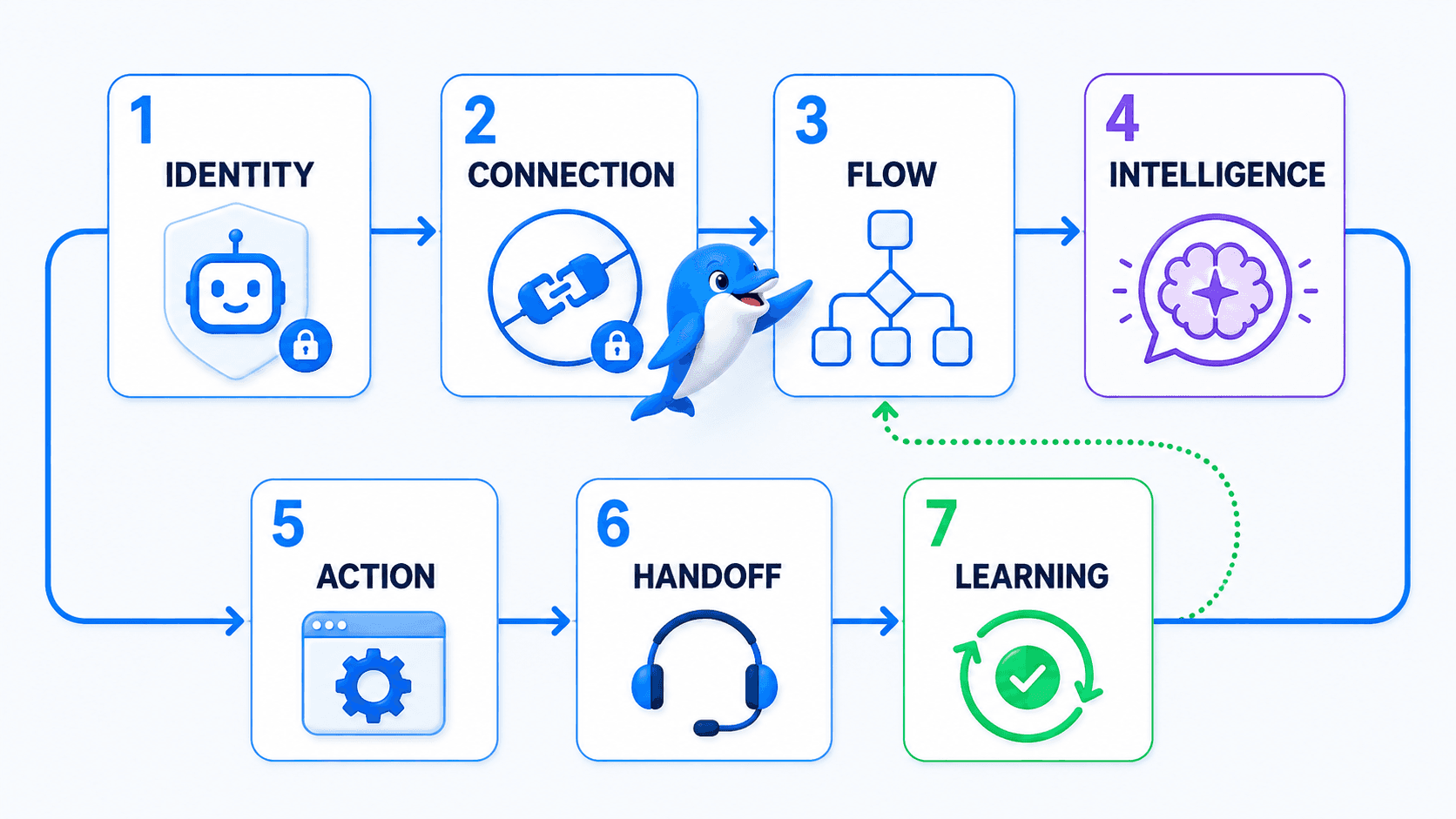
1. Identity
Define which bot represents the business, who owns it and how customers will recognize the correct username. Create it through the verified @BotFather, not an account with a similar name. Document ownership and token-rotation responsibility without copying the token into the document.
2. Connection
Connect the token to the system that will receive updates and run the automation. In UChat, the Telegram connection links the bot identity to a bot workspace and Flow Builder. If you later rotate the token or change ownership, retest this layer before changing the flow.
3. Flow
Map the steps that must be predictable: the /start route, menus, required questions, field validation, eligibility rules, confirmations and failure branches. Deterministic flow logic is especially valuable where a missed field or ambiguous choice would break the next action.
4. Intelligence
Use AI for the parts customers express in many different ways: an open support question, intent classification or a request that needs approved business knowledge. Define what the agent may answer, which tools it may use and when it must stop.
5. Action
Connect the conversation to an outcome. That may be a CRM update, booking request, support ticket, notification, payment link, webhook or API call. A message saying “done” is not evidence that the external action succeeded; verify the response and build a failure path.
6. Handoff
Decide when a person takes over, which person or team receives the chat and what context they need. The customer should not have to repeat the service, order number or problem the bot already collected.
7. Learning
Record the outcome that matters: qualified lead, completed request, answer delivered, ticket created, human escalation or failed action. Review failure reasons and confusing menu paths. Improve the workflow, not just the bot's wording.
The architecture is intentionally broader than a BotFather tutorial. BotFather is essential, but it covers only the first layer.
How to build a Telegram chatbot in UChat without coding
The exact interface may change, but this implementation sequence remains useful.
Step 1: Choose one outcome and one start path
Avoid beginning with “automate Telegram.” Choose a real customer job and a measurable end state.
For example, a service business may want this path:
A visitor opens the bot from a link on the website and taps Start.
The bot offers Book, Pricing and Support.
The booking route collects service, location and preferred time.
An AI Agent answers one open question from approved service knowledge.
The flow creates a booking request or lead record.
A person receives sensitive, high-value or unclear cases with the collected context.
The success event is not “message sent.” It is “valid booking request created,” “qualified lead recorded” or “support case routed.”
Step 2: Create the bot with BotFather
Open the verified @BotFather account in Telegram, use /newbot and follow the prompts to choose the display name and username. The username must meet Telegram's bot naming rules and should be easy to recognize.
BotFather returns the token. Store it in the intended secure configuration, paste it only into the trusted connection field and remove it from notes or clipboard-history tools that should not retain secrets. If the token is exposed, revoke and replace it through BotFather.
Step 3: Connect the Telegram bot to UChat
In UChat, open the Telegram area, add a Telegram bot and paste the token into the connection field. Then create a flow from a template or blank canvas and open it in Flow Builder.
Watch the official Telegram connection walkthrough
Watch Connect Channel — Telegram on YouTube
Use the video for the overall sequence. Confirm the current labels in your UChat workspace before writing internal click-by-click instructions.
For a more detailed reference, use UChat's Telegram connection training.
Step 4: Build the deterministic start flow
Create a short welcome that identifies the business, explains what the bot can do and gives the customer a small number of clear choices. A simple service bot might use:
Book a service
View pricing
Get support
Talk to a person
Use Flow Builder for required information, choices, conditions and validation. UChat's visual builder supports conditions, splits, actions and integrations without requiring code.
Do not ask for every possible field at the beginning. Collect the minimum needed to route the conversation, then request details when the selected path requires them.
Step 5: Add commands and a useful menu
Telegram's bot feature guide recommends familiar global commands such as /start and /help, with /settings where appropriate. Commands should be specific and their descriptions should explain the result.
UChat's Telegram user-menu training shows how menu commands can route into subflows or actions and how a workflow can change the available menu when necessary. Use that flexibility sparingly. A persistent, understandable menu is usually better than surprising customers with frequent changes.
Step 6: Add data, rules and the business action
Create clearly named fields for information the workflow genuinely needs, such as requested_service, service_location, preferred_time, telegram_entry_source and handoff_reason. Validate required data before calling another system.
UChat's integration layer can connect flows to supported business tools, automation platforms, webhooks and APIs. After every external action, handle both success and failure. If a calendar or CRM request fails, tell the customer the request is not yet confirmed and provide a recovery path.
Step 7: Add a bounded AI Agent
Use an AI Agent for open questions that are covered by current business knowledge. Give it a specific role, approved sources, explicit constraints and only the tools required for the job.
Good boundaries include:
do not invent availability or prices;
do not override validation or eligibility rules;
do not promise that an external action succeeded without a verified result;
escalate complaints, sensitive requests and unsupported questions;
ask a focused clarification question when intent is uncertain.
AI belongs inside the operating flow, not above it. The flow can collect exact data and enforce rules; the AI can interpret language; a person can exercise judgment.
Step 8: Configure human handoff
UChat Live Chat can pause or transfer automation, assign conversations and preserve customer context for a person. Define the trigger, destination, customer expectation and behavior when no agent is immediately available.
An effective handoff message is concrete: “I’m passing this to our booking team with the service, location and preferred time you shared.” It reassures the customer that the work already completed by the bot will not be lost.
Step 9: Test from a real Telegram account
Test the complete path on a phone, not only inside the builder. Use a separate Telegram account where possible so you see the first-time Start experience.
Verify:
the customer has the correct bot username;
Start opens the expected active flow;
commands and menus route to the intended subflows;
required fields and validation work;
AI stays within knowledge and tool boundaries;
external actions handle success and failure honestly;
human handoff transfers the right context;
group behavior matches Privacy Mode and admin settings;
duplicate triggers cannot send repeated replies;
the measured outcome matches the business goal.
What can a Telegram chatbot automate for business?
The strongest use cases connect a conversation to a defined business outcome.
Lead qualification and booking intake
Ask a short sequence of required questions, save the answers and apply basic routing rules. An AI Agent can answer a related open question, while a verified integration or team member finishes the booking. Keep “request received” separate from “appointment confirmed.”
Knowledge-backed customer support
Use approved help content for common questions, then route cases that require account access, exceptions or judgment. Record the unresolved topic and the reason for escalation so the human starts with useful context.
Structured menus and community navigation
Telegram commands and buttons work well when users repeatedly need a small set of functions. A community bot might route members to rules, event information, onboarding, support or account actions. In groups, account for Privacy Mode before expecting the bot to react to ordinary conversation.
Operational notifications
UChat's official Telegram notification training shows a flow action that selects a connected Telegram account, chooses a known recipient and sends a configured message. Use notifications for users already known to the bot and within the business's consent and communication policy. Telegram's user-initiation rule and current send limits still apply.
CRM, ticket and webhook actions
A Telegram conversation can collect the information required for another system and trigger the configured action. The flow should save the external reference, report only a verified result and provide a fallback if the destination is unavailable.
Flow, AI Agent or human agent—which should respond?
Most production chatbots need all three responders.
Responder | Best for | Essential guardrail |
|---|---|---|
Deterministic flow | Menus, required fields, consent, eligibility, validation and transactional steps | Keep choices explicit and test every branch |
AI Agent | Open questions, intent classification and approved-knowledge retrieval | Limit knowledge, tools and escalation authority |
Human agent | Complaints, exceptions, sensitive or high-value conversations | Preserve context, ownership and response expectations |
A useful sequence might begin with a deterministic menu, use AI for a customer's open question, return to fixed validation before a booking request and transfer to a person if the external action fails.
Do not let AI improvise credentials, legal conclusions, consent, pricing exceptions or irreversible actions. Natural language should make the experience easier, not weaken operational control.
Telegram commands, buttons and menus
Telegram makes structured navigation feel native. A command begins with /, and Telegram can show supported commands when a user types the slash or opens the menu button.
A practical starting set is:
/start— begin or restart the main route;/help— explain what the bot can do and how to reach a person;/book— start the booking intake;/support— open support triage;/settings— show user-specific settings, if the bot has any.
Telegram also distinguishes reply keyboards, which present predefined responses, from inline keyboards, which place action buttons below a message. Use the simplest control that makes the next step obvious.
The menu should be a map, not an inventory of everything the business offers. Keep it short, give commands plain-language descriptions and test whether a new user can reach the main outcome without guessing what to type.
Telegram rules that shape the workflow
The user normally starts the private relationship
Telegram's official tutorial says that, for ordinary private messaging, the user must have contacted the bot first. Design a legitimate start path: a website link, QR code, Telegram username, deep link or another permitted route that lets the person open the bot and choose to begin.
A list of Telegram usernames is not permission to cold-message them through a bot.
Protect the bot token
Treat the token like a password. Restrict who can view or replace it, never place it in public code or article screenshots and rotate it immediately if exposed. When diagnosing a connection issue, compare the bot identity and connection status without asking someone to paste the token into a public channel.
Group bots use Privacy Mode by default
Telegram says bots added to groups run in Privacy Mode by default. They receive relevant commands, inline messages, service messages and replies rather than every ordinary group message. Bot admins receive broader access, and Privacy Mode can be disabled when the workflow genuinely requires it.
Do not disable privacy simply because the bot missed a message during testing. First decide whether the bot should read that message, check whether it was a command or reply and verify the bot's group role. Telegram recommends disabling Privacy Mode only when necessary.
Sending is rate-limited
Telegram applies limits to messages in individual chats, groups and bulk broadcasts. Sending too quickly can produce 429 errors. Queue and pace notifications, honor retry guidance and make jobs idempotent so a retry does not create duplicate messages or duplicate business actions. Recheck the current Telegram Bot FAQ before a large broadcast.
Telegram Business is a separate context
Telegram announced that Business users can connect bots to process and answer selected chats on their behalf, with controls over which chats the bot may access. That is Telegram platform capability. Do not assume a standard bot created through /newbot is automatically operating as a Telegram Business connected bot, or that every builder supports every Business feature.
How to choose a Telegram bot builder
Evaluate the builder against the complete workflow, not the speed of creating a greeting.
Connection security: Can the team connect and rotate the Bot API token without exposing it?
Telegram context: Does it support the private chat, group behavior, commands and menus your use case needs?
Flow depth: Can it validate fields, branch on conditions, reuse subflows and recover from failures?
AI control: Can you define knowledge, instructions, tools, constraints and escalation rules?
Customer context: Can the workflow store useful fields and preserve conversation history for the next step?
Business actions: Can it connect to the required CRM, booking system, ticketing tool, webhook or API?
Human operations: Can it assign, pause, transfer and audit a conversation without losing context?
Delivery safety: Can it throttle sends, handle
429responses and avoid duplicate actions?Channel reuse: Can useful logic be adapted to other supported channels without pretending their rules are identical?
Ownership: Can a team or agency separate clients, permissions and operating responsibility appropriately?
Support: Are training, troubleshooting and current product documentation available?
Cost: What platform, AI, integration and delivery costs apply to the expected usage?
A free tool may be enough for a small menu. It is not cheaper if the team later rebuilds the bot to gain reliable integrations, human handoff or operational visibility.
Common Telegram chatbot problems
Use a layered diagnostic sequence so you do not rebuild the flow when the problem is the identity, connection or Telegram context.
The bot does not reply
Confirm the user is speaking to the intended username, then check that the correct token is connected and the flow is active. Ask the test user to tap Start or send a message first. Verify the /start trigger routes to the intended flow and that no condition blocks the path.
Never request the full token in a public support thread or screenshot.
A command or menu goes to the wrong place
Check that commands are unique, the menu item points to the correct subflow or action and the destination flow is active. Test both a fresh user and an existing user because stored state or a dynamically changed menu may alter the route.
The bot misses messages in a group
Check whether the missing message was a command, reply or ordinary conversation. Then inspect the bot's admin role and Privacy Mode. Change privacy settings only when the bot's job requires broader message access, and re-add the bot if Telegram requires it for the setting to take effect.
Messages fail with a 429 error
Reduce the sending rate, queue broadcasts, add appropriate retry handling and ensure the same job cannot run twice. Separate the message-delivery retry from the external business action so a repeated notification does not create a second ticket or booking.
Forbidden: user is deactivated
UChat's Telegram support playbook maps this error to a recipient account that has been deactivated or deleted. If it affects one recipient, treat it as a recipient-side condition. If it suddenly affects many users, record timestamps, screenshots, bot identity and scope before escalating.
The chat reply works but the business action fails
Test the external action independently. Confirm authentication, required fields, payload mapping and the destination response. The customer-facing message should report the verified state: “request received for review” is safer than “booking confirmed” when confirmation did not return.
Telegram vs WhatsApp, Messenger and Instagram
Choose the channel where the intended audience already communicates and where the interaction model fits the job.
Channel | Useful starting point | Important design difference |
|---|---|---|
Telegram | Bot-native commands, menus, groups and a developer-friendly Bot API | User initiation, token security, group Privacy Mode and rate limits shape the workflow |
Phone-number-based customer service, notifications and business conversations | Meta templates, conversation rules and account setup apply; business calling is available only where supported | |
Messenger | Facebook Page messages, comments, ads and campaign context | Meta Page permissions and messaging-policy windows affect follow-up |
DMs and engagement from comments, Stories or Reels | Entry context and Instagram messaging permissions determine the available path |
UChat's multi-channel model is useful when the underlying business process is shared. Qualification fields, CRM actions, AI knowledge and handoff rules may be reusable, but the trigger, permission and message format should be adapted for each channel.
Frequently asked questions
Is a Telegram chatbot free?
Creating a bot with BotFather and using the standard Bot API can be free, but running a business chatbot may involve builder, hosting, AI, integration, support and paid-broadcast costs. Compare the complete operating cost, not only bot creation.
Can I build a Telegram bot without coding?
Yes. A no-code builder can connect the BotFather token to visual flows, data fields, AI, integrations and human support. Custom code is still useful when the bot needs unique product behavior or engineering-level control.
Can a Telegram bot message users first?
For ordinary private messages, the user must contact the bot first. Give customers a legitimate link, username, QR code or deep link that lets them open the bot and choose to begin.
Are Telegram chatbots safe?
They can be operated safely, but safety depends on the bot owner, token security, requested permissions, data handling and workflow design. Verify the username, never share a bot token and be cautious when a bot asks for sensitive data or makes unverifiable claims.
Can an AI Telegram chatbot hand over to a human?
Yes, if the platform and workflow include a human support layer. In UChat, Live Chat can pause or transfer automation and give the agent the conversation context. Define the escalation conditions before launch.
Does a Telegram group bot read every message?
Not by default. Telegram's Privacy Mode limits the messages a group bot receives. Admin status and privacy settings can change that behavior, but broader access should be enabled only when the bot's job requires it.
What should I do if a Telegram bot stops replying?
Check the bot username, token connection, user initiation, active Start flow and command routing. For group bots, check admin status and Privacy Mode. Then inspect rate-limit errors and external-action failures before rebuilding the automation.
Build the smallest complete Telegram workflow
Start with one private-chat use case. Create the bot through BotFather, connect it to UChat, build a short Start path and test the whole journey from customer entry to verified business action and human fallback.
Start a free UChat trial or follow the Telegram connection training to connect your first bot. Before choosing a plan, check the current UChat pricing page for the latest inclusions. The best first version is not the bot with the most commands. It is the one that completes one useful job reliably and tells the truth when it cannot.
A Telegram chatbot is a bot account connected to an automation system through the Telegram Bot API. BotFather creates the bot's identity and token, but it does not create a useful business workflow. For that, you need a clear start path, conversation logic, bounded AI, business actions, human support and a way to measure the result.
With UChat, you can connect the token to a visual Flow Builder, add an AI Agent for open questions, send data to other systems and transfer a conversation to a person. The customer still needs to contact the bot first in an ordinary private chat, and the workflow must follow Telegram's platform rules.
This guide reflects public Telegram and UChat information reviewed on September 5, 2026.
Telegram features, limits and product interfaces can change. Check the linked official sources before launching a production workflow.
What is a Telegram chatbot?
A Telegram chatbot is software that receives messages through a Telegram bot account and responds according to programmed or configured logic. It can present commands and buttons, collect information, answer questions, trigger work in another system and route exceptions to a human.
The bot account and the chatbot system are not the same thing:
BotFather creates the identity. You choose a name and username and receive a unique Bot API token.
A bot builder creates the behavior. It defines the questions, conditions, answers, actions and failure paths.
An AI Agent handles selected open language. It should work from approved knowledge, instructions and tools.
A human support layer handles judgment. It takes over when the conversation is sensitive, unclear or outside the automation's authority.
Telegram's official Bot API tutorial describes the token as the credential that authenticates the bot. Telegram also says to treat it like a password. If someone obtains it, they may be able to control the bot, so never expose it in a screenshot, shared document, support message or code example.
The more important design question is what should happen after a person taps Start. A weak bot sends a greeting and leaves the customer at a dead end. A useful business bot understands the entry point, collects only the information required for the job, completes or requests a business action and has a clear escape route to a person.
BotFather creates a Telegram endpoint. The valuable product is the operating system behind that endpoint.
Telegram also supports different bot contexts. A private bot chat, a group bot, a channel and a bot connected to a Telegram Business account do not receive the same messages or serve the same job. Define the context before choosing a builder or copying someone else's tutorial.
Three ways to build a Telegram chatbot
There is no universally best build route. Choose based on the workflow, operating team and maintenance burden.
Build route | Best for | Main tradeoff |
|---|---|---|
Custom Bot API development | A unique product that needs engineering-level control | You own code, hosting, data persistence, security, monitoring and maintenance |
Telegram-only no-code builder | A simple menu, broadcast or single-channel campaign | Workflow depth, integrations, human support or channel reuse may become limiting |
Multi-channel workflow platform | Sales and support processes that combine flows, AI, systems and people | The team must design the operating workflow instead of relying on a one-click bot |
Custom development
Telegram's API is developer-friendly, but a production bot needs more than a script that echoes messages. You need secure credential storage, update handling, a database, retry logic, rate-limit handling, observability and reliable hosting. Custom development makes sense when the bot itself is a software product or the behavior is genuinely unique.
A Telegram-only builder
A focused builder may be enough for a command menu, a simple content bot or a campaign that will stay entirely inside Telegram. Before committing, test the parts that often become important later: conditional logic, data validation, external actions, conversation history, agent assignment and failure recovery.
A multi-channel workflow platform
This route fits a business that sees Telegram as one customer channel rather than an isolated bot project. UChat publicly lists Telegram among its supported channels and connects channel conversations to visual flows, AI, integrations and human support. The goal is not to force identical behavior everywhere. It is to reuse business logic while respecting each channel's rules and interaction patterns.
The Telegram Bot Business Architecture
Before dragging nodes onto a canvas, design these seven layers. They turn “we created a bot” into a system that can safely complete a job.
1. Identity
Define which bot represents the business, who owns it and how customers will recognize the correct username. Create it through the verified @BotFather, not an account with a similar name. Document ownership and token-rotation responsibility without copying the token into the document.
2. Connection
Connect the token to the system that will receive updates and run the automation. In UChat, the Telegram connection links the bot identity to a bot workspace and Flow Builder. If you later rotate the token or change ownership, retest this layer before changing the flow.
3. Flow
Map the steps that must be predictable: the /start route, menus, required questions, field validation, eligibility rules, confirmations and failure branches. Deterministic flow logic is especially valuable where a missed field or ambiguous choice would break the next action.
4. Intelligence
Use AI for the parts customers express in many different ways: an open support question, intent classification or a request that needs approved business knowledge. Define what the agent may answer, which tools it may use and when it must stop.
5. Action
Connect the conversation to an outcome. That may be a CRM update, booking request, support ticket, notification, payment link, webhook or API call. A message saying “done” is not evidence that the external action succeeded; verify the response and build a failure path.
6. Handoff
Decide when a person takes over, which person or team receives the chat and what context they need. The customer should not have to repeat the service, order number or problem the bot already collected.
7. Learning
Record the outcome that matters: qualified lead, completed request, answer delivered, ticket created, human escalation or failed action. Review failure reasons and confusing menu paths. Improve the workflow, not just the bot's wording.
The architecture is intentionally broader than a BotFather tutorial. BotFather is essential, but it covers only the first layer.
How to build a Telegram chatbot in UChat without coding
The exact interface may change, but this implementation sequence remains useful.
Step 1: Choose one outcome and one start path
Avoid beginning with “automate Telegram.” Choose a real customer job and a measurable end state.
For example, a service business may want this path:
A visitor opens the bot from a link on the website and taps Start.
The bot offers Book, Pricing and Support.
The booking route collects service, location and preferred time.
An AI Agent answers one open question from approved service knowledge.
The flow creates a booking request or lead record.
A person receives sensitive, high-value or unclear cases with the collected context.
The success event is not “message sent.” It is “valid booking request created,” “qualified lead recorded” or “support case routed.”
Step 2: Create the bot with BotFather
Open the verified @BotFather account in Telegram, use /newbot and follow the prompts to choose the display name and username. The username must meet Telegram's bot naming rules and should be easy to recognize.
BotFather returns the token. Store it in the intended secure configuration, paste it only into the trusted connection field and remove it from notes or clipboard-history tools that should not retain secrets. If the token is exposed, revoke and replace it through BotFather.
Step 3: Connect the Telegram bot to UChat
In UChat, open the Telegram area, add a Telegram bot and paste the token into the connection field. Then create a flow from a template or blank canvas and open it in Flow Builder.
Watch the official Telegram connection walkthrough
Watch Connect Channel — Telegram on YouTube
Use the video for the overall sequence. Confirm the current labels in your UChat workspace before writing internal click-by-click instructions.
For a more detailed reference, use UChat's Telegram connection training.
Step 4: Build the deterministic start flow
Create a short welcome that identifies the business, explains what the bot can do and gives the customer a small number of clear choices. A simple service bot might use:
Book a service
View pricing
Get support
Talk to a person
Use Flow Builder for required information, choices, conditions and validation. UChat's visual builder supports conditions, splits, actions and integrations without requiring code.
Do not ask for every possible field at the beginning. Collect the minimum needed to route the conversation, then request details when the selected path requires them.
Step 5: Add commands and a useful menu
Telegram's bot feature guide recommends familiar global commands such as /start and /help, with /settings where appropriate. Commands should be specific and their descriptions should explain the result.
UChat's Telegram user-menu training shows how menu commands can route into subflows or actions and how a workflow can change the available menu when necessary. Use that flexibility sparingly. A persistent, understandable menu is usually better than surprising customers with frequent changes.
Step 6: Add data, rules and the business action
Create clearly named fields for information the workflow genuinely needs, such as requested_service, service_location, preferred_time, telegram_entry_source and handoff_reason. Validate required data before calling another system.
UChat's integration layer can connect flows to supported business tools, automation platforms, webhooks and APIs. After every external action, handle both success and failure. If a calendar or CRM request fails, tell the customer the request is not yet confirmed and provide a recovery path.
Step 7: Add a bounded AI Agent
Use an AI Agent for open questions that are covered by current business knowledge. Give it a specific role, approved sources, explicit constraints and only the tools required for the job.
Good boundaries include:
do not invent availability or prices;
do not override validation or eligibility rules;
do not promise that an external action succeeded without a verified result;
escalate complaints, sensitive requests and unsupported questions;
ask a focused clarification question when intent is uncertain.
AI belongs inside the operating flow, not above it. The flow can collect exact data and enforce rules; the AI can interpret language; a person can exercise judgment.
Step 8: Configure human handoff
UChat Live Chat can pause or transfer automation, assign conversations and preserve customer context for a person. Define the trigger, destination, customer expectation and behavior when no agent is immediately available.
An effective handoff message is concrete: “I’m passing this to our booking team with the service, location and preferred time you shared.” It reassures the customer that the work already completed by the bot will not be lost.
Step 9: Test from a real Telegram account
Test the complete path on a phone, not only inside the builder. Use a separate Telegram account where possible so you see the first-time Start experience.
Verify:
the customer has the correct bot username;
Start opens the expected active flow;
commands and menus route to the intended subflows;
required fields and validation work;
AI stays within knowledge and tool boundaries;
external actions handle success and failure honestly;
human handoff transfers the right context;
group behavior matches Privacy Mode and admin settings;
duplicate triggers cannot send repeated replies;
the measured outcome matches the business goal.
What can a Telegram chatbot automate for business?
The strongest use cases connect a conversation to a defined business outcome.
Lead qualification and booking intake
Ask a short sequence of required questions, save the answers and apply basic routing rules. An AI Agent can answer a related open question, while a verified integration or team member finishes the booking. Keep “request received” separate from “appointment confirmed.”
Knowledge-backed customer support
Use approved help content for common questions, then route cases that require account access, exceptions or judgment. Record the unresolved topic and the reason for escalation so the human starts with useful context.
Structured menus and community navigation
Telegram commands and buttons work well when users repeatedly need a small set of functions. A community bot might route members to rules, event information, onboarding, support or account actions. In groups, account for Privacy Mode before expecting the bot to react to ordinary conversation.
Operational notifications
UChat's official Telegram notification training shows a flow action that selects a connected Telegram account, chooses a known recipient and sends a configured message. Use notifications for users already known to the bot and within the business's consent and communication policy. Telegram's user-initiation rule and current send limits still apply.
CRM, ticket and webhook actions
A Telegram conversation can collect the information required for another system and trigger the configured action. The flow should save the external reference, report only a verified result and provide a fallback if the destination is unavailable.
Flow, AI Agent or human agent—which should respond?
Most production chatbots need all three responders.
Responder | Best for | Essential guardrail |
|---|---|---|
Deterministic flow | Menus, required fields, consent, eligibility, validation and transactional steps | Keep choices explicit and test every branch |
AI Agent | Open questions, intent classification and approved-knowledge retrieval | Limit knowledge, tools and escalation authority |
Human agent | Complaints, exceptions, sensitive or high-value conversations | Preserve context, ownership and response expectations |
A useful sequence might begin with a deterministic menu, use AI for a customer's open question, return to fixed validation before a booking request and transfer to a person if the external action fails.
Do not let AI improvise credentials, legal conclusions, consent, pricing exceptions or irreversible actions. Natural language should make the experience easier, not weaken operational control.
Telegram commands, buttons and menus
Telegram makes structured navigation feel native. A command begins with /, and Telegram can show supported commands when a user types the slash or opens the menu button.
A practical starting set is:
/start— begin or restart the main route;/help— explain what the bot can do and how to reach a person;/book— start the booking intake;/support— open support triage;/settings— show user-specific settings, if the bot has any.
Telegram also distinguishes reply keyboards, which present predefined responses, from inline keyboards, which place action buttons below a message. Use the simplest control that makes the next step obvious.
The menu should be a map, not an inventory of everything the business offers. Keep it short, give commands plain-language descriptions and test whether a new user can reach the main outcome without guessing what to type.
Telegram rules that shape the workflow
The user normally starts the private relationship
Telegram's official tutorial says that, for ordinary private messaging, the user must have contacted the bot first. Design a legitimate start path: a website link, QR code, Telegram username, deep link or another permitted route that lets the person open the bot and choose to begin.
A list of Telegram usernames is not permission to cold-message them through a bot.
Protect the bot token
Treat the token like a password. Restrict who can view or replace it, never place it in public code or article screenshots and rotate it immediately if exposed. When diagnosing a connection issue, compare the bot identity and connection status without asking someone to paste the token into a public channel.
Group bots use Privacy Mode by default
Telegram says bots added to groups run in Privacy Mode by default. They receive relevant commands, inline messages, service messages and replies rather than every ordinary group message. Bot admins receive broader access, and Privacy Mode can be disabled when the workflow genuinely requires it.
Do not disable privacy simply because the bot missed a message during testing. First decide whether the bot should read that message, check whether it was a command or reply and verify the bot's group role. Telegram recommends disabling Privacy Mode only when necessary.
Sending is rate-limited
Telegram applies limits to messages in individual chats, groups and bulk broadcasts. Sending too quickly can produce 429 errors. Queue and pace notifications, honor retry guidance and make jobs idempotent so a retry does not create duplicate messages or duplicate business actions. Recheck the current Telegram Bot FAQ before a large broadcast.
Telegram Business is a separate context
Telegram announced that Business users can connect bots to process and answer selected chats on their behalf, with controls over which chats the bot may access. That is Telegram platform capability. Do not assume a standard bot created through /newbot is automatically operating as a Telegram Business connected bot, or that every builder supports every Business feature.
How to choose a Telegram bot builder
Evaluate the builder against the complete workflow, not the speed of creating a greeting.
Connection security: Can the team connect and rotate the Bot API token without exposing it?
Telegram context: Does it support the private chat, group behavior, commands and menus your use case needs?
Flow depth: Can it validate fields, branch on conditions, reuse subflows and recover from failures?
AI control: Can you define knowledge, instructions, tools, constraints and escalation rules?
Customer context: Can the workflow store useful fields and preserve conversation history for the next step?
Business actions: Can it connect to the required CRM, booking system, ticketing tool, webhook or API?
Human operations: Can it assign, pause, transfer and audit a conversation without losing context?
Delivery safety: Can it throttle sends, handle
429responses and avoid duplicate actions?Channel reuse: Can useful logic be adapted to other supported channels without pretending their rules are identical?
Ownership: Can a team or agency separate clients, permissions and operating responsibility appropriately?
Support: Are training, troubleshooting and current product documentation available?
Cost: What platform, AI, integration and delivery costs apply to the expected usage?
A free tool may be enough for a small menu. It is not cheaper if the team later rebuilds the bot to gain reliable integrations, human handoff or operational visibility.
Common Telegram chatbot problems
Use a layered diagnostic sequence so you do not rebuild the flow when the problem is the identity, connection or Telegram context.
The bot does not reply
Confirm the user is speaking to the intended username, then check that the correct token is connected and the flow is active. Ask the test user to tap Start or send a message first. Verify the /start trigger routes to the intended flow and that no condition blocks the path.
Never request the full token in a public support thread or screenshot.
A command or menu goes to the wrong place
Check that commands are unique, the menu item points to the correct subflow or action and the destination flow is active. Test both a fresh user and an existing user because stored state or a dynamically changed menu may alter the route.
The bot misses messages in a group
Check whether the missing message was a command, reply or ordinary conversation. Then inspect the bot's admin role and Privacy Mode. Change privacy settings only when the bot's job requires broader message access, and re-add the bot if Telegram requires it for the setting to take effect.
Messages fail with a 429 error
Reduce the sending rate, queue broadcasts, add appropriate retry handling and ensure the same job cannot run twice. Separate the message-delivery retry from the external business action so a repeated notification does not create a second ticket or booking.
Forbidden: user is deactivated
UChat's Telegram support playbook maps this error to a recipient account that has been deactivated or deleted. If it affects one recipient, treat it as a recipient-side condition. If it suddenly affects many users, record timestamps, screenshots, bot identity and scope before escalating.
The chat reply works but the business action fails
Test the external action independently. Confirm authentication, required fields, payload mapping and the destination response. The customer-facing message should report the verified state: “request received for review” is safer than “booking confirmed” when confirmation did not return.
Telegram vs WhatsApp, Messenger and Instagram
Choose the channel where the intended audience already communicates and where the interaction model fits the job.
Channel | Useful starting point | Important design difference |
|---|---|---|
Telegram | Bot-native commands, menus, groups and a developer-friendly Bot API | User initiation, token security, group Privacy Mode and rate limits shape the workflow |
Phone-number-based customer service, notifications and business conversations | Meta templates, conversation rules and account setup apply; business calling is available only where supported | |
Messenger | Facebook Page messages, comments, ads and campaign context | Meta Page permissions and messaging-policy windows affect follow-up |
DMs and engagement from comments, Stories or Reels | Entry context and Instagram messaging permissions determine the available path |
UChat's multi-channel model is useful when the underlying business process is shared. Qualification fields, CRM actions, AI knowledge and handoff rules may be reusable, but the trigger, permission and message format should be adapted for each channel.
Frequently asked questions
Is a Telegram chatbot free?
Creating a bot with BotFather and using the standard Bot API can be free, but running a business chatbot may involve builder, hosting, AI, integration, support and paid-broadcast costs. Compare the complete operating cost, not only bot creation.
Can I build a Telegram bot without coding?
Yes. A no-code builder can connect the BotFather token to visual flows, data fields, AI, integrations and human support. Custom code is still useful when the bot needs unique product behavior or engineering-level control.
Can a Telegram bot message users first?
For ordinary private messages, the user must contact the bot first. Give customers a legitimate link, username, QR code or deep link that lets them open the bot and choose to begin.
Are Telegram chatbots safe?
They can be operated safely, but safety depends on the bot owner, token security, requested permissions, data handling and workflow design. Verify the username, never share a bot token and be cautious when a bot asks for sensitive data or makes unverifiable claims.
Can an AI Telegram chatbot hand over to a human?
Yes, if the platform and workflow include a human support layer. In UChat, Live Chat can pause or transfer automation and give the agent the conversation context. Define the escalation conditions before launch.
Does a Telegram group bot read every message?
Not by default. Telegram's Privacy Mode limits the messages a group bot receives. Admin status and privacy settings can change that behavior, but broader access should be enabled only when the bot's job requires it.
What should I do if a Telegram bot stops replying?
Check the bot username, token connection, user initiation, active Start flow and command routing. For group bots, check admin status and Privacy Mode. Then inspect rate-limit errors and external-action failures before rebuilding the automation.
Build the smallest complete Telegram workflow
Start with one private-chat use case. Create the bot through BotFather, connect it to UChat, build a short Start path and test the whole journey from customer entry to verified business action and human fallback.
Start a free UChat trial or follow the Telegram connection training to connect your first bot. Before choosing a plan, check the current UChat pricing page for the latest inclusions. The best first version is not the bot with the most commands. It is the one that completes one useful job reliably and tells the truth when it cannot.