12 minutes
UChat
Posted by
UChat vs ManyChat: Which Chatbot Platform Is Better When Social Automation Needs To Scale?
12 minutes
Posted by
UChat

Quick Answer
ManyChat is a strong choice if you mainly want fast social automation.
Think comment-to-DM campaigns, Story replies, TikTok or Instagram lead capture, and simple follow-up inside social inboxes.
UChat is a better fit when that first reply needs to become a real business workflow.
That is the key difference.
Choose ManyChat when speed and simplicity matter most.
Choose UChat when the conversation needs AI agents, APIs, live chat handoff, CRM/tickets, integrations, more channels, or white-label agency delivery.
For agencies, UChat Partner is the more relevant option because it lets you operate under your own brand, use your own domain, manage client workspaces, define your own client-facing pricing, and build a recurring service around automation.
You can also explore how UChat combines AI agents, 15+ communication channels, live chat handoff, CRM workflows, and third-party integrations.
The Real Question
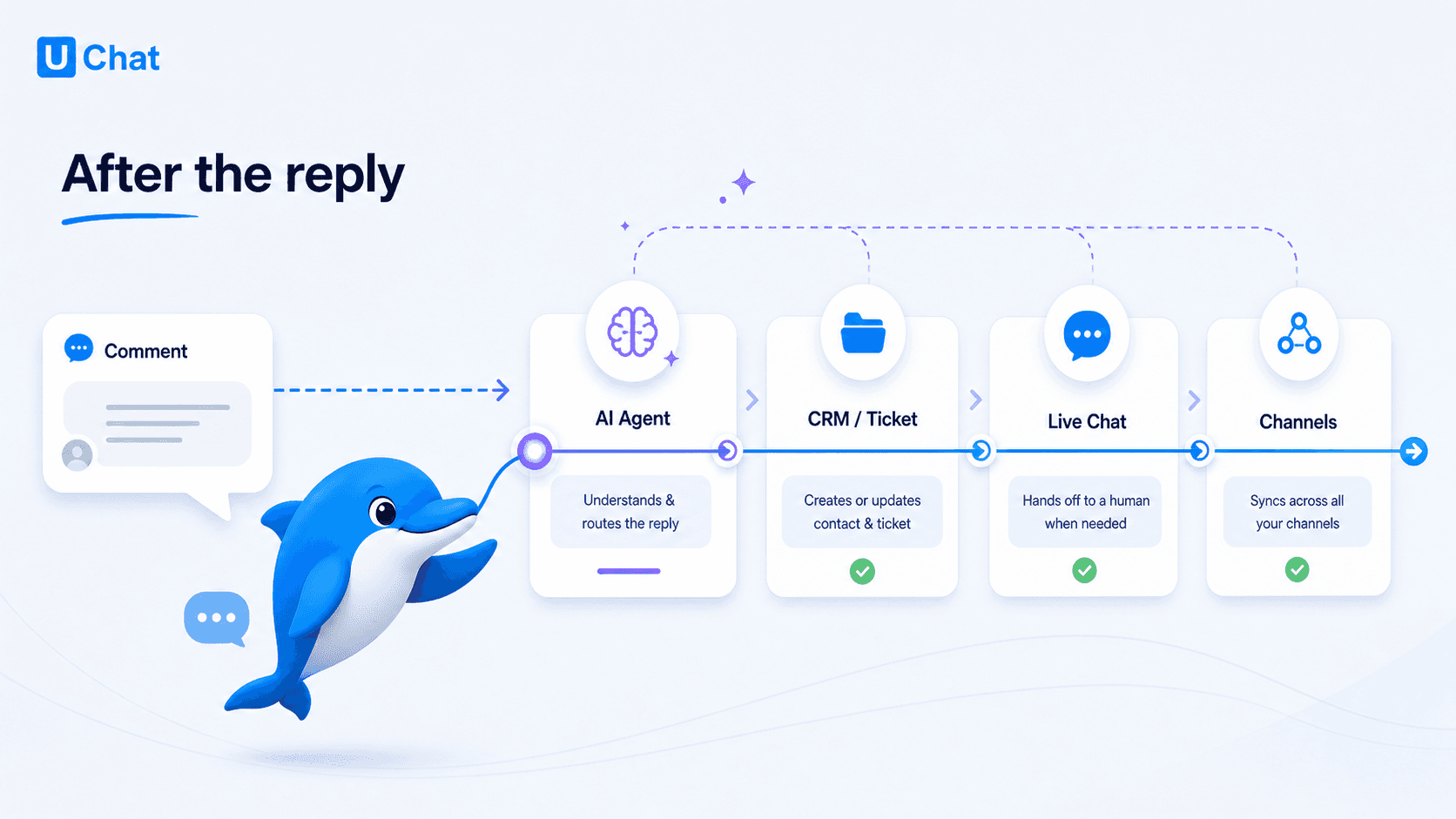
Most comparison articles ask, "Which platform has more features?"
A better question is:
What happens after the customer replies?
If someone comments on an Instagram post and all you want to do is send a link in DM, you may not need a complex automation setup. ManyChat is focused, polished, and very good for that kind of social campaign.
But if that comment should start a qualification process, update a customer record, trigger an AI agent, create a ticket, notify a human agent, or continue later on WhatsApp or Web Chat, the decision changes.
At that point, you are not only choosing a DM tool.
You are choosing the system that carries the conversation into the rest of your business.
That is where UChat becomes much more interesting.
When ManyChat Makes Sense
ManyChat makes sense when you want to move fast on social.
It is especially comfortable for creators, social sellers, small ecommerce brands, and marketers who care about campaigns like:
Instagram comment-to-DM automation;
Story replies and Live comments;
TikTok and Messenger lead capture;
social growth campaigns;
keywords, rules, broadcasts, and inbox follow-up.
There is nothing wrong with that. In fact, this is ManyChat's strength.
It has a clear product motion: launch a campaign, capture the lead, follow up in DM, and keep the setup easy enough for a marketing team to manage.
If the workflow starts and ends in social DMs, ManyChat can be the cleaner choice.
When UChat Makes Sense
UChat makes sense when the conversation needs to connect to operations.
That could mean:
an AI agent qualifies the lead before a human steps in;
the bot saves answers into custom fields;
the workflow calls an external API;
a support ticket or CRM record is created;
a live chat agent receives the conversation with context;
the same customer journey continues across Instagram, WhatsApp, Messenger, Web Chat, SMS, or another channel;
an agency manages client workspaces under its own brand.
A basic DM flow can get the conversation started.
But a business still has to qualify people, answer follow-up questions, route urgent cases, update systems, and keep track of who needs attention.
UChat is built for that second layer.
It is not always the fastest tool for a one-off campaign. It asks you to think more carefully about the workflow.
That extra structure becomes useful when automation has to support sales, support, ecommerce, or client delivery.
Social Automation
This comparison should not be framed as "ManyChat has social automation and UChat does not."
That would be too simple, and it would be wrong.
ManyChat has strong public documentation around Instagram comments, Auto-DM from comments, Story replies, Live comments, Instagram ads, Share-to-DM, TikTok automations, rules, and keywords.
UChat also supports important Instagram and social automation paths, including comment workflows, story and mention triggers, ad-related referrals, shared-story triggers, and AI-assisted campaign flows.
The difference is what each product is trying to optimize for.
ManyChat is optimized for getting social campaigns live quickly.
UChat is better when the social trigger is only the first step in a bigger workflow.
A Practical Workflow Example
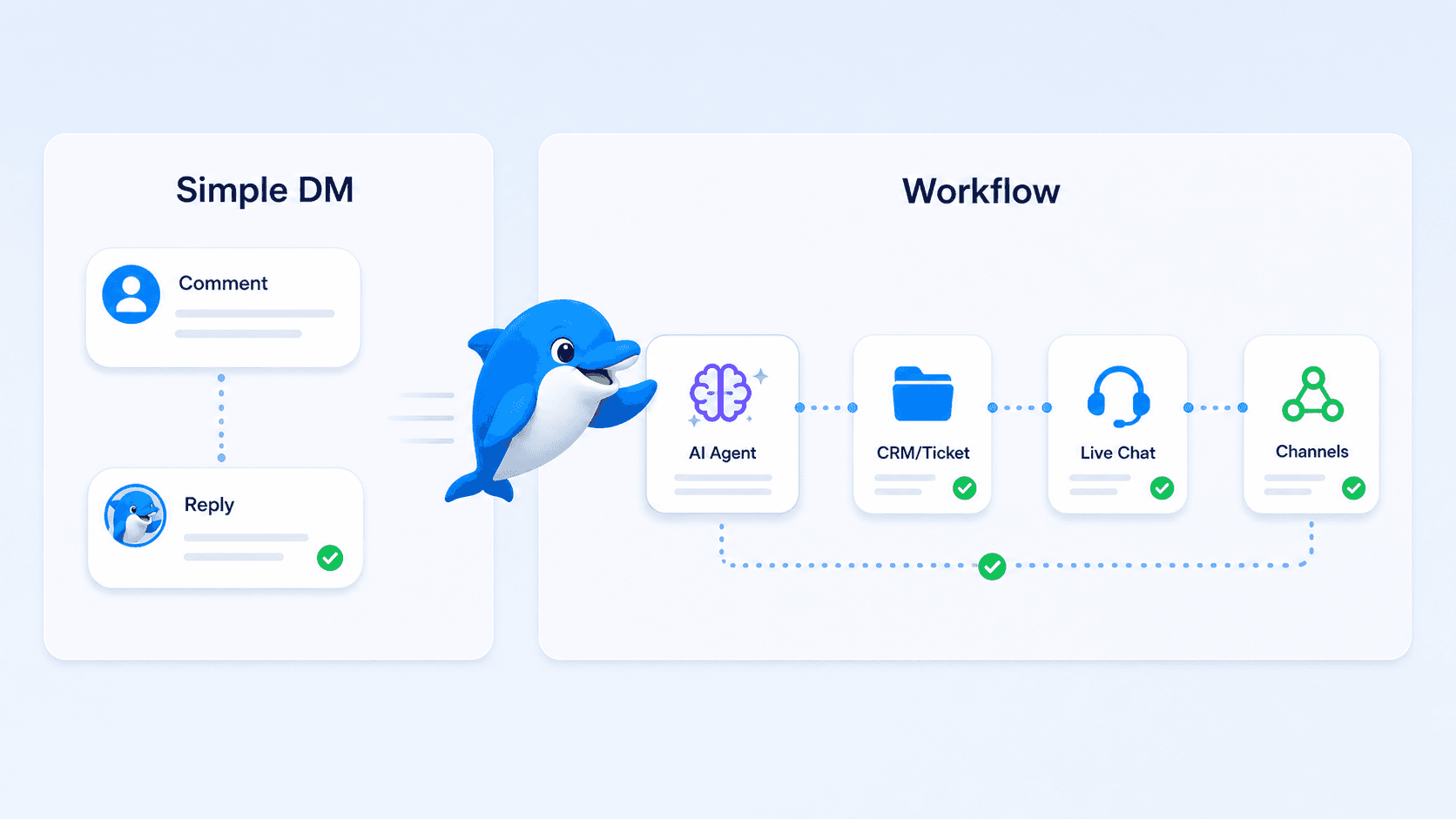
A simple social automation may look like this:
A user comments on an Instagram post.
The platform sends a DM.
The user receives a link, coupon, or next message.
That can be exactly what you need.
A more operational workflow may look like this:
A user comments on an Instagram post.
UChat sends the first response.
The flow asks a qualifying question.
An AI agent reads the answer and classifies the intent.
The result is saved to a custom field.
A CRM board or support ticket is updated.
Shopify, Calendly, Stripe, Google Sheets, or another API action runs.
A human agent is assigned if the conversation needs support.
The customer can continue later through Web Chat, WhatsApp, Messenger, SMS, or another channel.
That is the point where UChat starts to pull ahead.
Why it matters: The trigger is not the product. The workflow after the trigger is the product.
Feature Depth
ManyChat is strongest around social campaign execution.
UChat is strongest when social automation connects to AI, channels, data, support, and business systems.
Here is the practical way to think about it:
Social campaigns
ManyChat is very strong for social-first campaigns.
UChat also supports social automation, but its advantage appears when the social trigger needs to continue into a larger workflow.
AI
ManyChat AI helps with replies, comments, goals, Flow Builder assistance, text improvement, AI steps, and intention recognition.
UChat AI agents are more useful when AI needs to do workflow work: answer from knowledge, collect missing details, call functions, trigger tools, update records, and hand off to a human with context.
Channels
ManyChat is strong when the customer journey is centered on social channels.
UChat is stronger when the journey crosses social, messaging, web chat, support, and operational channels.
Support operations
ManyChat includes inbox and conversation management features.
UChat puts more emphasis on live chat handoff, assignment, mobile support, CRM boards, tickets, and follow-up workflows.
Agencies and white label
ManyChat can work for agencies building campaigns for clients.
UChat Partner is more relevant when an agency wants to sell a branded automation platform under its own domain, pricing, support model, and client workspace structure.
Pricing: Do Not Compare Only The Starting Price
UChat and ManyChat price differently, so the cheapest-looking plan is not always the most useful comparison.
At the time of this review, UChat's public pricing includes:
Free plan;
Business plan at $15/month;
Partner plan at $199/month.
The UChat Business plan includes 1 bot, 1,000 bot users, 5 members, and add-ons for extra bots, members, and bot users.
The UChat Partner plan includes 5 bots, 10,000 bot users, 5 members, white-label branding, custom domain, own pricing, client workspace management, Partner API, and billing/onboarding automation.
At the time of this review, ManyChat's public pricing starts with a Free plan, then paid plans from $14/month for Essential, $29/month for Pro, $69/month for Business, and $139/month for Advanced when billed annually.
ManyChat uses an Active Contacts pricing model, and Manychat AI is listed as a Pro add-on at $29/month.
The better pricing question is not simply, "Which one is cheaper?"
It is:
Which channels matter to your business?
Do you need AI agents, or only basic automation?
Do you need live chat, CRM/tickets, or team assignment?
Do you need APIs, webhooks, ecommerce, payments, calendars, or external integrations?
Are you selling automation services to clients under your own brand?
For a small social campaign, ManyChat's pricing model may be easier to think about.
For broader automation, support, and agency use cases, UChat's value depends on the full operating model, not only the first monthly price.
AI: Replying Is Not The Same As Operating
Both platforms can use AI in customer conversations.
The difference is how much responsibility you want the AI to take.
If you mainly want AI to help with replies, comments, FAQs, or social DMs, ManyChat can be a natural place to start.
UChat is more useful when the AI needs to participate in the workflow.
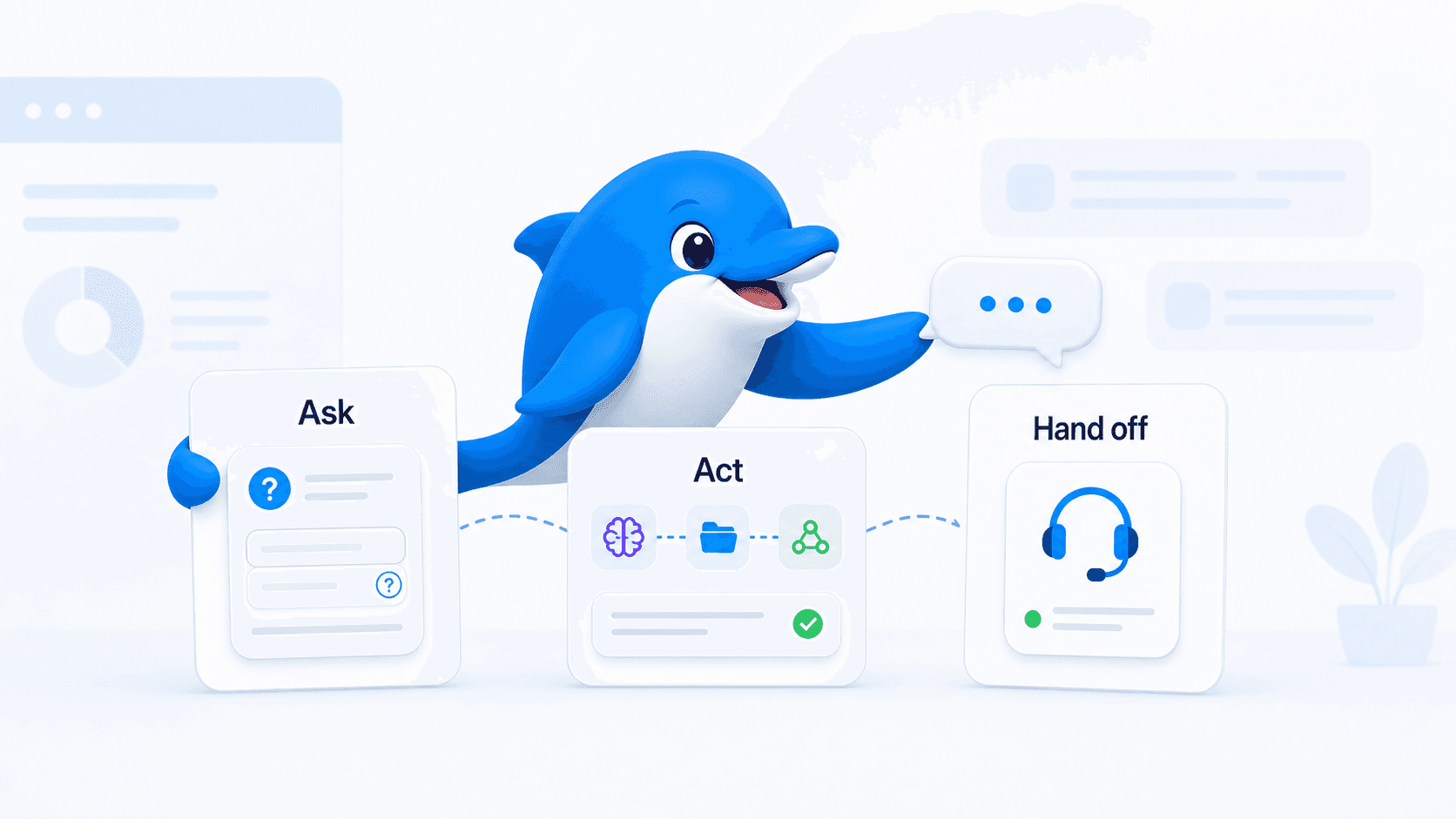
For example, an AI agent can answer from knowledge, collect missing details, call functions, route by intent, update a CRM or ticket, trigger external tools, or hand off to a human agent with context.
This matters in real support and sales conversations.
Customers do not always ask clean, simple questions.
Sometimes the AI should answer.
Sometimes it should ask for a workspace ID, order details, or missing context.
Sometimes it should stop and bring in a person.
A good automation platform should help you make those handoffs cleanly.
Channels And Omnichannel Workflows
ManyChat is strongest when the customer journey is centered on social channels.
UChat becomes more useful when the customer journey crosses channels.
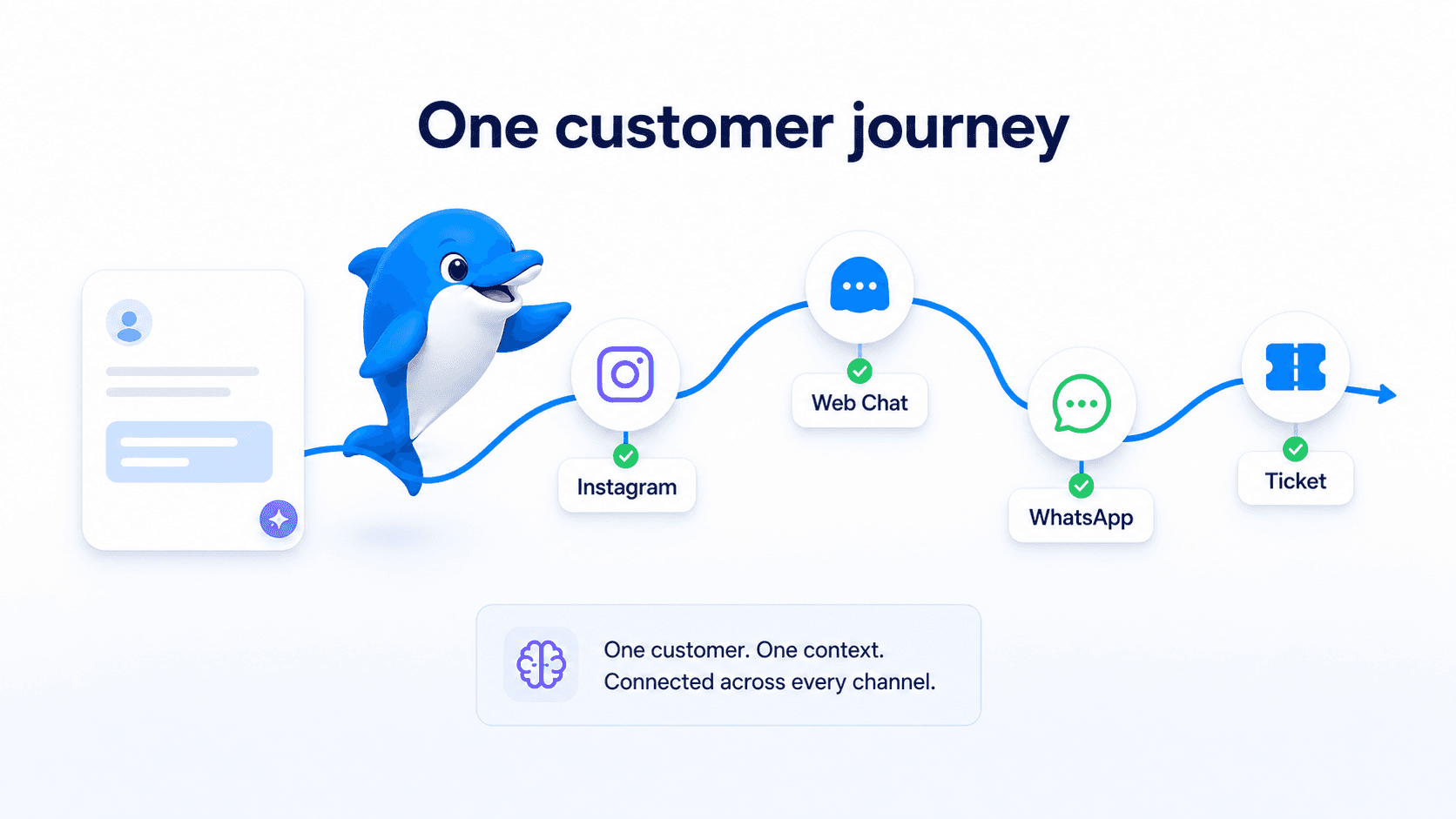
For example, a customer may first comment on Instagram, continue in DM, later ask a question on Web Chat, receive a WhatsApp reminder, and then need a support ticket.
A business does not want five disconnected automations for that journey.
It wants one customer context and a workflow that can move across channels.
That is where UChat's omnichannel model matters.
It does not mean every channel has identical rules. WhatsApp, Instagram, Messenger, Web Chat, SMS, Voice, and TikTok each have their own limits.
But UChat gives teams a way to design reusable logic while respecting those channel-specific constraints.
Live Chat, CRM, And Support Operations
Many chatbot tools work well until a human needs to step in.
That handoff is where a lot of customer experience breaks.
The agent does not know what the customer already answered. The conversation is in the wrong inbox. Nobody is sure who owns the follow-up. The customer gets asked the same question twice.
UChat puts more emphasis on this part of the workflow:
pause automation;
assign the conversation to an agent or group;
notify the team;
continue the chat from the live chat inbox or mobile app;
create or update CRM records and tickets;
track conversation status and follow-up.
The goal is not to automate every conversation forever.
The goal is to resolve more conversations faster, while giving humans the context they need when they step in.
White Label And Agency Use
This is one of the clearest reasons to choose UChat.
UChat Partner is built for agencies and service providers that want to operate under their own brand.
Partners can use a custom domain, configure branding, manage client workspaces, define their own client-facing pricing, use Partner API automation, and build a support/billing model around their own service.
The simple version:
Agency model: UChat powers the platform. The partner owns the client relationship.
That matters if you want to sell AI agents, WhatsApp automation, Instagram automation, live chat, templates, onboarding, and managed support as a recurring service.
If your agency only wants to build campaigns inside a client's existing social automation account, ManyChat can work.
If your agency wants to sell a branded automation platform and manage client workspaces under your own operating model, UChat Partner is the more relevant comparison.
Decision Checklist
Use ManyChat when:
the campaign is mostly Instagram or TikTok;
the goal is comments-to-DM, Story replies, Live comments, ads, or social growth;
the team wants a very direct campaign setup path;
speed and simplicity matter more than workflow depth.
Use UChat when:
social automation needs to become a sales, support, or operations workflow;
AI agents need to use business knowledge, tools, functions, and handoff logic;
customer conversations happen across multiple channels;
the team needs live chat, CRM/tickets, assignments, mobile support, or reporting;
the business needs ecommerce, payments, calendars, CRMs, email, webhooks, APIs, or Mini Apps;
an agency wants white-label client workspaces and partner-controlled pricing.
If you are still deciding, look at your next six months, not only your next campaign.
If the workflow is likely to stay simple, ManyChat is a strong choice.
If you expect the automation to touch support, CRM, ecommerce, AI agents, or client delivery, UChat gives you more space to grow.
FAQ
Is UChat or ManyChat better for Instagram automation?
ManyChat is strong for standard Instagram social campaigns such as comments-to-DM, Story replies, Live comments, ads, and Share-to-DM.
UChat also supports Instagram automation, but its clearest advantage appears when Instagram needs to connect to AI agents, APIs, live chat, CRM/tickets, integrations, or other channels.
Does UChat support Instagram comment automation like ManyChat?
Yes. UChat supports Instagram comment automation and comment triggers.
The better comparison is not "who has comment automation?"
It is what happens after the comment trigger fires.
Is UChat harder to set up than ManyChat?
It can be, depending on the workflow.
ManyChat can be simpler for a standard social campaign.
UChat gives more control for AI agents, APIs, live chat, CRM/tickets, and omnichannel automation, so deeper workflows need more planning and testing.
Is UChat better for agencies?
UChat is usually the more relevant option for agencies that want white-label delivery, custom domain, client workspaces, partner-controlled pricing, Partner API automation, and a broader service offer around AI agents and omnichannel automation.
Is ManyChat cheaper than UChat?
It depends on the use case.
ManyChat's Active Contacts pricing can be attractive for social campaigns.
UChat's value becomes clearer when pricing is compared against channels, AI agents, integrations, live chat, CRM/tickets, support operations, and white-label partner needs.
Final Verdict
ManyChat is a strong choice for simple social automation.
It is focused, clear, and well packaged for creators and social-first campaigns.
UChat is the better choice when social automation is only the first step.
If you need AI agents, deeper workflows, APIs, live chat handoff, CRM/tickets, more channels, integrations, or white-label partner infrastructure, UChat gives you more room to build the system behind the conversation.
Ready to test the workflow? Start a 14-day free UChat trial with no credit card required.
Building automation services under your own brand? Book a UChat Partner demo.
Compare Other Chatbot Platforms
Compare UChat with Chatfuel for social AI automation, or with Landbot for website and WhatsApp lead-capture workflows.
Review Note
This comparison was reviewed on 2026-07-30 against UChat pricing, ManyChat pricing, Manychat AI, ManyChat Instagram, Chatimize UChat and ManyChat reviews, and G2 review pages for UChat and Manychat.
Pricing and platform features can change, so verify the live pricing pages before making a final purchase decision.
Quick Answer
ManyChat is a strong choice if you mainly want fast social automation.
Think comment-to-DM campaigns, Story replies, TikTok or Instagram lead capture, and simple follow-up inside social inboxes.
UChat is a better fit when that first reply needs to become a real business workflow.
That is the key difference.
Choose ManyChat when speed and simplicity matter most.
Choose UChat when the conversation needs AI agents, APIs, live chat handoff, CRM/tickets, integrations, more channels, or white-label agency delivery.
For agencies, UChat Partner is the more relevant option because it lets you operate under your own brand, use your own domain, manage client workspaces, define your own client-facing pricing, and build a recurring service around automation.
You can also explore how UChat combines AI agents, 15+ communication channels, live chat handoff, CRM workflows, and third-party integrations.
The Real Question
Most comparison articles ask, "Which platform has more features?"
A better question is:
What happens after the customer replies?
If someone comments on an Instagram post and all you want to do is send a link in DM, you may not need a complex automation setup. ManyChat is focused, polished, and very good for that kind of social campaign.
But if that comment should start a qualification process, update a customer record, trigger an AI agent, create a ticket, notify a human agent, or continue later on WhatsApp or Web Chat, the decision changes.
At that point, you are not only choosing a DM tool.
You are choosing the system that carries the conversation into the rest of your business.
That is where UChat becomes much more interesting.
When ManyChat Makes Sense
ManyChat makes sense when you want to move fast on social.
It is especially comfortable for creators, social sellers, small ecommerce brands, and marketers who care about campaigns like:
Instagram comment-to-DM automation;
Story replies and Live comments;
TikTok and Messenger lead capture;
social growth campaigns;
keywords, rules, broadcasts, and inbox follow-up.
There is nothing wrong with that. In fact, this is ManyChat's strength.
It has a clear product motion: launch a campaign, capture the lead, follow up in DM, and keep the setup easy enough for a marketing team to manage.
If the workflow starts and ends in social DMs, ManyChat can be the cleaner choice.
When UChat Makes Sense
UChat makes sense when the conversation needs to connect to operations.
That could mean:
an AI agent qualifies the lead before a human steps in;
the bot saves answers into custom fields;
the workflow calls an external API;
a support ticket or CRM record is created;
a live chat agent receives the conversation with context;
the same customer journey continues across Instagram, WhatsApp, Messenger, Web Chat, SMS, or another channel;
an agency manages client workspaces under its own brand.
A basic DM flow can get the conversation started.
But a business still has to qualify people, answer follow-up questions, route urgent cases, update systems, and keep track of who needs attention.
UChat is built for that second layer.
It is not always the fastest tool for a one-off campaign. It asks you to think more carefully about the workflow.
That extra structure becomes useful when automation has to support sales, support, ecommerce, or client delivery.
Social Automation
This comparison should not be framed as "ManyChat has social automation and UChat does not."
That would be too simple, and it would be wrong.
ManyChat has strong public documentation around Instagram comments, Auto-DM from comments, Story replies, Live comments, Instagram ads, Share-to-DM, TikTok automations, rules, and keywords.
UChat also supports important Instagram and social automation paths, including comment workflows, story and mention triggers, ad-related referrals, shared-story triggers, and AI-assisted campaign flows.
The difference is what each product is trying to optimize for.
ManyChat is optimized for getting social campaigns live quickly.
UChat is better when the social trigger is only the first step in a bigger workflow.
A Practical Workflow Example
A simple social automation may look like this:
A user comments on an Instagram post.
The platform sends a DM.
The user receives a link, coupon, or next message.
That can be exactly what you need.
A more operational workflow may look like this:
A user comments on an Instagram post.
UChat sends the first response.
The flow asks a qualifying question.
An AI agent reads the answer and classifies the intent.
The result is saved to a custom field.
A CRM board or support ticket is updated.
Shopify, Calendly, Stripe, Google Sheets, or another API action runs.
A human agent is assigned if the conversation needs support.
The customer can continue later through Web Chat, WhatsApp, Messenger, SMS, or another channel.
That is the point where UChat starts to pull ahead.
Why it matters: The trigger is not the product. The workflow after the trigger is the product.
Feature Depth
ManyChat is strongest around social campaign execution.
UChat is strongest when social automation connects to AI, channels, data, support, and business systems.
Here is the practical way to think about it:
Social campaigns
ManyChat is very strong for social-first campaigns.
UChat also supports social automation, but its advantage appears when the social trigger needs to continue into a larger workflow.
AI
ManyChat AI helps with replies, comments, goals, Flow Builder assistance, text improvement, AI steps, and intention recognition.
UChat AI agents are more useful when AI needs to do workflow work: answer from knowledge, collect missing details, call functions, trigger tools, update records, and hand off to a human with context.
Channels
ManyChat is strong when the customer journey is centered on social channels.
UChat is stronger when the journey crosses social, messaging, web chat, support, and operational channels.
Support operations
ManyChat includes inbox and conversation management features.
UChat puts more emphasis on live chat handoff, assignment, mobile support, CRM boards, tickets, and follow-up workflows.
Agencies and white label
ManyChat can work for agencies building campaigns for clients.
UChat Partner is more relevant when an agency wants to sell a branded automation platform under its own domain, pricing, support model, and client workspace structure.
Pricing: Do Not Compare Only The Starting Price
UChat and ManyChat price differently, so the cheapest-looking plan is not always the most useful comparison.
At the time of this review, UChat's public pricing includes:
Free plan;
Business plan at $15/month;
Partner plan at $199/month.
The UChat Business plan includes 1 bot, 1,000 bot users, 5 members, and add-ons for extra bots, members, and bot users.
The UChat Partner plan includes 5 bots, 10,000 bot users, 5 members, white-label branding, custom domain, own pricing, client workspace management, Partner API, and billing/onboarding automation.
At the time of this review, ManyChat's public pricing starts with a Free plan, then paid plans from $14/month for Essential, $29/month for Pro, $69/month for Business, and $139/month for Advanced when billed annually.
ManyChat uses an Active Contacts pricing model, and Manychat AI is listed as a Pro add-on at $29/month.
The better pricing question is not simply, "Which one is cheaper?"
It is:
Which channels matter to your business?
Do you need AI agents, or only basic automation?
Do you need live chat, CRM/tickets, or team assignment?
Do you need APIs, webhooks, ecommerce, payments, calendars, or external integrations?
Are you selling automation services to clients under your own brand?
For a small social campaign, ManyChat's pricing model may be easier to think about.
For broader automation, support, and agency use cases, UChat's value depends on the full operating model, not only the first monthly price.
AI: Replying Is Not The Same As Operating
Both platforms can use AI in customer conversations.
The difference is how much responsibility you want the AI to take.
If you mainly want AI to help with replies, comments, FAQs, or social DMs, ManyChat can be a natural place to start.
UChat is more useful when the AI needs to participate in the workflow.
For example, an AI agent can answer from knowledge, collect missing details, call functions, route by intent, update a CRM or ticket, trigger external tools, or hand off to a human agent with context.
This matters in real support and sales conversations.
Customers do not always ask clean, simple questions.
Sometimes the AI should answer.
Sometimes it should ask for a workspace ID, order details, or missing context.
Sometimes it should stop and bring in a person.
A good automation platform should help you make those handoffs cleanly.
Channels And Omnichannel Workflows
ManyChat is strongest when the customer journey is centered on social channels.
UChat becomes more useful when the customer journey crosses channels.
For example, a customer may first comment on Instagram, continue in DM, later ask a question on Web Chat, receive a WhatsApp reminder, and then need a support ticket.
A business does not want five disconnected automations for that journey.
It wants one customer context and a workflow that can move across channels.
That is where UChat's omnichannel model matters.
It does not mean every channel has identical rules. WhatsApp, Instagram, Messenger, Web Chat, SMS, Voice, and TikTok each have their own limits.
But UChat gives teams a way to design reusable logic while respecting those channel-specific constraints.
Live Chat, CRM, And Support Operations
Many chatbot tools work well until a human needs to step in.
That handoff is where a lot of customer experience breaks.
The agent does not know what the customer already answered. The conversation is in the wrong inbox. Nobody is sure who owns the follow-up. The customer gets asked the same question twice.
UChat puts more emphasis on this part of the workflow:
pause automation;
assign the conversation to an agent or group;
notify the team;
continue the chat from the live chat inbox or mobile app;
create or update CRM records and tickets;
track conversation status and follow-up.
The goal is not to automate every conversation forever.
The goal is to resolve more conversations faster, while giving humans the context they need when they step in.
White Label And Agency Use
This is one of the clearest reasons to choose UChat.
UChat Partner is built for agencies and service providers that want to operate under their own brand.
Partners can use a custom domain, configure branding, manage client workspaces, define their own client-facing pricing, use Partner API automation, and build a support/billing model around their own service.
The simple version:
Agency model: UChat powers the platform. The partner owns the client relationship.
That matters if you want to sell AI agents, WhatsApp automation, Instagram automation, live chat, templates, onboarding, and managed support as a recurring service.
If your agency only wants to build campaigns inside a client's existing social automation account, ManyChat can work.
If your agency wants to sell a branded automation platform and manage client workspaces under your own operating model, UChat Partner is the more relevant comparison.
Decision Checklist
Use ManyChat when:
the campaign is mostly Instagram or TikTok;
the goal is comments-to-DM, Story replies, Live comments, ads, or social growth;
the team wants a very direct campaign setup path;
speed and simplicity matter more than workflow depth.
Use UChat when:
social automation needs to become a sales, support, or operations workflow;
AI agents need to use business knowledge, tools, functions, and handoff logic;
customer conversations happen across multiple channels;
the team needs live chat, CRM/tickets, assignments, mobile support, or reporting;
the business needs ecommerce, payments, calendars, CRMs, email, webhooks, APIs, or Mini Apps;
an agency wants white-label client workspaces and partner-controlled pricing.
If you are still deciding, look at your next six months, not only your next campaign.
If the workflow is likely to stay simple, ManyChat is a strong choice.
If you expect the automation to touch support, CRM, ecommerce, AI agents, or client delivery, UChat gives you more space to grow.
FAQ
Is UChat or ManyChat better for Instagram automation?
ManyChat is strong for standard Instagram social campaigns such as comments-to-DM, Story replies, Live comments, ads, and Share-to-DM.
UChat also supports Instagram automation, but its clearest advantage appears when Instagram needs to connect to AI agents, APIs, live chat, CRM/tickets, integrations, or other channels.
Does UChat support Instagram comment automation like ManyChat?
Yes. UChat supports Instagram comment automation and comment triggers.
The better comparison is not "who has comment automation?"
It is what happens after the comment trigger fires.
Is UChat harder to set up than ManyChat?
It can be, depending on the workflow.
ManyChat can be simpler for a standard social campaign.
UChat gives more control for AI agents, APIs, live chat, CRM/tickets, and omnichannel automation, so deeper workflows need more planning and testing.
Is UChat better for agencies?
UChat is usually the more relevant option for agencies that want white-label delivery, custom domain, client workspaces, partner-controlled pricing, Partner API automation, and a broader service offer around AI agents and omnichannel automation.
Is ManyChat cheaper than UChat?
It depends on the use case.
ManyChat's Active Contacts pricing can be attractive for social campaigns.
UChat's value becomes clearer when pricing is compared against channels, AI agents, integrations, live chat, CRM/tickets, support operations, and white-label partner needs.
Final Verdict
ManyChat is a strong choice for simple social automation.
It is focused, clear, and well packaged for creators and social-first campaigns.
UChat is the better choice when social automation is only the first step.
If you need AI agents, deeper workflows, APIs, live chat handoff, CRM/tickets, more channels, integrations, or white-label partner infrastructure, UChat gives you more room to build the system behind the conversation.
Ready to test the workflow? Start a 14-day free UChat trial with no credit card required.
Building automation services under your own brand? Book a UChat Partner demo.
Compare Other Chatbot Platforms
Compare UChat with Chatfuel for social AI automation, or with Landbot for website and WhatsApp lead-capture workflows.
Review Note
This comparison was reviewed on 2026-07-30 against UChat pricing, ManyChat pricing, Manychat AI, ManyChat Instagram, Chatimize UChat and ManyChat reviews, and G2 review pages for UChat and Manychat.
Pricing and platform features can change, so verify the live pricing pages before making a final purchase decision.