13 minutes
UChat
Posted by
WhatsApp Business Calling API with AI Agents and Human Handoff
13 minutes
Posted by
UChat

The WhatsApp Business Calling API adds voice calling to a WhatsApp Business Cloud API number. With UChat, an eligible team can receive those calls in a browser, let a human or an existing AI Agent answer, transfer the conversation, supervise it live and connect the result to a visual automation flow.
Meta provides the calling network, account eligibility, customer permission rules and outbound pricing. UChat handles the work around the call. It gives agents a browser call centre, gives AI Agents a controlled way to answer and escalate, and gives supervisors tools to listen, coach or take over.
This guide reflects the public Meta and UChat documentation available on August 22, 2026. Calling rules and product settings can change, so check the linked documentation before a production launch.
What the WhatsApp Business Calling API does
The Calling API lets a customer call a business on WhatsApp and lets an approved business call a customer who has granted permission. It runs on the WhatsApp Business Cloud API. Meta uses Graph API and webhooks for call signalling, with WebRTC or SIP carrying the audio.
There are two call directions.
Call direction | Who starts it | Permission before the call | Calling API charge |
|---|---|---|---|
User-initiated | The customer | No outbound permission needed | Free on the Meta Calling API side |
Business-initiated | The business | Customer permission required | Charged by call duration |
A customer-initiated call sends a calls webhook to the business integration. The integration accepts the call and connects the media. Meta's user-initiated call guide says the business generally has 30 to 60 seconds to respond before the call is treated as unanswered.
For an outbound call, the business must first receive call permission from the customer. The current process and limits are documented in Meta's business-initiated call guide and call permission guide.
What UChat adds to the Calling API
The raw API gives a developer call events and an audio stream. A support or sales team still needs a place to answer, route and supervise those calls. UChat puts that work inside the same workspace used for WhatsApp conversations and automation.
Operating need | UChat workflow |
|---|---|
Answer an incoming call | An eligible Live Chat agent sees the ringing call and answers in the browser |
Let AI answer | An existing UChat AI Agent receives the call after the configured wait time |
Escalate a complex question | The AI Agent transfers the call to a human under defined conditions |
Support a human agent | A supervisor can listen, talk privately to the agent, join the customer conversation or take over |
Place an automated call | Flow Builder starts a WhatsApp AI call after permission has been checked |
Continue after the call | The workflow can use the transcript, summary or captured information for the next action |
UChat's public WhatsApp Calling Knowledge Base covers enabling Calling, call hours, permissions, Live Chat calling, AI Call Settings and the Flow Builder action. The official WhatsApp Business Calling in UChat walkthrough shows the setup and a working call.
Watch the complete UChat Calling walkthrough

Watch the complete UChat Calling walkthrough on YouTube
Watch the eight-minute official UChat walkthrough for number setup, inbound and outbound calls, AI Call Settings, Live Chat and Flow Builder.
Which WhatsApp calling product do you need
Three products with similar names solve different problems.
Product | Where it runs | Best suited to |
|---|---|---|
WhatsApp Business App calling | The mobile or desktop app | Small teams handling calls manually inside the app |
WhatsApp Business Calling API | A WhatsApp Business Cloud API integration | Teams that need routing, automation, AI or a custom call experience |
Programmable voice from a telephony provider | The telephone network through a provider such as Twilio or SignalWire | Calls to ordinary phone numbers and separate voice workflows |
UChat's native WhatsApp Calling feature belongs to the second row. The same connected Cloud API number can handle WhatsApp messages and eligible WhatsApp voice calls. A separate UChat SMS and Voice channel uses a telephony provider and should be planned as a different integration.
How an inbound WhatsApp call works in UChat
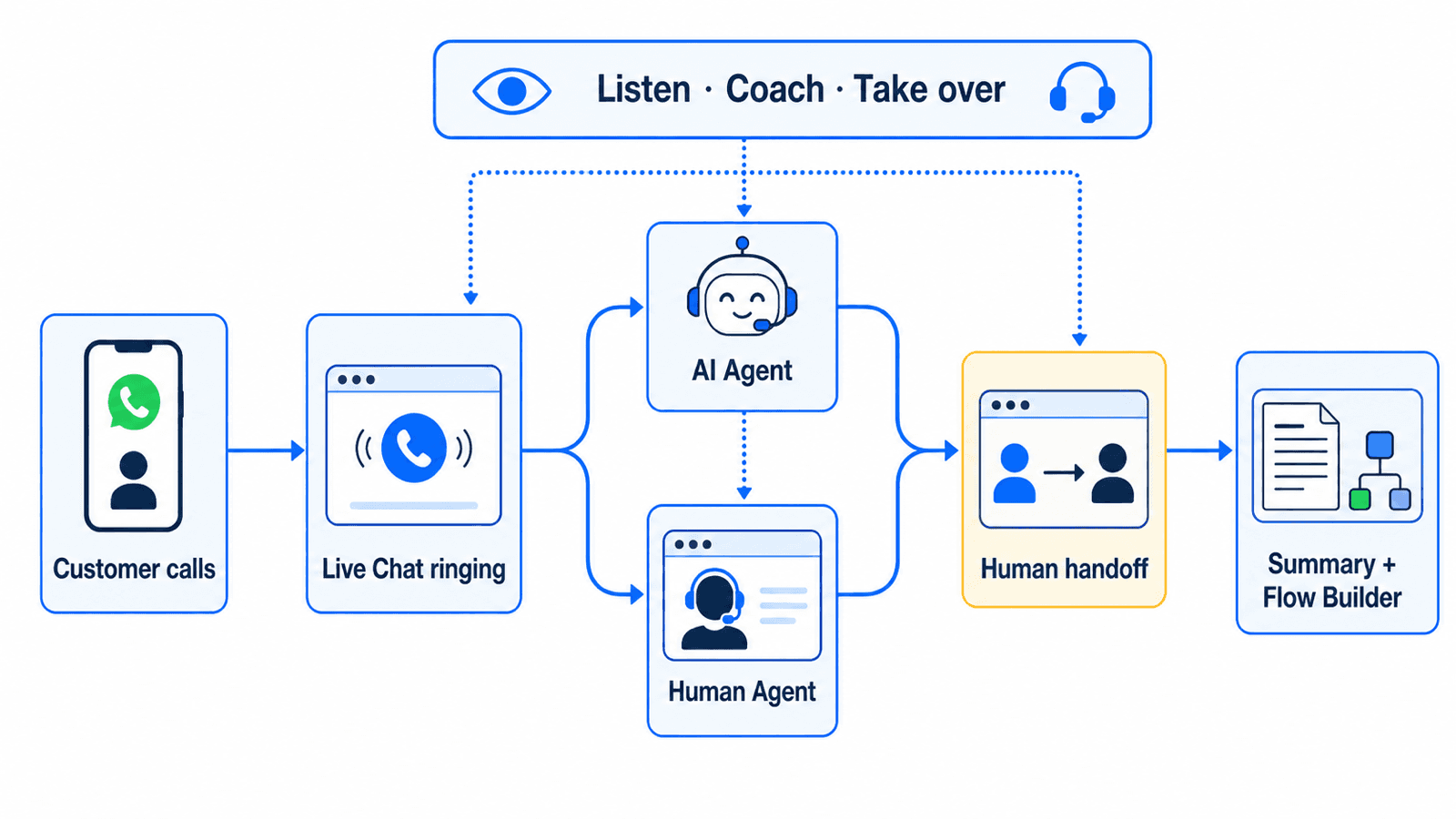
An inbound call can move through one browser workspace from first ring to follow-up.
A customer taps the call control in WhatsApp.
UChat displays the call in the Live Active Calls list, including its current status and an Answer control while it is ringing.
A human agent can answer in Live Chat. An AI Agent can answer after the wait period set by the workspace.
The AI Agent handles the conversation using its instructions and available business context. It can transfer the call when the request needs a person.
A supervisor can monitor a live call and step in when needed.
Recording, transcription, summary or analytics can support the next workflow when they are enabled and configured correctly.
The Live Active Calls update documents the ringing and active-call experience. Workspace administrators can also control who sees calls through Live Chat Settings. Agents who need a short break can set themselves Away, and a ringtone mute control is available in the call centre.
These details matter during a real shift. Agents need to know which call is ringing, who is handling it and when another person should take over. A browser-based queue also lets a remote team work without sharing a physical handset.
How a business-initiated call works
A business-initiated WhatsApp call starts with customer permission. UChat can check the current permission state, request permission through WhatsApp, and place the call from Live Chat or the call centre once permission exists. A Flow Builder action can start an AI call as part of an approved workflow.
Temporary permission lasts seven days, or 168 hours, under Meta's current rules. Permanent permission stays active until the customer revokes it. Permission can be requested inside an open customer service window, through an approved template outside that window, through the business profile, or through temporary callback permission after the customer calls.
Meta currently limits permission requests for each business-number and customer pair to one request in 24 hours and two requests in seven days. Repeated unanswered or rejected outbound calls can make WhatsApp ask the customer to reconsider permission and can eventually revoke it. These controls make calling suitable for requested callbacks, booked consultations and service follow-up. They do not support cold calling.
A useful Flow Builder example begins when a qualified lead asks for a demonstration. The flow checks permission, requests it if needed, starts an AI call at the agreed time, and transfers to a sales agent when the lead asks about a proposal or contract. The conversation result can then update the contact record and trigger the appropriate follow-up.
Configure an AI Agent for calls
UChat uses an existing AI Agent for the voice conversation. The AI Call Settings shown in UChat's Knowledge Base let the workspace choose the agent, wait time, supported realtime model and voice, transcription settings, first message, silence handling, follow-up behaviour, call duration and human transfer instructions.
Model and voice availability changes more quickly than the workflow itself. Check the choices shown in the workspace at launch time instead of designing a process around a model name in an older video.
The agent instructions should define its job and its limits. A support agent might authenticate the request, collect an order number, answer questions covered by the approved knowledge, and transfer payment disputes or account-security issues. A booking agent might confirm the service, location and preferred time before handing the customer to a person when an exception appears.
Flow Builder connects that call to the rest of the customer journey. The WhatsApp/Messenger AI Call action can place the call, while a permission-change trigger can start a separate flow when a customer grants or revokes permission. The automation can therefore check consent state at the point where it matters.
Human handoff and supervisor control
UChat supports an AI-to-human handoff during a WhatsApp call. The AI Agent can transfer when its instructions identify an escalation condition. The receiving person can continue the conversation in the same operating environment instead of asking the customer to call another number.
Supervisors have separate controls for AI and human calls. UChat's official AI call takeover video shows a supervisor listening after an AI Agent answers and then taking control of the call. The public AI call supervision update confirms the listen and takeover controls.
For a human-agent call, a supervisor can listen, talk privately to the agent, talk directly to the customer or take over. The private agent channel works as live coaching without requiring the customer to hear the guidance. An agent can also request takeover while the supervisor is listening. The 90-second supervisor controls walkthrough demonstrates these actions in the UChat interface.
Watch the supervisor controls demonstration

Watch the supervisor controls demonstration on YouTube
Watch the 90-second official UChat demonstration of listen, talk-to-agent, talk-to-customer and takeover controls.
This gives a team several levels of intervention. A supervisor can observe a routine call, coach a new agent, join when an answer needs authority, or replace the current speaker during a difficult escalation. The customer stays on the same WhatsApp call.
Permission, pricing and country rules
Permission and pricing come from Meta, even when the call is handled in UChat.
All user-initiated calls are free on the Meta Calling API side. Business-initiated calls are billed in six-second pulses. The rate depends on the customer's country code and the monthly minute tier. A partial pulse rounds up, and permission-request messages follow WhatsApp messaging prices. Check Meta's live Calling API pricing page instead of copying a per-minute rate into a budget.
Provider, UChat and AI-model charges may still apply. Review those charges separately before estimating the total cost of a call workflow.
A customer call starts or refreshes the 24-hour customer service window, including when the business does not answer. A business-initiated call refreshes the window when the customer accepts it. This can affect which follow-up messages the business can send after the conversation.
User-initiated calls are available wherever Cloud API is available. As of August 22, 2026, Meta excludes business-initiated calls when the business phone number has a country code from the United States, Canada, Egypt, Vietnam or Nigeria. The agent's physical location does not change this rule. Check Meta's Calling availability before rollout because country rules can change.

Eligibility and setup checklist
A production deployment starts with an eligible WhatsApp Business Cloud API number. Meta's current documentation lists several prerequisites.
The number must run on Cloud API.
The business must meet the current messaging-limit requirement.
The app must subscribe to the WABA
callswebhook and havewhatsapp_business_messagingpermission.Calling must be enabled for the business number.
The account needs a valid payment method or credit line for outbound calls.
In UChat, the workspace then enables calling on the connected number, chooses inbound call and callback behaviour, sets call hours, grants the right members access, and configures AI Call Settings if AI will answer. Test inbound, outbound, transfer, supervisor and failure paths before agents use the workflow with customers.
UChat announced WhatsApp and Messenger Calling for all workspaces on July 1, 2026. Workspace availability does not override Meta's eligibility, permission or country rules.
Recording, transcription and privacy
Meta documents per-call recording and transcription. When configured, the platform can play a disclosure and deliver the completed media or transcript through call webhooks. The business still needs a lawful reason to record, a clear disclosure, appropriate retention controls and access restrictions for every country in which it operates.
UChat's product documentation and walkthrough show automatic recording, summaries and calling analytics. At the time of UChat's August 2026 walkthrough, saving automatic recordings used an S3 integration. Confirm the current storage requirement and retention behaviour before publishing an internal policy or promising that every call will be stored.
Call permission and recording consent are separate decisions. A customer who allows the business to call has not automatically agreed to recording, transcription or AI analysis. Review Meta's recording and transcription documentation alongside local law and the WhatsApp Business Solution Terms.
Practical use cases
The strongest use cases begin with a customer who expects a call or chooses to call the business.
Customer support can let AI collect the account and issue details, answer approved questions, and transfer an exception to a human.
Sales teams can call a lead who requested a demonstration, qualify the need, and move a pricing discussion to a salesperson.
Appointment teams can confirm bookings, collect simple changes and hand unusual scheduling requests to staff.
Agencies can give each client workspace call visibility, operating hours and supervisor rules suited to its team.
The AI Agent should have a narrow job, reliable business knowledge and an explicit transfer path. High-risk actions, sensitive data and commitments that require authority should remain with trained people.
Frequently asked questions
Does the WhatsApp API allow voice calls?
Yes. WhatsApp Business Calling API adds voice calling to eligible WhatsApp Business Cloud API numbers. Customer-initiated and permission-based business-initiated calls follow different rules.
Can a business call a customer without permission?
No. A business needs the customer's WhatsApp call permission before starting an outbound call. A customer can call the business without granting outbound permission first.
Is WhatsApp Business Calling free?
Customer-initiated calls are free on the Meta Calling API side. Meta charges business-initiated calls by duration, and provider, UChat or AI-model costs may also apply.
Can an AI voice agent answer a WhatsApp call?
Yes. UChat can route the call to an existing AI Agent, subject to the workspace configuration and Meta eligibility. The agent can follow its instructions and transfer the call to a human when needed.
Can a UChat agent answer in a browser?
Yes. Eligible agents can see and answer ringing WhatsApp calls in UChat Live Chat. They can also place permitted outbound calls from the relevant UChat calling interface.
Can a supervisor listen to or take over a call?
Yes. UChat supports listening and takeover for AI Agent calls. For human-agent calls, the supervisor can listen, talk privately to the agent, talk to the customer or take over. An agent can request takeover while the supervisor listens.
Does a WhatsApp call open the 24-hour messaging window?
A customer-initiated call starts or refreshes the window. A business-initiated call refreshes it when the customer accepts the call. Meta's current pricing documentation defines the exact behaviour.
Can WhatsApp calls be recorded and transcribed?
Meta and UChat document recording and transcription options. The business must configure disclosure and storage correctly and comply with local consent, privacy and retention requirements.
Bring WhatsApp calls into your UChat workflow
UChat turns an eligible WhatsApp Cloud API number into a browser-based calling workflow for AI Agents, human teams and supervisors. The same Flow Builder that handles the surrounding conversation can request permission, start an approved AI call, react to permission changes and continue the work after the call.
Read the UChat WhatsApp Calling setup guide, review UChat pricing, then start a UChat trial to test the complete path with an eligible number. Test with your own team first, confirm Meta's current rules, and give every AI call a clear route to a person.
The WhatsApp Business Calling API adds voice calling to a WhatsApp Business Cloud API number. With UChat, an eligible team can receive those calls in a browser, let a human or an existing AI Agent answer, transfer the conversation, supervise it live and connect the result to a visual automation flow.
Meta provides the calling network, account eligibility, customer permission rules and outbound pricing. UChat handles the work around the call. It gives agents a browser call centre, gives AI Agents a controlled way to answer and escalate, and gives supervisors tools to listen, coach or take over.
This guide reflects the public Meta and UChat documentation available on August 22, 2026. Calling rules and product settings can change, so check the linked documentation before a production launch.
What the WhatsApp Business Calling API does
The Calling API lets a customer call a business on WhatsApp and lets an approved business call a customer who has granted permission. It runs on the WhatsApp Business Cloud API. Meta uses Graph API and webhooks for call signalling, with WebRTC or SIP carrying the audio.
There are two call directions.
Call direction | Who starts it | Permission before the call | Calling API charge |
|---|---|---|---|
User-initiated | The customer | No outbound permission needed | Free on the Meta Calling API side |
Business-initiated | The business | Customer permission required | Charged by call duration |
A customer-initiated call sends a calls webhook to the business integration. The integration accepts the call and connects the media. Meta's user-initiated call guide says the business generally has 30 to 60 seconds to respond before the call is treated as unanswered.
For an outbound call, the business must first receive call permission from the customer. The current process and limits are documented in Meta's business-initiated call guide and call permission guide.
What UChat adds to the Calling API
The raw API gives a developer call events and an audio stream. A support or sales team still needs a place to answer, route and supervise those calls. UChat puts that work inside the same workspace used for WhatsApp conversations and automation.
Operating need | UChat workflow |
|---|---|
Answer an incoming call | An eligible Live Chat agent sees the ringing call and answers in the browser |
Let AI answer | An existing UChat AI Agent receives the call after the configured wait time |
Escalate a complex question | The AI Agent transfers the call to a human under defined conditions |
Support a human agent | A supervisor can listen, talk privately to the agent, join the customer conversation or take over |
Place an automated call | Flow Builder starts a WhatsApp AI call after permission has been checked |
Continue after the call | The workflow can use the transcript, summary or captured information for the next action |
UChat's public WhatsApp Calling Knowledge Base covers enabling Calling, call hours, permissions, Live Chat calling, AI Call Settings and the Flow Builder action. The official WhatsApp Business Calling in UChat walkthrough shows the setup and a working call.
Watch the complete UChat Calling walkthrough
Watch the complete UChat Calling walkthrough on YouTube
Watch the eight-minute official UChat walkthrough for number setup, inbound and outbound calls, AI Call Settings, Live Chat and Flow Builder.
Which WhatsApp calling product do you need
Three products with similar names solve different problems.
Product | Where it runs | Best suited to |
|---|---|---|
WhatsApp Business App calling | The mobile or desktop app | Small teams handling calls manually inside the app |
WhatsApp Business Calling API | A WhatsApp Business Cloud API integration | Teams that need routing, automation, AI or a custom call experience |
Programmable voice from a telephony provider | The telephone network through a provider such as Twilio or SignalWire | Calls to ordinary phone numbers and separate voice workflows |
UChat's native WhatsApp Calling feature belongs to the second row. The same connected Cloud API number can handle WhatsApp messages and eligible WhatsApp voice calls. A separate UChat SMS and Voice channel uses a telephony provider and should be planned as a different integration.
How an inbound WhatsApp call works in UChat
An inbound call can move through one browser workspace from first ring to follow-up.
A customer taps the call control in WhatsApp.
UChat displays the call in the Live Active Calls list, including its current status and an Answer control while it is ringing.
A human agent can answer in Live Chat. An AI Agent can answer after the wait period set by the workspace.
The AI Agent handles the conversation using its instructions and available business context. It can transfer the call when the request needs a person.
A supervisor can monitor a live call and step in when needed.
Recording, transcription, summary or analytics can support the next workflow when they are enabled and configured correctly.
The Live Active Calls update documents the ringing and active-call experience. Workspace administrators can also control who sees calls through Live Chat Settings. Agents who need a short break can set themselves Away, and a ringtone mute control is available in the call centre.
These details matter during a real shift. Agents need to know which call is ringing, who is handling it and when another person should take over. A browser-based queue also lets a remote team work without sharing a physical handset.
How a business-initiated call works
A business-initiated WhatsApp call starts with customer permission. UChat can check the current permission state, request permission through WhatsApp, and place the call from Live Chat or the call centre once permission exists. A Flow Builder action can start an AI call as part of an approved workflow.
Temporary permission lasts seven days, or 168 hours, under Meta's current rules. Permanent permission stays active until the customer revokes it. Permission can be requested inside an open customer service window, through an approved template outside that window, through the business profile, or through temporary callback permission after the customer calls.
Meta currently limits permission requests for each business-number and customer pair to one request in 24 hours and two requests in seven days. Repeated unanswered or rejected outbound calls can make WhatsApp ask the customer to reconsider permission and can eventually revoke it. These controls make calling suitable for requested callbacks, booked consultations and service follow-up. They do not support cold calling.
A useful Flow Builder example begins when a qualified lead asks for a demonstration. The flow checks permission, requests it if needed, starts an AI call at the agreed time, and transfers to a sales agent when the lead asks about a proposal or contract. The conversation result can then update the contact record and trigger the appropriate follow-up.
Configure an AI Agent for calls
UChat uses an existing AI Agent for the voice conversation. The AI Call Settings shown in UChat's Knowledge Base let the workspace choose the agent, wait time, supported realtime model and voice, transcription settings, first message, silence handling, follow-up behaviour, call duration and human transfer instructions.
Model and voice availability changes more quickly than the workflow itself. Check the choices shown in the workspace at launch time instead of designing a process around a model name in an older video.
The agent instructions should define its job and its limits. A support agent might authenticate the request, collect an order number, answer questions covered by the approved knowledge, and transfer payment disputes or account-security issues. A booking agent might confirm the service, location and preferred time before handing the customer to a person when an exception appears.
Flow Builder connects that call to the rest of the customer journey. The WhatsApp/Messenger AI Call action can place the call, while a permission-change trigger can start a separate flow when a customer grants or revokes permission. The automation can therefore check consent state at the point where it matters.
Human handoff and supervisor control
UChat supports an AI-to-human handoff during a WhatsApp call. The AI Agent can transfer when its instructions identify an escalation condition. The receiving person can continue the conversation in the same operating environment instead of asking the customer to call another number.
Supervisors have separate controls for AI and human calls. UChat's official AI call takeover video shows a supervisor listening after an AI Agent answers and then taking control of the call. The public AI call supervision update confirms the listen and takeover controls.
For a human-agent call, a supervisor can listen, talk privately to the agent, talk directly to the customer or take over. The private agent channel works as live coaching without requiring the customer to hear the guidance. An agent can also request takeover while the supervisor is listening. The 90-second supervisor controls walkthrough demonstrates these actions in the UChat interface.
Watch the supervisor controls demonstration
Watch the supervisor controls demonstration on YouTube
Watch the 90-second official UChat demonstration of listen, talk-to-agent, talk-to-customer and takeover controls.
This gives a team several levels of intervention. A supervisor can observe a routine call, coach a new agent, join when an answer needs authority, or replace the current speaker during a difficult escalation. The customer stays on the same WhatsApp call.
Permission, pricing and country rules
Permission and pricing come from Meta, even when the call is handled in UChat.
All user-initiated calls are free on the Meta Calling API side. Business-initiated calls are billed in six-second pulses. The rate depends on the customer's country code and the monthly minute tier. A partial pulse rounds up, and permission-request messages follow WhatsApp messaging prices. Check Meta's live Calling API pricing page instead of copying a per-minute rate into a budget.
Provider, UChat and AI-model charges may still apply. Review those charges separately before estimating the total cost of a call workflow.
A customer call starts or refreshes the 24-hour customer service window, including when the business does not answer. A business-initiated call refreshes the window when the customer accepts it. This can affect which follow-up messages the business can send after the conversation.
User-initiated calls are available wherever Cloud API is available. As of August 22, 2026, Meta excludes business-initiated calls when the business phone number has a country code from the United States, Canada, Egypt, Vietnam or Nigeria. The agent's physical location does not change this rule. Check Meta's Calling availability before rollout because country rules can change.
Eligibility and setup checklist
A production deployment starts with an eligible WhatsApp Business Cloud API number. Meta's current documentation lists several prerequisites.
The number must run on Cloud API.
The business must meet the current messaging-limit requirement.
The app must subscribe to the WABA
callswebhook and havewhatsapp_business_messagingpermission.Calling must be enabled for the business number.
The account needs a valid payment method or credit line for outbound calls.
In UChat, the workspace then enables calling on the connected number, chooses inbound call and callback behaviour, sets call hours, grants the right members access, and configures AI Call Settings if AI will answer. Test inbound, outbound, transfer, supervisor and failure paths before agents use the workflow with customers.
UChat announced WhatsApp and Messenger Calling for all workspaces on July 1, 2026. Workspace availability does not override Meta's eligibility, permission or country rules.
Recording, transcription and privacy
Meta documents per-call recording and transcription. When configured, the platform can play a disclosure and deliver the completed media or transcript through call webhooks. The business still needs a lawful reason to record, a clear disclosure, appropriate retention controls and access restrictions for every country in which it operates.
UChat's product documentation and walkthrough show automatic recording, summaries and calling analytics. At the time of UChat's August 2026 walkthrough, saving automatic recordings used an S3 integration. Confirm the current storage requirement and retention behaviour before publishing an internal policy or promising that every call will be stored.
Call permission and recording consent are separate decisions. A customer who allows the business to call has not automatically agreed to recording, transcription or AI analysis. Review Meta's recording and transcription documentation alongside local law and the WhatsApp Business Solution Terms.
Practical use cases
The strongest use cases begin with a customer who expects a call or chooses to call the business.
Customer support can let AI collect the account and issue details, answer approved questions, and transfer an exception to a human.
Sales teams can call a lead who requested a demonstration, qualify the need, and move a pricing discussion to a salesperson.
Appointment teams can confirm bookings, collect simple changes and hand unusual scheduling requests to staff.
Agencies can give each client workspace call visibility, operating hours and supervisor rules suited to its team.
The AI Agent should have a narrow job, reliable business knowledge and an explicit transfer path. High-risk actions, sensitive data and commitments that require authority should remain with trained people.
Frequently asked questions
Does the WhatsApp API allow voice calls?
Yes. WhatsApp Business Calling API adds voice calling to eligible WhatsApp Business Cloud API numbers. Customer-initiated and permission-based business-initiated calls follow different rules.
Can a business call a customer without permission?
No. A business needs the customer's WhatsApp call permission before starting an outbound call. A customer can call the business without granting outbound permission first.
Is WhatsApp Business Calling free?
Customer-initiated calls are free on the Meta Calling API side. Meta charges business-initiated calls by duration, and provider, UChat or AI-model costs may also apply.
Can an AI voice agent answer a WhatsApp call?
Yes. UChat can route the call to an existing AI Agent, subject to the workspace configuration and Meta eligibility. The agent can follow its instructions and transfer the call to a human when needed.
Can a UChat agent answer in a browser?
Yes. Eligible agents can see and answer ringing WhatsApp calls in UChat Live Chat. They can also place permitted outbound calls from the relevant UChat calling interface.
Can a supervisor listen to or take over a call?
Yes. UChat supports listening and takeover for AI Agent calls. For human-agent calls, the supervisor can listen, talk privately to the agent, talk to the customer or take over. An agent can request takeover while the supervisor listens.
Does a WhatsApp call open the 24-hour messaging window?
A customer-initiated call starts or refreshes the window. A business-initiated call refreshes it when the customer accepts the call. Meta's current pricing documentation defines the exact behaviour.
Can WhatsApp calls be recorded and transcribed?
Meta and UChat document recording and transcription options. The business must configure disclosure and storage correctly and comply with local consent, privacy and retention requirements.
Bring WhatsApp calls into your UChat workflow
UChat turns an eligible WhatsApp Cloud API number into a browser-based calling workflow for AI Agents, human teams and supervisors. The same Flow Builder that handles the surrounding conversation can request permission, start an approved AI call, react to permission changes and continue the work after the call.
Read the UChat WhatsApp Calling setup guide, review UChat pricing, then start a UChat trial to test the complete path with an eligible number. Test with your own team first, confirm Meta's current rules, and give every AI call a clear route to a person.