18 minutes
UChat
Posted by
Facebook Messenger Chatbot: Build AI Automation for Sales and Support
18 minutes
Posted by
UChat

A Facebook Messenger chatbot connects conversations on a Facebook Page to automation, AI, business systems and human support. A useful bot does more than send an instant reply: it preserves why the person contacted you, collects the right information, completes a real business action and gives a human a clear way to take over.
The first decision is where the conversation should go after the reply. UChat can move it through fixed questions, an AI Agent, a business action and a human handoff while preserving the reason the customer contacted the Page.
This guide reflects public Meta and UChat information reviewed on September 5, 2026.
Meta policies, permissions and product interfaces can change. Verify the linked sources before launching a production workflow.
What is a Facebook Messenger chatbot?
A Facebook Messenger chatbot is software connected to a Facebook Page that responds to supported Messenger interactions and routes them through a business-defined workflow. It can answer questions, collect lead details, update another system, start a booking or support process and transfer the conversation to a person.
In this context, “Facebook chatbot” means a bot representing a business through Page messaging. It does not mean a bot that can contact every person who follows or likes a Page, and it does not bypass Meta's permissions or messaging rules.
It also helps to separate three ideas that are often mixed together:
A deterministic Messenger flow follows fixed questions, conditions and actions.
An AI Agent inside a Messenger workflow interprets open language, searches approved business knowledge and can use defined tools.
Meta Business Agent is Meta's own business-facing AI product and platform, announced in June 2026.
Those products can sound similar because all may answer customer questions. The real difference is who controls the operating model, which systems the conversation can reach and how much workflow logic the business needs.
The chatbot is the conversation layer. The valuable system is the path from customer intent to a verified outcome.
Suppose someone comments “price” on a service business's Facebook post. A weak automation sends a generic message and stops. A stronger workflow remembers which post started the conversation, asks for the service and location, answers an open question from approved knowledge, creates a lead or booking request, and transfers a complex case to the right person.
What can a Messenger chatbot automate?
A Messenger chatbot can automate several customer entry points, but each path carries different context and policy constraints. Start with the entry point that leads to a clear customer and business outcome.
Entry point | Context worth saving | Useful automation | Human fallback |
|---|---|---|---|
Page message | Message, intent and known contact fields | Answer, qualify, retrieve information or begin support | Sensitive, ambiguous or high-value request |
Facebook comment | Post, comment text, trigger and campaign | Start an eligible opt-in path and collect intent | Complaint, public-risk issue or failed qualification |
Messenger ad | Ad or campaign context and referral data | Continue the advertised offer and route the lead | Unclear offer, special terms or high-value lead |
Messenger or chat link | Link source and campaign | Begin a purpose-built sales or support flow | Wrong route or request outside the designed scope |
UChat supports Facebook Messenger alongside other messaging channels. In UChat, the entry can continue into a visual Flow Builder, an AI Agent, external systems and Live Chat.
Inbound Page messages
An inbound message is the clearest starting point because the customer has opened a conversation with the Page. Use fixed flow steps for exact data such as service, location or order number; use an AI Agent for varied questions; and hand over when the answer requires judgment.
Facebook comments
A configured comment trigger can turn public engagement into a Messenger workflow. UChat's official Facebook comment-trigger training demonstrates the durable pattern: create the opt-in flow, configure the trigger and keyword behavior, connect the path, and test the customer experience.
Save the post, campaign and comment before sending a private message. “How much is this?” makes sense only if the bot knows what “this” refers to. A comment does not create unlimited follow-up rights, so the first message should be relevant and should make the next step clear.
Messenger ads
A click-to-Messenger ad creates a campaign-specific entry. The first response should continue the promise made in the ad. UChat's Messenger Ads walkthrough shows the durable architecture of campaign context, referral path and flow routing. Confirm the current Meta ad objective and setup before launch.
Knowledge answers, qualification and business actions
After the entry, a bot can collect required details, apply rules, answer from approved knowledge, update another system and transfer to Live Chat. UChat's integration layer matters because a useful answer often creates another job, such as a booking request, lead update or support ticket.
Meta Business Agent and a workflow chatbot are not the same thing
Meta announced Meta Business Agent in June 2026. Meta says its agent can answer business-specific questions, recommend products, book appointments, qualify incoming leads and let a team member step in. Meta also says Messenger is supported as part of the product and platform rollout.
That creates a new but useful distinction for buyers:
Evaluation question | Meta Business Agent | A business-owned UChat workflow |
|---|---|---|
Who defines the product and rollout? | Meta | The business configures its bot, flows and operating rules in UChat |
What is the core model? | Meta's native business agent and agent platform | User-defined flows, AI knowledge and tools, integrations and Live Chat handoff |
What should you verify? | Current access, supported use case, systems and subscription terms | Required entry points, workflow depth, actions, handoff, channels and operating ownership |
When may it fit? | When the current native product covers the required customer journey | When the business needs deeper workflow control, external actions, reusable channel logic or agency delivery |
This is not a claim that one product should always replace the other. It is a reason to define the workflow before choosing the platform.
Ask what must happen after the first answer. Does the team need a fixed qualification path, custom fields, a CRM or booking action, a failure branch, cross-channel logic, a client workspace or a particular handoff process? The answer tells you whether a native agent is enough or whether you need a configurable automation layer.
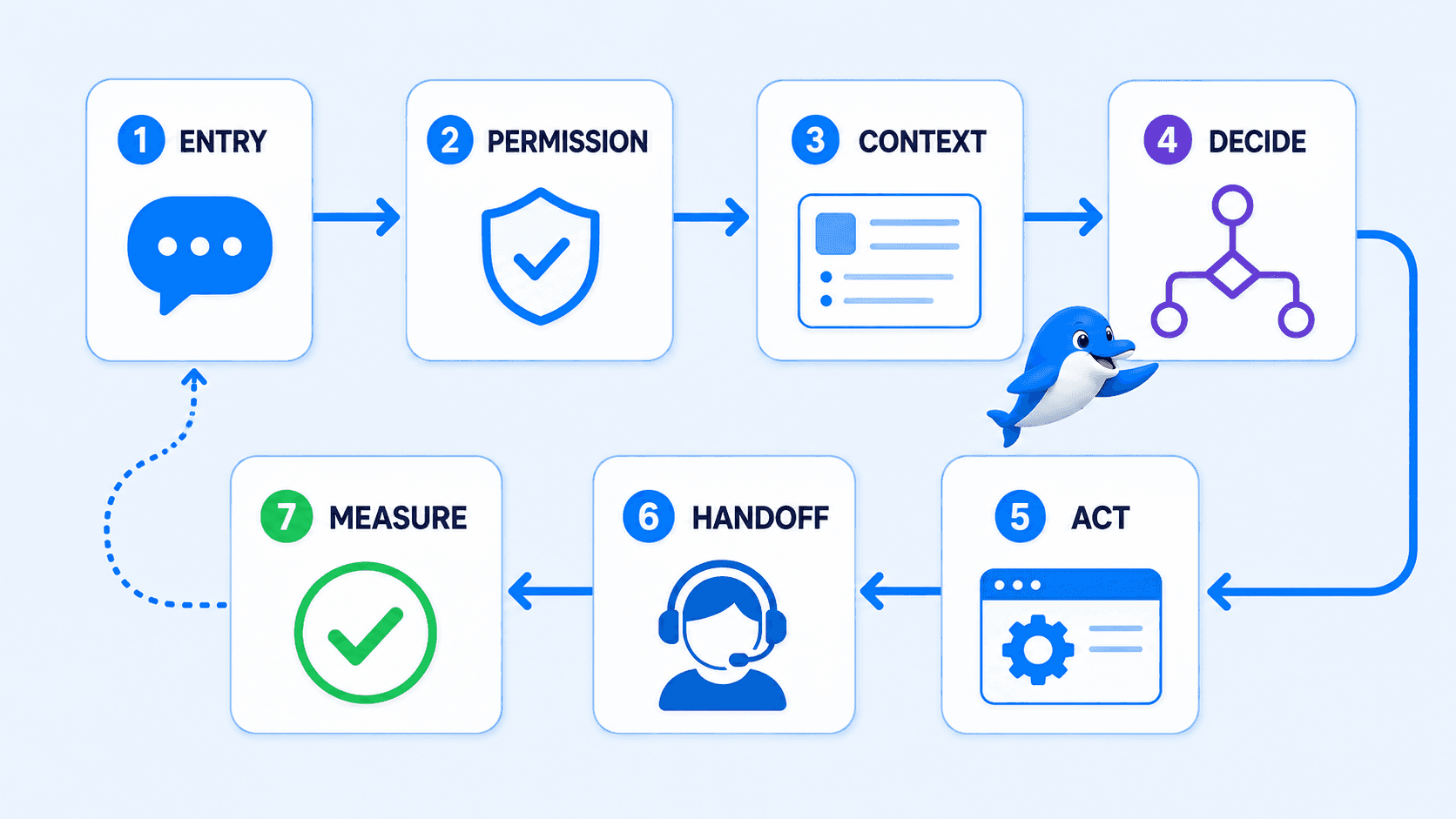
The Messenger Operating Loop
Use this seven-stage loop before adding nodes to a canvas. It keeps the chatbot tied to permission, context, a real action and a measurable result.
1. Entry
Identify the exact customer action that starts the workflow: a Page message, a comment, a Messenger ad or a purpose-built link. The entry determines what context exists and what the customer expects next.
2. Permission
Confirm what the business may send at this moment. A new inbound message, a comment entry and an out-of-window contact do not create identical messaging rights.
3. Context
Save the information that explains why the person contacted you. Useful context can include the source post or ad, campaign, original question, selected service, location, customer fields and conversation history.
4. Decide
Choose the right responder. A deterministic flow handles fixed rules. An AI Agent handles bounded open language. A human handles sensitive, unclear or high-value cases.
5. Act
Move the customer toward the intended outcome. That may be a useful answer, a booking request, a lead update, a ticket, a payment step, a webhook or another verified system action.
6. Handoff
Define when automation stops, who receives the conversation and which information the agent needs. Customers should not have to repeat details already collected by the bot.
7. Measure
Record whether the workflow completed its job. Useful outcomes include qualified lead, booking request, resolved question, ticket created, human handoff, rejected eligibility or failed system action.
The loop is simple by design. Its value comes from making the team answer seven operating questions before launch instead of judging a chatbot by how quickly it can send its first reply.
How to build a Facebook Messenger chatbot in UChat
The interface will continue to evolve, but the implementation sequence should remain stable.
Step 1: Choose one outcome and entry point
Do not begin with “automate Messenger.” Choose one customer action and one measurable outcome.
Examples:
comment on a service post → qualified booking request;
click a Messenger ad → campaign-specific lead qualification;
send a support question → answer or ticket with the right context;
message about an order → retrieve approved information or hand off.
Define the success event, the failure event and the human route before building the conversation.
Step 2: Connect the correct Facebook Page
In UChat, connect the Facebook Page that should receive the automation, authorize the required access and create or select the intended Facebook bot. UChat's concise Connect Channel for Facebook video shows the Page selection, bot creation and Flow Builder entry.
Watch the official Facebook connection walkthrough
Watch Connect Channel for Facebook on YouTube
Use the video for the overall sequence. Confirm the current permission screen and exact button labels in your UChat workspace before publishing internal instructions.
If the expected Page is missing, do not keep rebuilding the flow. First confirm the signed-in Facebook account, Page access, selected Pages and Meta Business Integration permissions.
Step 3: Build the deterministic path
Use Flow Builder for consent, menus, required fields, conditions and fixed business rules. These are the parts of the conversation where predictability matters more than natural language.
For the “price” comment example, the deterministic path may ask for service type and location, then check whether that combination is eligible for the standard booking process. Keep the questions short and explain why each answer is needed.
Step 4: Store source and qualification context
Map useful values into clearly named fields such as messenger_entry_type, facebook_source_post, requested_service, handoff_reason and workflow_outcome. Collect only what the workflow needs and apply the business's normal privacy, consent and retention practices.
Step 5: Add a bounded AI Agent
Use an AI Agent where customers describe the same intent in varied language or ask open-ended questions covered by approved business knowledge.
Give the agent a defined role, clear instructions, current knowledge and only the tools it needs. Tell it when to stop. A missing answer, unusual commercial request, complaint, failed action or sensitive topic should route to a safe fallback instead of inviting the model to improvise.
AI should not own every part of the workflow. Consent, eligibility, exact prices, required fields and irreversible actions are usually safer as deterministic steps or verified system responses.
Step 6: Connect the business action
Choose the action that makes the conversation useful. UChat integrations, webhooks, API actions and flow nodes can create a lead, request a booking, retrieve approved information, open a ticket, notify a team or pass data to another system. Every external action needs a failure branch with a clear customer message and, when necessary, a human handoff.
Step 7: Configure Live Chat handoff
UChat's Live Chat gives a human team a place to finish conversations automation should not own. Define:
the conditions that trigger handoff;
which agent or team receives it;
what the customer is told;
what fields and conversation history the agent sees;
what happens when no agent is immediately available.
Good handoff copy is honest: “I’m passing this to our booking team with the service and location you shared.” It sets an expectation and reassures the customer that the context has not been lost.
Step 8: Test the real Messenger path
Test from a real non-admin Facebook account and on mobile Messenger. A builder preview cannot reproduce every permission, Page and delivery condition.
Verify that the trigger fires once, context is stored, and the first response matches the entry and current policy. Test every required field, condition, AI boundary, business-action failure, human handoff, duplicate trigger and out-of-window path. Confirm reporting records the outcome defined in Step 1.
Three useful Messenger chatbot workflows
1. Facebook comment to qualified lead
Entry: A person comments with a relevant keyword or question.
Context: Source post, comment, campaign and triggering rule.
Response: A relevant opt-in path followed by two or three qualification questions.
Action: Create or update the lead and request a booking or sales follow-up.
Handoff: Complaint, unclear need, special commercial terms or high-value opportunity.
The public comment should receive an appropriate response, while the private workflow should explain why it has started. Test keyword variations and make sure overlapping automations cannot reply twice.
2. Messenger ad to campaign-specific route
Entry: A person starts Messenger from an ad.
Context: Ad, offer, campaign and available referral data.
Response: Continue the exact offer rather than show a general bot menu.
Action: Qualify, record the lead and route it by product, location or intent.
Handoff: Bespoke request, missing campaign context or a lead requiring immediate attention.
This path is strongest when the ad and first message feel like one continuous experience. If the ad promises a quote, the bot should not begin by asking the person to choose between support, careers and company information.
3. Support message to answer, ticket or person
Entry: A customer sends a Page message describing a problem.
Context: Message, known contact data and any order or case identifier the customer supplies.
Response: A bounded knowledge answer or a short diagnostic flow.
Action: Resolve the question, retrieve approved information or create a ticket.
Handoff: Identity, payment, complaint, repeated failure, missing knowledge or anything outside the approved automation scope.
Do not make a customer repeat troubleshooting after handoff. Transfer the problem statement, steps already attempted, captured identifiers and the reason the bot stopped.
These patterns are operating examples, not conversion promises. Their results depend on the offer, entry rights, knowledge quality, connected systems, testing and human process.
Which should respond: a flow, AI Agent or human agent?
The most reliable Messenger chatbot uses all three. Each responder should handle the work it is best suited to.
Responder | Best for | Guardrail |
|---|---|---|
Deterministic flow | Consent, menus, required fields, routing and fixed business rules | Make choices explicit and test every branch |
AI Agent | Open questions, intent classification and approved-knowledge retrieval | Limit knowledge and tools; define fallback and escalation |
Human agent | Exceptions, complaints, sensitive issues and high-value decisions | Preserve context, define ownership and set a realistic response expectation |
Use a flow when the answer must be exact. Use AI when language varies but the knowledge and action scope can be bounded. Use a person when judgment, empathy, authority or accountability matters more than speed.
That layered design is usually more useful than an “AI handles everything” goal. It gives the team predictable business rules without forcing every customer to use a rigid menu.
Messenger's messaging window and utility follow-up
Messenger automation is governed by Meta's current permissions and messaging policies. UChat's current training and interface distinguish an active response window from a user who is outside the allowed window.
In practical terms:
design ordinary automated replies around a supported customer interaction;
treat the standard response window as a product requirement, not an afterthought;
do not assume Page followers or previous contacts can always receive a new free-form message;
use only currently eligible and approved follow-up paths;
stop safely when the workflow does not have permission to send.
UChat's official Messenger Utility Messages video shows the current product pattern for eligible utility follow-up: authorize the additional Page permission, create or sync an approved utility message template, and use that template from Flow Builder or Live Chat when the contact is outside the standard window.
Meta controls the permission, category rules and approval. A utility message is not a loophole for unrestricted promotion. Before launch, review the current Messenger Platform policy, confirm the allowed use case and test the approved template in the real Page conversation.
If a campaign depends on an exact time window, tag or template category, refresh the rule on the day the campaign is approved. Do not rely on a screenshot from an older tutorial.
How to choose a Facebook Messenger chatbot builder
Choose the builder around the complete operating workflow, not the prettiest first-message demo.
Official Page connection and entry points: Can the platform connect the right Page, recover from missing permissions, and support the messages, comments, ads or links you plan to use?
Workflow depth: Can it handle conditions, fields, reusable flows, system actions, failure branches and testing?
AI control: Can the team define knowledge, instructions, tools, fallback and escalation?
Context: Will source, campaign and qualification data survive through the workflow and handoff?
Business actions: Can the conversation reach the required booking, CRM, ticket, payment, webhook or API process?
Human operations: Does the inbox support assignment, notifications, ownership and useful conversation history?
Policy-aware follow-up: Does the product make the allowed window visible and support eligible approved paths without encouraging misuse?
Channel and agency operations: Can the team reuse logic across supported channels and, when relevant, manage separate client workspaces, access and branding?
Total cost and training: Add platform plans, AI usage, seats, provider charges and implementation time, then check whether current tutorials match Meta's permissions and interface.
UChat is a strong fit when Messenger is one entry into a deeper no-code workflow with AI, business actions, multiple channels and Live Chat. A simpler tool may fit better when the only requirement is a short, repeatable Messenger sequence.
If your shortlist includes ManyChat, use the evidence-based UChat vs ManyChat comparison. For current UChat plan details, consult the live pricing page rather than a copied price table.
Common Messenger chatbot problems
Troubleshoot the operating chain in order. Rewriting message copy will not fix a missing Page permission or invalid entry path.
Page missing or disconnected. Confirm the Facebook account, Page access and Pages selected during authorization. Review Meta Business Integration permissions before reconnecting.
Trigger does not fire. Check that automation is active, the trigger belongs to the correct bot and Page, and the real customer action matches the rule. Test comments from a non-admin account.
Duplicate replies. Look for overlapping comment rules, duplicate flows, repeated webhook events or another platform connected to the Page.
Message not sent. Check the response window, recipient, Page, permissions, payload and Meta delivery response. Invalid data, unavailable recipients, temporary blocks and rate limits require different fixes.
Data collected but no action. Inspect field mapping and required values before the CRM, booking, ticket or API step. Add a failure branch that tells the customer what happens next.
Unsafe AI answer. Reduce knowledge and tool scope, improve instructions, add a handoff condition and test real customer wording.
Handoff loses context. Pass the source, collected fields, AI summary and failure reason. Define ownership and what happens when the team is away.
Use error codes as evidence, not as the whole diagnosis. Start with the failed layer, then choose a safe retry, wait, correction or escalation path.
Frequently asked questions
What is a Facebook Messenger chatbot?
A Facebook Messenger chatbot is automation connected to a Facebook Page. It can respond to supported customer interactions, collect information, use business knowledge, trigger workflows and transfer a conversation to a person, subject to current Meta permissions and messaging rules.
Can I create a Messenger chatbot without coding?
Yes. A visual platform such as UChat lets a team connect a Facebook Page and build triggers, questions, conditions, actions, AI and handoff in Flow Builder. Custom APIs may still require technical setup, but the core conversation does not have to be hand-coded.
Can a Messenger chatbot reply to Facebook comments?
Yes, when the Page, trigger and permissions are configured for a supported comment workflow. The private conversation must follow current Meta rules. Save the source post and comment, make the first message relevant and test from a real non-admin account.
Can a Messenger chatbot message anyone who likes my Page?
Do not assume it can. Following or liking a Page is not the same as opening every permitted Messenger response path. Build automation around supported customer interactions and current Meta policy rather than Page audience size.
What is the 24-hour Messenger rule?
It is the standard customer-care response window commonly applied after an eligible customer interaction on Messenger. Outside the allowed window, free-form messaging is restricted. Use only current eligible paths such as approved utility templates for permitted use cases, and verify Meta's current policy before launch.
Can AI answer Messenger questions from my business knowledge?
Yes. A UChat AI Agent can use defined instructions, approved knowledge and tools inside a Messenger workflow. Keep required fields and fixed rules deterministic, limit the AI's scope, and transfer missing, sensitive or high-value cases to a human.
Can a human take over a Messenger conversation?
Yes. UChat Live Chat can receive a conversation when a flow or AI Agent reaches an escalation condition. Configure who owns the handoff, what context is preserved and what the customer is told about the expected response.
What is the difference between Meta Business Agent and a Messenger chatbot builder?
Meta Business Agent is Meta's native business agent and agent platform. A chatbot builder such as UChat lets the business configure its own flows, AI knowledge and tools, integrations, handoff and multi-channel operating logic. Evaluate the current product access and the complete workflow your team needs.
Is a Facebook Messenger chatbot free?
Costs depend on the platform plan, team access, AI and external services, implementation work and any current channel or provider charges. Use live pricing pages and test the complete workflow; a free entry plan does not make system design, connected services or ongoing operations free.
How should I test a Messenger chatbot before launch?
Use a real non-admin account on mobile. Test every entry, stored field, condition, AI answer, business action, failure branch, response-window state and human handoff. Confirm the workflow records the outcome it was designed to produce.
Build one Messenger workflow end to end
Start with one high-value entry and make it complete:
connect the correct Facebook Page;
choose a Page message, comment, ad or link entry;
preserve the source context;
collect the required information with deterministic steps;
add a bounded AI Agent for open questions;
complete one CRM, booking, ticket, payment, webhook or API action;
force a failure and confirm the human handoff;
retest from mobile and record the final outcome.
Start a free UChat trial and build the workflow around one customer job, not around the number of messages the bot can send.
If you are connecting the Page for the first time, begin with UChat's Facebook connection lesson, then return to the Messenger Operating Loop before expanding the automation.
A Facebook Messenger chatbot connects conversations on a Facebook Page to automation, AI, business systems and human support. A useful bot does more than send an instant reply: it preserves why the person contacted you, collects the right information, completes a real business action and gives a human a clear way to take over.
The first decision is where the conversation should go after the reply. UChat can move it through fixed questions, an AI Agent, a business action and a human handoff while preserving the reason the customer contacted the Page.
This guide reflects public Meta and UChat information reviewed on September 5, 2026.
Meta policies, permissions and product interfaces can change. Verify the linked sources before launching a production workflow.
What is a Facebook Messenger chatbot?
A Facebook Messenger chatbot is software connected to a Facebook Page that responds to supported Messenger interactions and routes them through a business-defined workflow. It can answer questions, collect lead details, update another system, start a booking or support process and transfer the conversation to a person.
In this context, “Facebook chatbot” means a bot representing a business through Page messaging. It does not mean a bot that can contact every person who follows or likes a Page, and it does not bypass Meta's permissions or messaging rules.
It also helps to separate three ideas that are often mixed together:
A deterministic Messenger flow follows fixed questions, conditions and actions.
An AI Agent inside a Messenger workflow interprets open language, searches approved business knowledge and can use defined tools.
Meta Business Agent is Meta's own business-facing AI product and platform, announced in June 2026.
Those products can sound similar because all may answer customer questions. The real difference is who controls the operating model, which systems the conversation can reach and how much workflow logic the business needs.
The chatbot is the conversation layer. The valuable system is the path from customer intent to a verified outcome.
Suppose someone comments “price” on a service business's Facebook post. A weak automation sends a generic message and stops. A stronger workflow remembers which post started the conversation, asks for the service and location, answers an open question from approved knowledge, creates a lead or booking request, and transfers a complex case to the right person.
What can a Messenger chatbot automate?
A Messenger chatbot can automate several customer entry points, but each path carries different context and policy constraints. Start with the entry point that leads to a clear customer and business outcome.
Entry point | Context worth saving | Useful automation | Human fallback |
|---|---|---|---|
Page message | Message, intent and known contact fields | Answer, qualify, retrieve information or begin support | Sensitive, ambiguous or high-value request |
Facebook comment | Post, comment text, trigger and campaign | Start an eligible opt-in path and collect intent | Complaint, public-risk issue or failed qualification |
Messenger ad | Ad or campaign context and referral data | Continue the advertised offer and route the lead | Unclear offer, special terms or high-value lead |
Messenger or chat link | Link source and campaign | Begin a purpose-built sales or support flow | Wrong route or request outside the designed scope |
UChat supports Facebook Messenger alongside other messaging channels. In UChat, the entry can continue into a visual Flow Builder, an AI Agent, external systems and Live Chat.
Inbound Page messages
An inbound message is the clearest starting point because the customer has opened a conversation with the Page. Use fixed flow steps for exact data such as service, location or order number; use an AI Agent for varied questions; and hand over when the answer requires judgment.
Facebook comments
A configured comment trigger can turn public engagement into a Messenger workflow. UChat's official Facebook comment-trigger training demonstrates the durable pattern: create the opt-in flow, configure the trigger and keyword behavior, connect the path, and test the customer experience.
Save the post, campaign and comment before sending a private message. “How much is this?” makes sense only if the bot knows what “this” refers to. A comment does not create unlimited follow-up rights, so the first message should be relevant and should make the next step clear.
Messenger ads
A click-to-Messenger ad creates a campaign-specific entry. The first response should continue the promise made in the ad. UChat's Messenger Ads walkthrough shows the durable architecture of campaign context, referral path and flow routing. Confirm the current Meta ad objective and setup before launch.
Knowledge answers, qualification and business actions
After the entry, a bot can collect required details, apply rules, answer from approved knowledge, update another system and transfer to Live Chat. UChat's integration layer matters because a useful answer often creates another job, such as a booking request, lead update or support ticket.
Meta Business Agent and a workflow chatbot are not the same thing
Meta announced Meta Business Agent in June 2026. Meta says its agent can answer business-specific questions, recommend products, book appointments, qualify incoming leads and let a team member step in. Meta also says Messenger is supported as part of the product and platform rollout.
That creates a new but useful distinction for buyers:
Evaluation question | Meta Business Agent | A business-owned UChat workflow |
|---|---|---|
Who defines the product and rollout? | Meta | The business configures its bot, flows and operating rules in UChat |
What is the core model? | Meta's native business agent and agent platform | User-defined flows, AI knowledge and tools, integrations and Live Chat handoff |
What should you verify? | Current access, supported use case, systems and subscription terms | Required entry points, workflow depth, actions, handoff, channels and operating ownership |
When may it fit? | When the current native product covers the required customer journey | When the business needs deeper workflow control, external actions, reusable channel logic or agency delivery |
This is not a claim that one product should always replace the other. It is a reason to define the workflow before choosing the platform.
Ask what must happen after the first answer. Does the team need a fixed qualification path, custom fields, a CRM or booking action, a failure branch, cross-channel logic, a client workspace or a particular handoff process? The answer tells you whether a native agent is enough or whether you need a configurable automation layer.
The Messenger Operating Loop
Use this seven-stage loop before adding nodes to a canvas. It keeps the chatbot tied to permission, context, a real action and a measurable result.
1. Entry
Identify the exact customer action that starts the workflow: a Page message, a comment, a Messenger ad or a purpose-built link. The entry determines what context exists and what the customer expects next.
2. Permission
Confirm what the business may send at this moment. A new inbound message, a comment entry and an out-of-window contact do not create identical messaging rights.
3. Context
Save the information that explains why the person contacted you. Useful context can include the source post or ad, campaign, original question, selected service, location, customer fields and conversation history.
4. Decide
Choose the right responder. A deterministic flow handles fixed rules. An AI Agent handles bounded open language. A human handles sensitive, unclear or high-value cases.
5. Act
Move the customer toward the intended outcome. That may be a useful answer, a booking request, a lead update, a ticket, a payment step, a webhook or another verified system action.
6. Handoff
Define when automation stops, who receives the conversation and which information the agent needs. Customers should not have to repeat details already collected by the bot.
7. Measure
Record whether the workflow completed its job. Useful outcomes include qualified lead, booking request, resolved question, ticket created, human handoff, rejected eligibility or failed system action.
The loop is simple by design. Its value comes from making the team answer seven operating questions before launch instead of judging a chatbot by how quickly it can send its first reply.
How to build a Facebook Messenger chatbot in UChat
The interface will continue to evolve, but the implementation sequence should remain stable.
Step 1: Choose one outcome and entry point
Do not begin with “automate Messenger.” Choose one customer action and one measurable outcome.
Examples:
comment on a service post → qualified booking request;
click a Messenger ad → campaign-specific lead qualification;
send a support question → answer or ticket with the right context;
message about an order → retrieve approved information or hand off.
Define the success event, the failure event and the human route before building the conversation.
Step 2: Connect the correct Facebook Page
In UChat, connect the Facebook Page that should receive the automation, authorize the required access and create or select the intended Facebook bot. UChat's concise Connect Channel for Facebook video shows the Page selection, bot creation and Flow Builder entry.
Watch the official Facebook connection walkthrough
Watch Connect Channel for Facebook on YouTube
Use the video for the overall sequence. Confirm the current permission screen and exact button labels in your UChat workspace before publishing internal instructions.
If the expected Page is missing, do not keep rebuilding the flow. First confirm the signed-in Facebook account, Page access, selected Pages and Meta Business Integration permissions.
Step 3: Build the deterministic path
Use Flow Builder for consent, menus, required fields, conditions and fixed business rules. These are the parts of the conversation where predictability matters more than natural language.
For the “price” comment example, the deterministic path may ask for service type and location, then check whether that combination is eligible for the standard booking process. Keep the questions short and explain why each answer is needed.
Step 4: Store source and qualification context
Map useful values into clearly named fields such as messenger_entry_type, facebook_source_post, requested_service, handoff_reason and workflow_outcome. Collect only what the workflow needs and apply the business's normal privacy, consent and retention practices.
Step 5: Add a bounded AI Agent
Use an AI Agent where customers describe the same intent in varied language or ask open-ended questions covered by approved business knowledge.
Give the agent a defined role, clear instructions, current knowledge and only the tools it needs. Tell it when to stop. A missing answer, unusual commercial request, complaint, failed action or sensitive topic should route to a safe fallback instead of inviting the model to improvise.
AI should not own every part of the workflow. Consent, eligibility, exact prices, required fields and irreversible actions are usually safer as deterministic steps or verified system responses.
Step 6: Connect the business action
Choose the action that makes the conversation useful. UChat integrations, webhooks, API actions and flow nodes can create a lead, request a booking, retrieve approved information, open a ticket, notify a team or pass data to another system. Every external action needs a failure branch with a clear customer message and, when necessary, a human handoff.
Step 7: Configure Live Chat handoff
UChat's Live Chat gives a human team a place to finish conversations automation should not own. Define:
the conditions that trigger handoff;
which agent or team receives it;
what the customer is told;
what fields and conversation history the agent sees;
what happens when no agent is immediately available.
Good handoff copy is honest: “I’m passing this to our booking team with the service and location you shared.” It sets an expectation and reassures the customer that the context has not been lost.
Step 8: Test the real Messenger path
Test from a real non-admin Facebook account and on mobile Messenger. A builder preview cannot reproduce every permission, Page and delivery condition.
Verify that the trigger fires once, context is stored, and the first response matches the entry and current policy. Test every required field, condition, AI boundary, business-action failure, human handoff, duplicate trigger and out-of-window path. Confirm reporting records the outcome defined in Step 1.
Three useful Messenger chatbot workflows
1. Facebook comment to qualified lead
Entry: A person comments with a relevant keyword or question.
Context: Source post, comment, campaign and triggering rule.
Response: A relevant opt-in path followed by two or three qualification questions.
Action: Create or update the lead and request a booking or sales follow-up.
Handoff: Complaint, unclear need, special commercial terms or high-value opportunity.
The public comment should receive an appropriate response, while the private workflow should explain why it has started. Test keyword variations and make sure overlapping automations cannot reply twice.
2. Messenger ad to campaign-specific route
Entry: A person starts Messenger from an ad.
Context: Ad, offer, campaign and available referral data.
Response: Continue the exact offer rather than show a general bot menu.
Action: Qualify, record the lead and route it by product, location or intent.
Handoff: Bespoke request, missing campaign context or a lead requiring immediate attention.
This path is strongest when the ad and first message feel like one continuous experience. If the ad promises a quote, the bot should not begin by asking the person to choose between support, careers and company information.
3. Support message to answer, ticket or person
Entry: A customer sends a Page message describing a problem.
Context: Message, known contact data and any order or case identifier the customer supplies.
Response: A bounded knowledge answer or a short diagnostic flow.
Action: Resolve the question, retrieve approved information or create a ticket.
Handoff: Identity, payment, complaint, repeated failure, missing knowledge or anything outside the approved automation scope.
Do not make a customer repeat troubleshooting after handoff. Transfer the problem statement, steps already attempted, captured identifiers and the reason the bot stopped.
These patterns are operating examples, not conversion promises. Their results depend on the offer, entry rights, knowledge quality, connected systems, testing and human process.
Which should respond: a flow, AI Agent or human agent?
The most reliable Messenger chatbot uses all three. Each responder should handle the work it is best suited to.
Responder | Best for | Guardrail |
|---|---|---|
Deterministic flow | Consent, menus, required fields, routing and fixed business rules | Make choices explicit and test every branch |
AI Agent | Open questions, intent classification and approved-knowledge retrieval | Limit knowledge and tools; define fallback and escalation |
Human agent | Exceptions, complaints, sensitive issues and high-value decisions | Preserve context, define ownership and set a realistic response expectation |
Use a flow when the answer must be exact. Use AI when language varies but the knowledge and action scope can be bounded. Use a person when judgment, empathy, authority or accountability matters more than speed.
That layered design is usually more useful than an “AI handles everything” goal. It gives the team predictable business rules without forcing every customer to use a rigid menu.
Messenger's messaging window and utility follow-up
Messenger automation is governed by Meta's current permissions and messaging policies. UChat's current training and interface distinguish an active response window from a user who is outside the allowed window.
In practical terms:
design ordinary automated replies around a supported customer interaction;
treat the standard response window as a product requirement, not an afterthought;
do not assume Page followers or previous contacts can always receive a new free-form message;
use only currently eligible and approved follow-up paths;
stop safely when the workflow does not have permission to send.
UChat's official Messenger Utility Messages video shows the current product pattern for eligible utility follow-up: authorize the additional Page permission, create or sync an approved utility message template, and use that template from Flow Builder or Live Chat when the contact is outside the standard window.
Meta controls the permission, category rules and approval. A utility message is not a loophole for unrestricted promotion. Before launch, review the current Messenger Platform policy, confirm the allowed use case and test the approved template in the real Page conversation.
If a campaign depends on an exact time window, tag or template category, refresh the rule on the day the campaign is approved. Do not rely on a screenshot from an older tutorial.
How to choose a Facebook Messenger chatbot builder
Choose the builder around the complete operating workflow, not the prettiest first-message demo.
Official Page connection and entry points: Can the platform connect the right Page, recover from missing permissions, and support the messages, comments, ads or links you plan to use?
Workflow depth: Can it handle conditions, fields, reusable flows, system actions, failure branches and testing?
AI control: Can the team define knowledge, instructions, tools, fallback and escalation?
Context: Will source, campaign and qualification data survive through the workflow and handoff?
Business actions: Can the conversation reach the required booking, CRM, ticket, payment, webhook or API process?
Human operations: Does the inbox support assignment, notifications, ownership and useful conversation history?
Policy-aware follow-up: Does the product make the allowed window visible and support eligible approved paths without encouraging misuse?
Channel and agency operations: Can the team reuse logic across supported channels and, when relevant, manage separate client workspaces, access and branding?
Total cost and training: Add platform plans, AI usage, seats, provider charges and implementation time, then check whether current tutorials match Meta's permissions and interface.
UChat is a strong fit when Messenger is one entry into a deeper no-code workflow with AI, business actions, multiple channels and Live Chat. A simpler tool may fit better when the only requirement is a short, repeatable Messenger sequence.
If your shortlist includes ManyChat, use the evidence-based UChat vs ManyChat comparison. For current UChat plan details, consult the live pricing page rather than a copied price table.
Common Messenger chatbot problems
Troubleshoot the operating chain in order. Rewriting message copy will not fix a missing Page permission or invalid entry path.
Page missing or disconnected. Confirm the Facebook account, Page access and Pages selected during authorization. Review Meta Business Integration permissions before reconnecting.
Trigger does not fire. Check that automation is active, the trigger belongs to the correct bot and Page, and the real customer action matches the rule. Test comments from a non-admin account.
Duplicate replies. Look for overlapping comment rules, duplicate flows, repeated webhook events or another platform connected to the Page.
Message not sent. Check the response window, recipient, Page, permissions, payload and Meta delivery response. Invalid data, unavailable recipients, temporary blocks and rate limits require different fixes.
Data collected but no action. Inspect field mapping and required values before the CRM, booking, ticket or API step. Add a failure branch that tells the customer what happens next.
Unsafe AI answer. Reduce knowledge and tool scope, improve instructions, add a handoff condition and test real customer wording.
Handoff loses context. Pass the source, collected fields, AI summary and failure reason. Define ownership and what happens when the team is away.
Use error codes as evidence, not as the whole diagnosis. Start with the failed layer, then choose a safe retry, wait, correction or escalation path.
Frequently asked questions
What is a Facebook Messenger chatbot?
A Facebook Messenger chatbot is automation connected to a Facebook Page. It can respond to supported customer interactions, collect information, use business knowledge, trigger workflows and transfer a conversation to a person, subject to current Meta permissions and messaging rules.
Can I create a Messenger chatbot without coding?
Yes. A visual platform such as UChat lets a team connect a Facebook Page and build triggers, questions, conditions, actions, AI and handoff in Flow Builder. Custom APIs may still require technical setup, but the core conversation does not have to be hand-coded.
Can a Messenger chatbot reply to Facebook comments?
Yes, when the Page, trigger and permissions are configured for a supported comment workflow. The private conversation must follow current Meta rules. Save the source post and comment, make the first message relevant and test from a real non-admin account.
Can a Messenger chatbot message anyone who likes my Page?
Do not assume it can. Following or liking a Page is not the same as opening every permitted Messenger response path. Build automation around supported customer interactions and current Meta policy rather than Page audience size.
What is the 24-hour Messenger rule?
It is the standard customer-care response window commonly applied after an eligible customer interaction on Messenger. Outside the allowed window, free-form messaging is restricted. Use only current eligible paths such as approved utility templates for permitted use cases, and verify Meta's current policy before launch.
Can AI answer Messenger questions from my business knowledge?
Yes. A UChat AI Agent can use defined instructions, approved knowledge and tools inside a Messenger workflow. Keep required fields and fixed rules deterministic, limit the AI's scope, and transfer missing, sensitive or high-value cases to a human.
Can a human take over a Messenger conversation?
Yes. UChat Live Chat can receive a conversation when a flow or AI Agent reaches an escalation condition. Configure who owns the handoff, what context is preserved and what the customer is told about the expected response.
What is the difference between Meta Business Agent and a Messenger chatbot builder?
Meta Business Agent is Meta's native business agent and agent platform. A chatbot builder such as UChat lets the business configure its own flows, AI knowledge and tools, integrations, handoff and multi-channel operating logic. Evaluate the current product access and the complete workflow your team needs.
Is a Facebook Messenger chatbot free?
Costs depend on the platform plan, team access, AI and external services, implementation work and any current channel or provider charges. Use live pricing pages and test the complete workflow; a free entry plan does not make system design, connected services or ongoing operations free.
How should I test a Messenger chatbot before launch?
Use a real non-admin account on mobile. Test every entry, stored field, condition, AI answer, business action, failure branch, response-window state and human handoff. Confirm the workflow records the outcome it was designed to produce.
Build one Messenger workflow end to end
Start with one high-value entry and make it complete:
connect the correct Facebook Page;
choose a Page message, comment, ad or link entry;
preserve the source context;
collect the required information with deterministic steps;
add a bounded AI Agent for open questions;
complete one CRM, booking, ticket, payment, webhook or API action;
force a failure and confirm the human handoff;
retest from mobile and record the final outcome.
Start a free UChat trial and build the workflow around one customer job, not around the number of messages the bot can send.
If you are connecting the Page for the first time, begin with UChat's Facebook connection lesson, then return to the Messenger Operating Loop before expanding the automation.