18 minutes
UChat
Posted by
Instagram Chatbot Guide: Automate DMs, Comments and Leads
18 minutes
Posted by
UChat

An Instagram chatbot connects an Instagram professional account to automation that can handle permitted DMs, comments and story interactions. A useful bot does more than send a fast reply. It preserves the source context, qualifies the request, triggers the next business action and gives a human agent a clear path to take over.
This guide covers business automation for Instagram, not how an individual starts a chat with Meta AI inside the Instagram app. It explains the official platform boundaries first, then shows how UChat can connect an Instagram conversation to Flow Builder, an AI Agent, integrations and Live Chat.
This guide reflects the public Meta and UChat documentation reviewed on August 31, 2026.
Rules and product settings can change; verify the linked sources before launch.
What is an Instagram chatbot?
An Instagram chatbot is software connected to a business or creator account that responds to supported customer interactions through the official Instagram API. It can start a workflow when someone sends a DM, comments on content, replies to a story, mentions the account in a story or shares a post into the conversation.
That is different from Instagram's own Meta AI assistant. Meta AI is an assistant a person can use inside Instagram and other Meta apps. A business Instagram chatbot represents the business and follows the workflow, knowledge, permissions and escalation rules the business has configured.
It also is not an unofficial script that logs in with a personal username and password. Meta's current Instagram Platform overview describes official access for Instagram professional accounts—businesses and creators—and the connection paths available to them.
The chatbot is the conversation layer. The useful business system is the path from customer intent to a verified next action.
For example, a comment asking “Do you have appointments this week?” should not end with an automatic “Check your DMs.” A better workflow keeps the Reel or post context, then asks which service and location the person needs. It records the lead, checks or requests availability, and sends uncertain cases to a person.
What can an Instagram chatbot automate?
An Instagram chatbot can automate several customer-initiated entry points, but each entry point has its own context and platform rules. Start with the path that creates a clear customer or business outcome.
Entry point | Context worth saving | Useful automation | Human fallback |
|---|---|---|---|
Direct message | Message, intent and known customer fields | Answer a question, qualify a lead, retrieve information or start support | Ambiguous, sensitive or high-value request |
Comment on a post or Reel | Comment text, comment ID, post/media context and campaign | Send a permitted private reply, ask for opt-in and route the lead | Complaint, policy issue or failed qualification |
Story reply | Story ID, URL and reply text | Deliver an offer, identify the campaign and ask a qualifying question | Special request or missing context |
Story mention | Story ID and URL | Thank the person, route a referral or customer-care workflow | Brand issue or content requiring review |
Media post shared in DM | Shared-post URL and message | Identify the product or content and provide the relevant next step | Product ambiguity or complex question |
UChat publicly supports Instagram alongside its other messaging channels and describes workflows for Instagram comments, story tags and DMs. The important advantage of using a workflow platform is that the response can continue into structured data, business rules, AI, external systems and human support.
Direct messages
A DM is the clearest conversational entry point because the person has contacted the professional account. Meta's Instagram Messaging API allows an app to send and receive messages after the Instagram user messages the professional account. Under the current rules, the app has 24 hours to respond to that ordinary inbound message.
In UChat, the DM can enter a deterministic flow for consent, menus and required fields. An AI Agent can handle open questions from approved knowledge, while a condition can route anything uncertain to a person.
Comments and private replies
A comment trigger can turn public engagement into a private conversation, but it is not permission for unlimited outbound messages.
Meta's current private-reply documentation permits one private reply to a comment within seven days. A follow-up can be sent only after the recipient responds, and it must then follow the documented 24-hour response window. Private replies to Instagram Live comments are limited to the live broadcast.
That makes the first private reply valuable. It should explain why the person is receiving it and invite a relevant response—not push the person into a long automation they did not request.
UChat's Instagram comments automation course covers the comment trigger, DM opt-in path, flow connection and testing. Use that course for the detailed implementation after you understand the complete operating path in this guide.
Story replies and mentions
Story engagement carries context that a generic “Thanks” message throws away. In UChat's official story reply and mention training, a workflow can capture the story ID, story URL and reply message, then use conditions to select the right response.
That allows one automation to treat a product launch, event reminder and customer story differently. The same trigger can also support a referral or loyalty workflow, provided the offer, permission path and business rules are clear.
Shared posts
When someone shares a post to a business in Instagram, the post itself is part of the question. UChat's media-post-shared training demonstrates a trigger that saves the shared post URL, starts a flow and makes the conversation visible in Live Chat.
For an ecommerce store, that can mean answering a question about the exact product. For a service business, it can mean identifying which offer or location the person is asking about before qualification begins.
Instagram chatbot rules and limits to understand first
Reliable automation starts with platform constraints, not with a flow canvas. These four boundaries prevent many broken or misleading designs.
1. Use an eligible professional account
Meta documents the Instagram Login API for professional accounts: businesses and creators. Do not plan an official business automation around a personal account.
UChat's current direct Instagram login walkthrough shows a professional account connected through Instagram login and linked to a bot. Meta's Business Login for Instagram path can serve an Instagram-only professional account without first linking it to a Facebook Page.
You may still find older tutorials that say a Facebook Page is mandatory. Meta's Facebook Login for Business path applies to professional accounts linked to a Page. These are different connection paths. Follow the current connection option shown inside UChat rather than combining steps from old and new tutorials.
2. Build around customer-initiated conversations
The Instagram Messaging API says conversations begin after an Instagram user messages the professional account through a supported surface such as the Feed, a post or a story mention. The app has 24 hours to respond to an ordinary inbound message. Comment private replies are a documented special entry path with their own limits.
This means an Instagram chatbot is not a cold-DM engine for every follower. Design the workflow around an explicit customer action, preserve the source of that action and make the next step relevant to it.
3. Treat permissions and response windows as product requirements
Message and comment permissions are not a technical footnote. They determine what the business can do next.
Document the entry point for each flow, the permitted first response, when further messaging becomes available and what should happen if the customer does not respond. Recheck these rules before every major campaign because Meta can change platform behavior.
4. Give automation a stop condition
Even a permitted message can create a poor experience if the bot loops, invents an answer or ignores a complaint. Every workflow needs:
a maximum number of clarification attempts;
a fallback when knowledge or an external action fails;
a route for sensitive or high-value requests;
a clear way for the customer or team to reach a person;
logs and test cases for the successful and unsuccessful paths.
Meta also documents a HUMAN_AGENT message tag for approved human support outside the standard 24-hour messaging window. It can allow a person to respond within seven days of the customer's message, requires the relevant app permission, and cannot be used for automated or unrelated messages.
Handoff boundary: Human support can extend a service conversation, but it does not reopen the window for automated marketing.
The goal is controlled automation, not automation at any cost.
The Instagram Conversation Path
Use this six-stage framework before building nodes. It keeps the conversation tied to permission, context and a measurable business outcome.
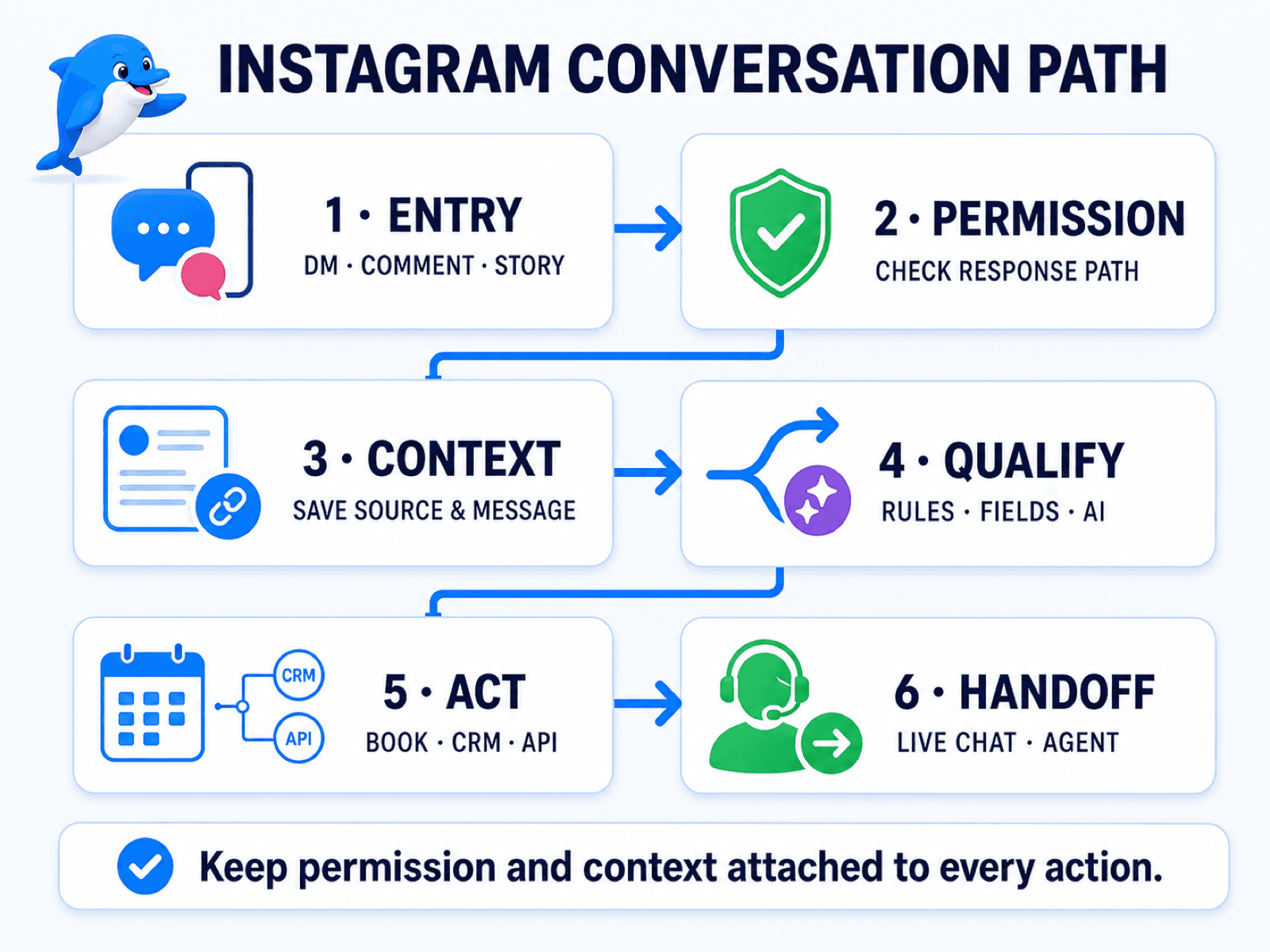
1. Entry
Identify the exact customer action: DM, comment, story reply, story mention or shared post. The entry determines which context exists and which response path applies.
2. Permission
Confirm what the current Instagram rules allow. A DM, story interaction and comment private reply do not automatically create the same follow-up rights.
3. Context
Save the information that explains why the person contacted you. That may include the post or story ID, URL, comment text, reply message, campaign, location or product.
4. Qualify
Use conditions and required questions to determine what the person needs. Add AI only where natural-language classification or knowledge retrieval improves the path.
5. Act
Move the conversation forward. Send the relevant answer, create a booking request, update CRM data, open a ticket, call an API or trigger another approved workflow.
6. Handoff
Define when a human should take over and what context they need. The agent should not have to ask the customer to repeat the post, service, location and question the automation already collected.
The framework is deliberately simple. Its value comes from forcing each automation to answer six operating questions before launch.
How to build an Instagram chatbot in UChat
The exact interface will evolve, but the implementation sequence stays consistent.
Step 1: Connect the Instagram professional account
Open the Instagram channel connection in UChat and use the current Instagram login route. Review the requested permissions, select the correct professional account and link it to the intended Instagram or omnichannel bot.
If your account structure differs from the current walkthrough, stop and confirm which Meta connection path you are using. Do not use credentials, permissions or app settings copied from an unrelated tutorial.
Step 2: Choose one valuable trigger
Do not automate every interaction on day one. Choose one entry point with a clear job, such as:
a Reel comment requesting a price guide;
a story reply asking for an appointment;
a DM asking about an order;
a shared product post asking about availability.
Define the success event before building: qualified lead, appointment request, answered support question, ticket created or human conversation started.
Start with one valuable trigger, not every possible interaction.
Step 3: Save the source context
Map the available post, story, comment or message information into clearly named fields. Avoid a generic campaign_data field that nobody can interpret later.
Useful names include instagram_entry_type, instagram_media_url, instagram_story_id, instagram_comment_text, requested_service and handoff_reason. Keep only the data the workflow needs and apply your normal privacy and retention practices.
Step 4: Build the deterministic path in Flow Builder
Use UChat's visual Flow Builder for consent, menus, required fields, conditions and routing. Deterministic steps are better than AI when the business needs an exact answer or a required value.
For the appointment example, ask for service, location and preferred date through fixed questions. Then use conditions to decide whether the request can continue to booking or needs review.
Step 5: Add a bounded AI Agent
Use an AI Agent for open-ended language, classification and answers drawn from approved business knowledge. Give it a defined role, instructions, knowledge and only the tools it needs.
The AI should know when to stop. If the question involves a complaint, refund, medical or legal detail, unusual price, missing knowledge or failed action, route it to the appropriate human path instead of asking the model to improvise.
Step 6: Connect the business action
A reply is rarely the final outcome. Use UChat integrations, webhooks, API actions or workflow nodes to perform the next verified step.
Depending on the business, that may be:
create a booking request;
write a lead to a CRM or sheet;
retrieve product or order information;
open or update a support ticket;
notify a team;
trigger a follow-up workflow after the customer has opted in.
Always provide a failure path. “The API returned an error” should become a useful customer message and an internal alert, not a silent dead end.
Step 7: Add Live Chat handoff
UChat's Live Chat gives a human team a place to handle conversations automation should not finish. Define the handoff condition, assignment rule, notification and the fields an agent should see.
Good handoff copy sets an honest expectation: “I’m passing this to our booking team with the service and date you shared.” It is better than pretending the AI is still solving the issue.
Step 8: Test the real Instagram path
Test with a real non-admin Instagram account on mobile. Previewing the flow inside a builder is not enough.
Verify:
the correct trigger fires;
the expected context is saved;
the first reply follows the current platform rule;
opt-in and follow-up behave correctly;
every condition reaches the expected branch;
AI answers stay inside the approved knowledge and tools;
an external action succeeds and fails safely;
a human receives the conversation with context;
duplicate comments or messages do not create loops;
reporting captures the outcome you defined.
Five useful Instagram chatbot workflows
1. Reel comment to qualified lead
Trigger — a person comments with a relevant keyword or question.
Context — Reel or post, comment text and campaign.
Action — send the permitted private reply, obtain a response, ask two or three qualification questions and record the lead.
Handoff — high-value request, complaint, unclear intent or special commercial terms.
2. Story reply to appointment request
Trigger — a person replies to a story promoting a service or event.
Context — story ID, URL and reply message.
Action — identify the offer, collect service and timing, then create a booking request or pass the details to a calendar workflow.
Handoff — no matching availability or a request outside the standard service.
3. Story mention to referral or customer-care route
Trigger — a person mentions the professional account in a story.
Context — story URL and campaign or customer relationship.
Action — thank the person and route to the correct referral, loyalty or customer-care flow.
Handoff — negative content, brand risk or a case that needs a personal response.
4. Shared post to product assistance
Trigger — a person shares one of the business's posts into a DM.
Context — shared-post URL plus the person's message.
Action — identify the product or offer, answer from current information and retrieve availability or relevant details when an integration supports it.
Handoff — uncertain product match, custom order or high-value purchase.
5. Support DM to ticket or human agent
Trigger — a customer sends a support question.
Context — message, known customer information and any order or case identifier the person supplies.
Action — answer a bounded FAQ, retrieve approved status information or create a ticket.
Handoff — identity, payment, complaint, repeated failure or anything outside the AI Agent's approved scope.
These workflows are reusable patterns, not promises of automatic conversion. The result depends on the offer, permission path, knowledge quality, connected systems, testing and human operating process.
Flow, AI Agent or human agent—which should respond?
The most reliable Instagram chatbot uses all three. Each should handle the work it is best suited to.
Responder | Best for | Guardrail |
|---|---|---|
Deterministic flow | Consent, menus, required fields, routing and fixed business rules | Make choices explicit and test every branch |
AI Agent | Open questions, intent classification and answers from approved knowledge | Limit knowledge and tools; define confidence and escalation rules |
Human agent | Exceptions, complaints, sensitive issues and high-value decisions | Preserve context, define ownership and set a realistic response expectation |
Use a flow when the answer must be exact. Use AI when language varies but the knowledge and action scope can be bounded. Use a person when judgment, empathy, authority or accountability matters more than speed.
How to choose an Instagram chatbot platform
Choose the platform around the complete workflow you need, not the first trigger shown in a demo.
Ask these questions:
Does it use the official professional-account integration? Avoid tools that require unsafe credential sharing or promise access Meta does not document.
Which entry points does it support? Confirm DMs, comments, story interactions and any advanced trigger you need.
Can it preserve source context? The platform should keep enough post, story and message data to route a useful response.
How deep is the workflow builder? Look beyond message sequences for conditions, fields, reusable flows, API actions, error handling and testing.
How is AI controlled? Check knowledge boundaries, instructions, tool permissions, fallback and human escalation.
What can happen after the conversation? Booking, CRM, ecommerce, tickets, webhooks and other systems determine business value.
Can a human take over cleanly? Inspect inbox, assignment, notifications, context and reporting.
Will the same logic need other channels? A business may later add WhatsApp, Messenger, web chat, SMS or voice.
How does the account model fit your team or agency? Check workspaces, clients, team access, branding, billing and support ownership.
What is the total cost? Review platform plans, AI usage, team seats, channel charges and implementation time on current pricing pages.
UChat is a strong fit when the Instagram trigger needs to continue into AI, deeper no-code workflows, external actions, multiple channels and Live Chat. A simpler social automation tool may be the better fit when the only requirement is a fast, repeatable comment-to-DM campaign.
If you are comparing the two approaches directly, read UChat vs ManyChat. For current UChat plan details, use the live pricing page rather than an old screenshot or copied price table.
Common Instagram chatbot mistakes
Confusing Meta AI with business automation
The search terms overlap, but the jobs do not. State which type of chatbot you are building before comparing features or following a tutorial.
Expecting cold-DM access
An official Instagram business integration is based on supported customer interactions and documented response paths. Do not design a campaign around messaging arbitrary followers.
Losing the post or story context
“How much is this?” is useless if the workflow does not know which product or offer “this” refers to. Save the source before asking another question.
Using AI for every decision
Consent, prices, eligibility and policy rules should use deterministic logic when the answer must be exact. AI can interpret language without owning every business decision.
Hiding the human route
A customer should not have to fight the bot. Add explicit escalation for sensitive, valuable, unclear and failed cases.
Testing only the happy path
Test duplicate comments, missing fields, expired response paths, AI uncertainty, API timeouts, agent unavailability and mobile message rendering.
Measuring replies instead of outcomes
A reply count can rise while lead quality falls. Track the outcome that justified the workflow: qualified leads, booking requests, resolved questions, tickets, handoffs and completion time.
Frequently asked questions
What is an Instagram chatbot?
An Instagram chatbot is automation connected to an Instagram professional account through the official API. It can respond to supported DMs and engagement, preserve conversation context, collect information, use business knowledge, trigger actions and hand a conversation to a person.
Can a chatbot reply to Instagram DMs?
Yes. Meta's Instagram Messaging API supports sending and receiving messages after the Instagram user messages the professional account. Under the current rules, the app has 24 hours to respond to an ordinary inbound message. The account, app permissions and current messaging rules must be configured correctly.
Can an Instagram chatbot message everyone who comments?
It can send a permitted private reply to a comment under Meta's current rules, but that is not an unlimited follow-up sequence. Meta currently documents one private reply within seven days; further messages require the person to respond and then follow the documented response window.
Do I need an Instagram professional account?
Yes for the official business integration described in this guide. Meta documents the Instagram Login API for professional accounts—businesses and creators—not personal consumer accounts.
Do I need a Facebook Page to connect Instagram?
Not always. Business Login for Instagram can support an Instagram-only professional account without first linking a Facebook Page. The Facebook Login for Business path applies to professional accounts linked to a Page. UChat's direct-login training demonstrates the Instagram-only path, so follow the connection option shown in your current workspace.
Can an Instagram chatbot use AI?
Yes. UChat can route Instagram conversations to an AI Agent with instructions, business knowledge and approved tools. Use deterministic steps for exact rules and required fields, then add AI where open-ended language or knowledge retrieval helps.
Can a human take over the conversation?
Yes. UChat can route a conversation to Live Chat so an agent can handle exceptions or high-value cases. A good handoff includes the entry source, collected fields, AI result and reason for escalation.
Which Instagram chatbot is right for a small business?
The right fit depends on the workflow. A simple tool may be enough for one comment-to-DM campaign. UChat is a strong fit when the business also needs AI knowledge, conditions, integrations, business actions, other channels or human handoff. Test one real workflow before choosing.
Is an Instagram chatbot free?
Some platforms offer free plans or trials, but the complete cost can include platform limits, AI usage, team access, integrations and implementation. UChat offers a 14-day trial with Pro access and no credit card required; verify current plan details on the pricing page.
How do I test an Instagram chatbot before launch?
Test from a real mobile Instagram account. Verify the trigger, saved context, permission path, opt-in, every condition, AI boundaries, external-action success and failure, Live Chat handoff, duplicate-event handling and the final business outcome.
Build one complete Instagram workflow
Start with one customer action and carry it all the way to a verified result. Connect the professional account, choose one trigger, save the source context, qualify the request, run one business action and force a human-handoff test.
Start a 14-day UChat free trial to build that workflow in Flow Builder. If your first use case is a comment-to-DM campaign, continue with the Instagram comments automation course after the workflow design is clear.
An Instagram chatbot connects an Instagram professional account to automation that can handle permitted DMs, comments and story interactions. A useful bot does more than send a fast reply. It preserves the source context, qualifies the request, triggers the next business action and gives a human agent a clear path to take over.
This guide covers business automation for Instagram, not how an individual starts a chat with Meta AI inside the Instagram app. It explains the official platform boundaries first, then shows how UChat can connect an Instagram conversation to Flow Builder, an AI Agent, integrations and Live Chat.
This guide reflects the public Meta and UChat documentation reviewed on August 31, 2026.
Rules and product settings can change; verify the linked sources before launch.
What is an Instagram chatbot?
An Instagram chatbot is software connected to a business or creator account that responds to supported customer interactions through the official Instagram API. It can start a workflow when someone sends a DM, comments on content, replies to a story, mentions the account in a story or shares a post into the conversation.
That is different from Instagram's own Meta AI assistant. Meta AI is an assistant a person can use inside Instagram and other Meta apps. A business Instagram chatbot represents the business and follows the workflow, knowledge, permissions and escalation rules the business has configured.
It also is not an unofficial script that logs in with a personal username and password. Meta's current Instagram Platform overview describes official access for Instagram professional accounts—businesses and creators—and the connection paths available to them.
The chatbot is the conversation layer. The useful business system is the path from customer intent to a verified next action.
For example, a comment asking “Do you have appointments this week?” should not end with an automatic “Check your DMs.” A better workflow keeps the Reel or post context, then asks which service and location the person needs. It records the lead, checks or requests availability, and sends uncertain cases to a person.
What can an Instagram chatbot automate?
An Instagram chatbot can automate several customer-initiated entry points, but each entry point has its own context and platform rules. Start with the path that creates a clear customer or business outcome.
Entry point | Context worth saving | Useful automation | Human fallback |
|---|---|---|---|
Direct message | Message, intent and known customer fields | Answer a question, qualify a lead, retrieve information or start support | Ambiguous, sensitive or high-value request |
Comment on a post or Reel | Comment text, comment ID, post/media context and campaign | Send a permitted private reply, ask for opt-in and route the lead | Complaint, policy issue or failed qualification |
Story reply | Story ID, URL and reply text | Deliver an offer, identify the campaign and ask a qualifying question | Special request or missing context |
Story mention | Story ID and URL | Thank the person, route a referral or customer-care workflow | Brand issue or content requiring review |
Media post shared in DM | Shared-post URL and message | Identify the product or content and provide the relevant next step | Product ambiguity or complex question |
UChat publicly supports Instagram alongside its other messaging channels and describes workflows for Instagram comments, story tags and DMs. The important advantage of using a workflow platform is that the response can continue into structured data, business rules, AI, external systems and human support.
Direct messages
A DM is the clearest conversational entry point because the person has contacted the professional account. Meta's Instagram Messaging API allows an app to send and receive messages after the Instagram user messages the professional account. Under the current rules, the app has 24 hours to respond to that ordinary inbound message.
In UChat, the DM can enter a deterministic flow for consent, menus and required fields. An AI Agent can handle open questions from approved knowledge, while a condition can route anything uncertain to a person.
Comments and private replies
A comment trigger can turn public engagement into a private conversation, but it is not permission for unlimited outbound messages.
Meta's current private-reply documentation permits one private reply to a comment within seven days. A follow-up can be sent only after the recipient responds, and it must then follow the documented 24-hour response window. Private replies to Instagram Live comments are limited to the live broadcast.
That makes the first private reply valuable. It should explain why the person is receiving it and invite a relevant response—not push the person into a long automation they did not request.
UChat's Instagram comments automation course covers the comment trigger, DM opt-in path, flow connection and testing. Use that course for the detailed implementation after you understand the complete operating path in this guide.
Story replies and mentions
Story engagement carries context that a generic “Thanks” message throws away. In UChat's official story reply and mention training, a workflow can capture the story ID, story URL and reply message, then use conditions to select the right response.
That allows one automation to treat a product launch, event reminder and customer story differently. The same trigger can also support a referral or loyalty workflow, provided the offer, permission path and business rules are clear.
Shared posts
When someone shares a post to a business in Instagram, the post itself is part of the question. UChat's media-post-shared training demonstrates a trigger that saves the shared post URL, starts a flow and makes the conversation visible in Live Chat.
For an ecommerce store, that can mean answering a question about the exact product. For a service business, it can mean identifying which offer or location the person is asking about before qualification begins.
Instagram chatbot rules and limits to understand first
Reliable automation starts with platform constraints, not with a flow canvas. These four boundaries prevent many broken or misleading designs.
1. Use an eligible professional account
Meta documents the Instagram Login API for professional accounts: businesses and creators. Do not plan an official business automation around a personal account.
UChat's current direct Instagram login walkthrough shows a professional account connected through Instagram login and linked to a bot. Meta's Business Login for Instagram path can serve an Instagram-only professional account without first linking it to a Facebook Page.
You may still find older tutorials that say a Facebook Page is mandatory. Meta's Facebook Login for Business path applies to professional accounts linked to a Page. These are different connection paths. Follow the current connection option shown inside UChat rather than combining steps from old and new tutorials.
2. Build around customer-initiated conversations
The Instagram Messaging API says conversations begin after an Instagram user messages the professional account through a supported surface such as the Feed, a post or a story mention. The app has 24 hours to respond to an ordinary inbound message. Comment private replies are a documented special entry path with their own limits.
This means an Instagram chatbot is not a cold-DM engine for every follower. Design the workflow around an explicit customer action, preserve the source of that action and make the next step relevant to it.
3. Treat permissions and response windows as product requirements
Message and comment permissions are not a technical footnote. They determine what the business can do next.
Document the entry point for each flow, the permitted first response, when further messaging becomes available and what should happen if the customer does not respond. Recheck these rules before every major campaign because Meta can change platform behavior.
4. Give automation a stop condition
Even a permitted message can create a poor experience if the bot loops, invents an answer or ignores a complaint. Every workflow needs:
a maximum number of clarification attempts;
a fallback when knowledge or an external action fails;
a route for sensitive or high-value requests;
a clear way for the customer or team to reach a person;
logs and test cases for the successful and unsuccessful paths.
Meta also documents a HUMAN_AGENT message tag for approved human support outside the standard 24-hour messaging window. It can allow a person to respond within seven days of the customer's message, requires the relevant app permission, and cannot be used for automated or unrelated messages.
Handoff boundary: Human support can extend a service conversation, but it does not reopen the window for automated marketing.
The goal is controlled automation, not automation at any cost.
The Instagram Conversation Path
Use this six-stage framework before building nodes. It keeps the conversation tied to permission, context and a measurable business outcome.
1. Entry
Identify the exact customer action: DM, comment, story reply, story mention or shared post. The entry determines which context exists and which response path applies.
2. Permission
Confirm what the current Instagram rules allow. A DM, story interaction and comment private reply do not automatically create the same follow-up rights.
3. Context
Save the information that explains why the person contacted you. That may include the post or story ID, URL, comment text, reply message, campaign, location or product.
4. Qualify
Use conditions and required questions to determine what the person needs. Add AI only where natural-language classification or knowledge retrieval improves the path.
5. Act
Move the conversation forward. Send the relevant answer, create a booking request, update CRM data, open a ticket, call an API or trigger another approved workflow.
6. Handoff
Define when a human should take over and what context they need. The agent should not have to ask the customer to repeat the post, service, location and question the automation already collected.
The framework is deliberately simple. Its value comes from forcing each automation to answer six operating questions before launch.
How to build an Instagram chatbot in UChat
The exact interface will evolve, but the implementation sequence stays consistent.
Step 1: Connect the Instagram professional account
Open the Instagram channel connection in UChat and use the current Instagram login route. Review the requested permissions, select the correct professional account and link it to the intended Instagram or omnichannel bot.
If your account structure differs from the current walkthrough, stop and confirm which Meta connection path you are using. Do not use credentials, permissions or app settings copied from an unrelated tutorial.
Step 2: Choose one valuable trigger
Do not automate every interaction on day one. Choose one entry point with a clear job, such as:
a Reel comment requesting a price guide;
a story reply asking for an appointment;
a DM asking about an order;
a shared product post asking about availability.
Define the success event before building: qualified lead, appointment request, answered support question, ticket created or human conversation started.
Start with one valuable trigger, not every possible interaction.
Step 3: Save the source context
Map the available post, story, comment or message information into clearly named fields. Avoid a generic campaign_data field that nobody can interpret later.
Useful names include instagram_entry_type, instagram_media_url, instagram_story_id, instagram_comment_text, requested_service and handoff_reason. Keep only the data the workflow needs and apply your normal privacy and retention practices.
Step 4: Build the deterministic path in Flow Builder
Use UChat's visual Flow Builder for consent, menus, required fields, conditions and routing. Deterministic steps are better than AI when the business needs an exact answer or a required value.
For the appointment example, ask for service, location and preferred date through fixed questions. Then use conditions to decide whether the request can continue to booking or needs review.
Step 5: Add a bounded AI Agent
Use an AI Agent for open-ended language, classification and answers drawn from approved business knowledge. Give it a defined role, instructions, knowledge and only the tools it needs.
The AI should know when to stop. If the question involves a complaint, refund, medical or legal detail, unusual price, missing knowledge or failed action, route it to the appropriate human path instead of asking the model to improvise.
Step 6: Connect the business action
A reply is rarely the final outcome. Use UChat integrations, webhooks, API actions or workflow nodes to perform the next verified step.
Depending on the business, that may be:
create a booking request;
write a lead to a CRM or sheet;
retrieve product or order information;
open or update a support ticket;
notify a team;
trigger a follow-up workflow after the customer has opted in.
Always provide a failure path. “The API returned an error” should become a useful customer message and an internal alert, not a silent dead end.
Step 7: Add Live Chat handoff
UChat's Live Chat gives a human team a place to handle conversations automation should not finish. Define the handoff condition, assignment rule, notification and the fields an agent should see.
Good handoff copy sets an honest expectation: “I’m passing this to our booking team with the service and date you shared.” It is better than pretending the AI is still solving the issue.
Step 8: Test the real Instagram path
Test with a real non-admin Instagram account on mobile. Previewing the flow inside a builder is not enough.
Verify:
the correct trigger fires;
the expected context is saved;
the first reply follows the current platform rule;
opt-in and follow-up behave correctly;
every condition reaches the expected branch;
AI answers stay inside the approved knowledge and tools;
an external action succeeds and fails safely;
a human receives the conversation with context;
duplicate comments or messages do not create loops;
reporting captures the outcome you defined.
Five useful Instagram chatbot workflows
1. Reel comment to qualified lead
Trigger — a person comments with a relevant keyword or question.
Context — Reel or post, comment text and campaign.
Action — send the permitted private reply, obtain a response, ask two or three qualification questions and record the lead.
Handoff — high-value request, complaint, unclear intent or special commercial terms.
2. Story reply to appointment request
Trigger — a person replies to a story promoting a service or event.
Context — story ID, URL and reply message.
Action — identify the offer, collect service and timing, then create a booking request or pass the details to a calendar workflow.
Handoff — no matching availability or a request outside the standard service.
3. Story mention to referral or customer-care route
Trigger — a person mentions the professional account in a story.
Context — story URL and campaign or customer relationship.
Action — thank the person and route to the correct referral, loyalty or customer-care flow.
Handoff — negative content, brand risk or a case that needs a personal response.
4. Shared post to product assistance
Trigger — a person shares one of the business's posts into a DM.
Context — shared-post URL plus the person's message.
Action — identify the product or offer, answer from current information and retrieve availability or relevant details when an integration supports it.
Handoff — uncertain product match, custom order or high-value purchase.
5. Support DM to ticket or human agent
Trigger — a customer sends a support question.
Context — message, known customer information and any order or case identifier the person supplies.
Action — answer a bounded FAQ, retrieve approved status information or create a ticket.
Handoff — identity, payment, complaint, repeated failure or anything outside the AI Agent's approved scope.
These workflows are reusable patterns, not promises of automatic conversion. The result depends on the offer, permission path, knowledge quality, connected systems, testing and human operating process.
Flow, AI Agent or human agent—which should respond?
The most reliable Instagram chatbot uses all three. Each should handle the work it is best suited to.
Responder | Best for | Guardrail |
|---|---|---|
Deterministic flow | Consent, menus, required fields, routing and fixed business rules | Make choices explicit and test every branch |
AI Agent | Open questions, intent classification and answers from approved knowledge | Limit knowledge and tools; define confidence and escalation rules |
Human agent | Exceptions, complaints, sensitive issues and high-value decisions | Preserve context, define ownership and set a realistic response expectation |
Use a flow when the answer must be exact. Use AI when language varies but the knowledge and action scope can be bounded. Use a person when judgment, empathy, authority or accountability matters more than speed.
How to choose an Instagram chatbot platform
Choose the platform around the complete workflow you need, not the first trigger shown in a demo.
Ask these questions:
Does it use the official professional-account integration? Avoid tools that require unsafe credential sharing or promise access Meta does not document.
Which entry points does it support? Confirm DMs, comments, story interactions and any advanced trigger you need.
Can it preserve source context? The platform should keep enough post, story and message data to route a useful response.
How deep is the workflow builder? Look beyond message sequences for conditions, fields, reusable flows, API actions, error handling and testing.
How is AI controlled? Check knowledge boundaries, instructions, tool permissions, fallback and human escalation.
What can happen after the conversation? Booking, CRM, ecommerce, tickets, webhooks and other systems determine business value.
Can a human take over cleanly? Inspect inbox, assignment, notifications, context and reporting.
Will the same logic need other channels? A business may later add WhatsApp, Messenger, web chat, SMS or voice.
How does the account model fit your team or agency? Check workspaces, clients, team access, branding, billing and support ownership.
What is the total cost? Review platform plans, AI usage, team seats, channel charges and implementation time on current pricing pages.
UChat is a strong fit when the Instagram trigger needs to continue into AI, deeper no-code workflows, external actions, multiple channels and Live Chat. A simpler social automation tool may be the better fit when the only requirement is a fast, repeatable comment-to-DM campaign.
If you are comparing the two approaches directly, read UChat vs ManyChat. For current UChat plan details, use the live pricing page rather than an old screenshot or copied price table.
Common Instagram chatbot mistakes
Confusing Meta AI with business automation
The search terms overlap, but the jobs do not. State which type of chatbot you are building before comparing features or following a tutorial.
Expecting cold-DM access
An official Instagram business integration is based on supported customer interactions and documented response paths. Do not design a campaign around messaging arbitrary followers.
Losing the post or story context
“How much is this?” is useless if the workflow does not know which product or offer “this” refers to. Save the source before asking another question.
Using AI for every decision
Consent, prices, eligibility and policy rules should use deterministic logic when the answer must be exact. AI can interpret language without owning every business decision.
Hiding the human route
A customer should not have to fight the bot. Add explicit escalation for sensitive, valuable, unclear and failed cases.
Testing only the happy path
Test duplicate comments, missing fields, expired response paths, AI uncertainty, API timeouts, agent unavailability and mobile message rendering.
Measuring replies instead of outcomes
A reply count can rise while lead quality falls. Track the outcome that justified the workflow: qualified leads, booking requests, resolved questions, tickets, handoffs and completion time.
Frequently asked questions
What is an Instagram chatbot?
An Instagram chatbot is automation connected to an Instagram professional account through the official API. It can respond to supported DMs and engagement, preserve conversation context, collect information, use business knowledge, trigger actions and hand a conversation to a person.
Can a chatbot reply to Instagram DMs?
Yes. Meta's Instagram Messaging API supports sending and receiving messages after the Instagram user messages the professional account. Under the current rules, the app has 24 hours to respond to an ordinary inbound message. The account, app permissions and current messaging rules must be configured correctly.
Can an Instagram chatbot message everyone who comments?
It can send a permitted private reply to a comment under Meta's current rules, but that is not an unlimited follow-up sequence. Meta currently documents one private reply within seven days; further messages require the person to respond and then follow the documented response window.
Do I need an Instagram professional account?
Yes for the official business integration described in this guide. Meta documents the Instagram Login API for professional accounts—businesses and creators—not personal consumer accounts.
Do I need a Facebook Page to connect Instagram?
Not always. Business Login for Instagram can support an Instagram-only professional account without first linking a Facebook Page. The Facebook Login for Business path applies to professional accounts linked to a Page. UChat's direct-login training demonstrates the Instagram-only path, so follow the connection option shown in your current workspace.
Can an Instagram chatbot use AI?
Yes. UChat can route Instagram conversations to an AI Agent with instructions, business knowledge and approved tools. Use deterministic steps for exact rules and required fields, then add AI where open-ended language or knowledge retrieval helps.
Can a human take over the conversation?
Yes. UChat can route a conversation to Live Chat so an agent can handle exceptions or high-value cases. A good handoff includes the entry source, collected fields, AI result and reason for escalation.
Which Instagram chatbot is right for a small business?
The right fit depends on the workflow. A simple tool may be enough for one comment-to-DM campaign. UChat is a strong fit when the business also needs AI knowledge, conditions, integrations, business actions, other channels or human handoff. Test one real workflow before choosing.
Is an Instagram chatbot free?
Some platforms offer free plans or trials, but the complete cost can include platform limits, AI usage, team access, integrations and implementation. UChat offers a 14-day trial with Pro access and no credit card required; verify current plan details on the pricing page.
How do I test an Instagram chatbot before launch?
Test from a real mobile Instagram account. Verify the trigger, saved context, permission path, opt-in, every condition, AI boundaries, external-action success and failure, Live Chat handoff, duplicate-event handling and the final business outcome.
Build one complete Instagram workflow
Start with one customer action and carry it all the way to a verified result. Connect the professional account, choose one trigger, save the source context, qualify the request, run one business action and force a human-handoff test.
Start a 14-day UChat free trial to build that workflow in Flow Builder. If your first use case is a comment-to-DM campaign, continue with the Instagram comments automation course after the workflow design is clear.