14 minutes
UChat
Posted by
WhatsApp Chatbot Platform for Sales, Support and Automation
14 minutes
Posted by
UChat

UChat turns WhatsApp conversations into connected sales, support and operational workflows. Build the conversation in a visual flow, add an AI Agent with business knowledge, connect external systems, collect structured information with WhatsApp Flows and hand complex cases to a person with the customer context intact.
Meta controls access to the WhatsApp Business Platform, message categories, template approval and messaging charges. UChat provides the automation, AI, integrations and team workspace around that channel. This page reflects the public WhatsApp and UChat documentation available on August 22, 2026.
Start a 14-day UChat free trial or explore the complete WhatsApp training course.
What is a WhatsApp chatbot platform
A WhatsApp chatbot platform connects a WhatsApp Business Platform number to automation that can receive messages, send approved templates, collect data, answer questions, call business systems and pass a conversation to a human. The customer stays in WhatsApp while the business manages the workflow through a separate platform.
UChat supports WhatsApp inside a wider automation workspace. A team can use the same visual Flow Builder, AI Agents, Live Chat and integrations that support its other customer channels.
This matters when a conversation needs to produce an outcome. A useful workflow can capture an order number, check the order, update a CRM field, book an appointment, send the right follow-up and involve a person when the request leaves the safe path.
A useful WhatsApp chatbot completes business work and knows when a person should take over.
What can you automate on WhatsApp with UChat
UChat can automate common WhatsApp journeys while keeping clear points for review and human escalation. The right use case begins with one customer request and follows it through to a business action.
Use case | What the workflow can do | Where a person may step in |
|---|---|---|
Lead qualification | Ask about the need, budget, location or timeline, save answers and route the lead | High-value opportunities, unusual requirements or commercial negotiation |
Appointment booking | Collect the preferred service and time, call a calendar action and send reminders | Rescheduling conflicts, exceptions or sensitive appointments |
Product discovery | Show products, answer catalog questions and guide the customer toward a suitable option | Complex product advice, custom quotes or regulated purchases |
Order support | Collect an order reference, retrieve order information and share an update | Refunds, disputes, lost orders or account-security issues |
Approved follow-up | Send a template for a reminder, order event or relevant campaign when the workflow permits it | Consent questions, complaints or requests to stop messages |
Structured data collection | Open a WhatsApp Flow for a form, survey, booking request or feedback | Incomplete submissions or answers that require judgment |
UChat's public WhatsApp training includes lead capture, appointment and feedback examples with WhatsApp Flows. Its integrations page documents Shopify product recommendations, order tracking and cart recovery, plus a catalog experience inside WhatsApp.
One workflow from inquiry to appointment
Consider a service business that receives a new WhatsApp inquiry.
The workflow identifies the requested service and location.
An AI Agent answers questions from approved business knowledge and collects the missing details.
The flow saves the customer's answers in fields and checks the booking system.
The customer chooses a suitable time through a conversational step or structured WhatsApp Flow.
UChat sends the booking information to the connected system and schedules the appropriate reminder.
A human receives the conversation when the customer asks for an exception, a custom price or a decision the AI Agent should not make.
The customer sees one WhatsApp conversation. The business gets structured information, an action in its operating system and a visible escalation path.
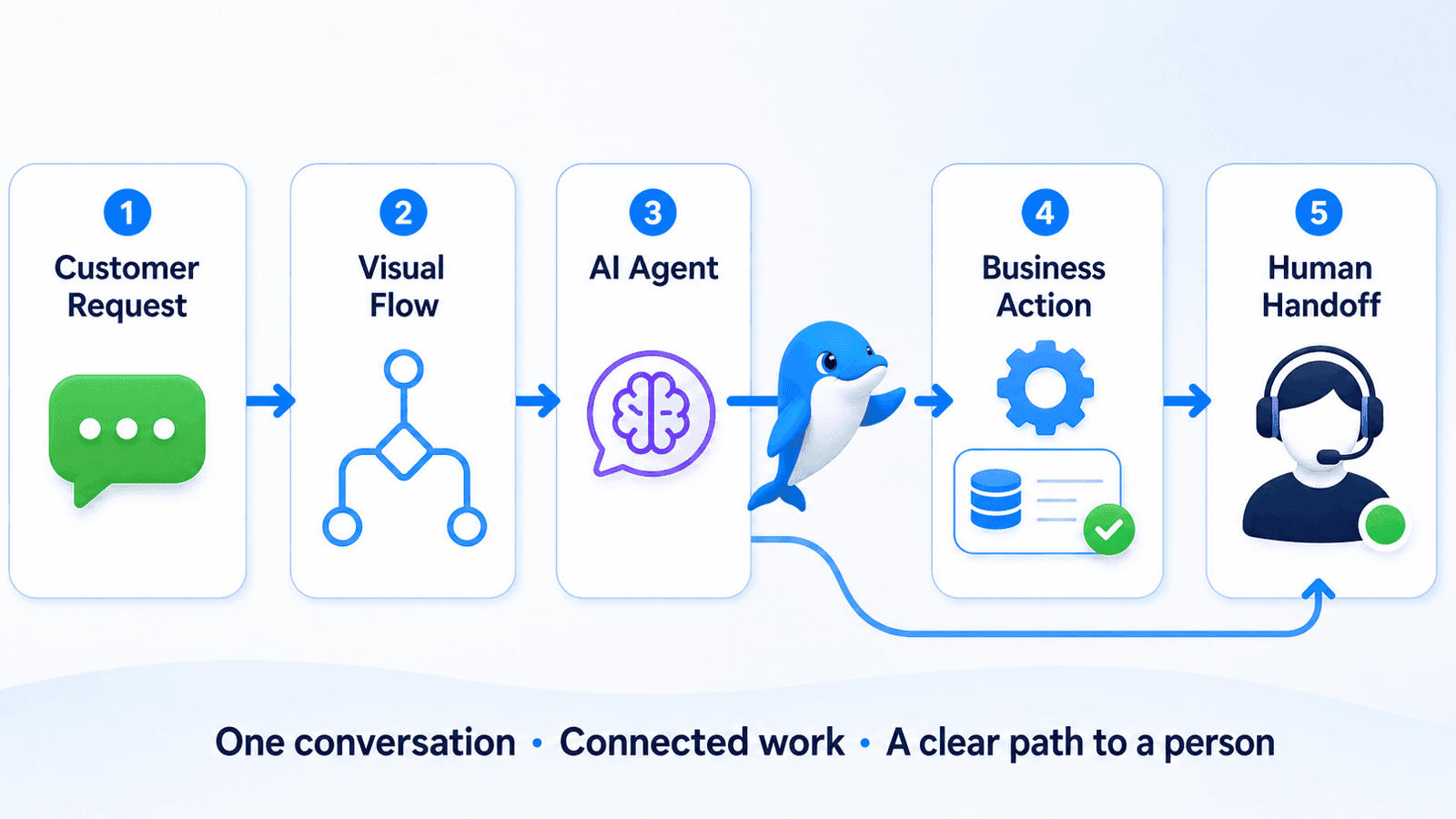
Build your first WhatsApp workflow with UChat.
Build the conversation visually
Build the operating path before adding AI. UChat's Flow Builder lets a team map the conversation and the work around it in one visual interface. A flow can include triggers, messages, conditions, field updates, actions, integrations, reusable subflows and transfers to human support.
The visual layout helps reviewers see what happens before launch. They can follow each branch, confirm which data is saved, find the points where an external system is called and check what happens when the expected response does not arrive.
Use templates for approved outbound messages
WhatsApp message templates are approved formats used for business-initiated messages and notifications. UChat's dynamic template tutorial documents variables, media headers, reply buttons, links and Flow buttons. Variables can insert customer or transaction information such as a name, appointment time or order reference.
Meta reviews templates and assigns their message category. A production workflow should include the current approved version of each template, mapped sample data and a fallback for missing variables. Template wording and category rules can change, so a copied screenshot from an old tutorial should never serve as the policy source.
Collect structured data with WhatsApp Flows
WhatsApp Flows can present an in-chat form for lead capture, appointment preferences, surveys and feedback. UChat's training shows conditional fields and pre-populated values, which can reduce repeated questions when the business already holds part of the customer's information.
Use a WhatsApp Flow when the answer needs a defined structure. Open conversation remains useful when the customer needs explanation, advice or room to describe an unusual issue. A well-designed workflow can move between both forms.
Add an AI Agent that can act
A UChat AI Agent can answer from business knowledge, follow defined instructions and use AI Functions to call external tools or trigger workflow actions. It can also save information directly into customer fields and pass context to another agent or a human team.
The agent needs a clear job. Give it the product and policy information it is allowed to use, the data it should collect, the actions it may perform and the conditions that require escalation.
For an ecommerce support agent, those limits may allow order lookups and standard delivery questions while sending refunds, payment disputes and identity issues to a person. A booking agent may suggest available times and create an appointment while transferring medical, legal or contractual questions.
Set guardrails before adding more knowledge
Good AI configuration starts with boundaries. UChat supports agent constraints such as avoiding unauthorized discounts and escalating refunds. The same approach works for WhatsApp.
Define the subjects the agent may answer.
Limit actions that change money, access or contractual commitments.
Require confirmation before a consequential external action.
Route uncertainty, complaints and sensitive requests to a person.
Test realistic failures, incomplete data and ambiguous customer replies.
Knowledge improves the available answer. Guardrails decide when the agent should stop answering and ask for help.
Hand complex conversations to people
UChat Live Chat lets teams assign conversations, use status labels, collaborate and keep customer data and context available during a handoff. Agents can respond from the browser or the UChat mobile app, and external handoff paths include tools such as Intercom, GoHighLevel, Chatwoot, Slack and custom webhooks.
Design the handoff as part of the workflow. Define which team receives the conversation, what information the bot must collect first, how urgent cases are marked and what the customer sees while waiting.
For example, an AI Agent can handle a delivery-status question, then transfer the conversation when the customer says the parcel contains a time-sensitive item. The human receives the order reference and previous messages. The customer can continue from the same point.
Eligible WhatsApp Cloud API numbers can also extend a conversation into voice. UChat supports browser agents, AI Agents and supervisor controls for WhatsApp Business calls. Read the WhatsApp Business Calling API guide when a live call belongs in the escalation path.
Connect WhatsApp to the rest of the business
WhatsApp becomes more useful when the workflow can read and update the systems that run the business. UChat supports native integrations and broader connection paths through automation platforms, APIs, webhooks and AI Functions.
Business need | Example UChat path |
|---|---|
Ecommerce | Shopify product recommendations, order tracking and cart-recovery workflows |
Product discovery | Facebook Catalog experiences inside WhatsApp |
Scheduling | Calendly or another calendar action called from the workflow |
Payments | Stripe or PayPal links and payment steps |
CRM and support | Native fields, tickets, or transfer to a supported live-chat and CRM platform |
Marketing systems | Mailchimp, Gmail, SMTP, SendGrid or an automation connector |
Custom operations | Webhook, HTTP request, API call, Mini App or reusable AI Function |
Choose the connection around the business action. A lead workflow may create or update a CRM record. An order workflow may query the store and save a support note. A booking workflow may reserve a time and send a utility reminder. The WhatsApp message starts the work and carries the result back to the customer.
Plan for WhatsApp rules and message costs
WhatsApp Business Platform messaging follows rules set by Meta. UChat cannot override template approval, message categories, customer-service windows, market availability or Meta's message charges.
WhatsApp's current Business Platform pricing page says businesses are charged for each delivered message, with rates based on the recipient's market and the message category. The four current categories are marketing, utility, authentication and service.
Message category | Typical purpose | Current high-level pricing treatment |
|---|---|---|
Marketing | Offers, promotions, product suggestions and cart reminders | Charged by delivered message at the applicable market and category rate |
Utility | Requested or transaction-related updates such as delivery or appointment information | Market-based pricing applies, with qualifying user-response messages free under current rules |
Authentication | One-time passwords and identity verification | Market-based pricing applies, with volume tiers available in eligible cases |
Service | Replies to an incoming customer inquiry | Free during the current 24-hour customer service window |
When a customer messages the business, WhatsApp opens a 24-hour customer service window. Each new customer message resets it. Service messages during that window are free under the current pricing page. Meta also describes a 72-hour free-entry window after a customer messages from a qualifying Click-to-WhatsApp ad or Facebook Page call-to-action button.
Rates vary by market and category and can change. Link to the live rate selector when estimating a campaign. Avoid copying a single price into an evergreen article.
The total operating cost can also include the UChat plan, connected provider charges and AI-model usage. Review UChat pricing separately from Meta's message charges so the budget shows both layers.
Can you keep an existing WhatsApp Business App number
Coexistence is an eligibility-based onboarding path. Eligible businesses can use it to keep an existing WhatsApp Business App number active on the phone while connecting the same number to WhatsApp Cloud API. UChat's Coexistence setup guide was updated in June 2026 and documents the current UChat connection flow.
Coexistence has its own requirements and limitations. The number must use the WhatsApp Business App, the app should be current, the business needs an active Meta Business Manager account and the business and country must meet WhatsApp policy requirements. The phone app must remain active after connection.
UChat also documents a one-to-one relationship between a Coexistence WABA and its phone number. A business that needs additional numbers may need a separate WABA created through standard Embedded Signup. Check the current setup screen and UChat guide before moving a production number.
For a new number, a migrated number or an account that does not qualify for Coexistence, follow the standard Cloud API onboarding path. Number choice affects a live customer channel, so test the plan with the account owner before making changes.
From first connection to a live workflow
A safe launch begins with the Meta assets and ends with a tested human fallback.
Test one real workflow from customer message to system action and human handoff before expanding the automation.
Prepare the Meta Business Manager, WhatsApp Business Account and the phone number you intend to use.
Choose standard Cloud API onboarding or the eligible Coexistence path.
Connect the number to UChat and confirm that inbound test messages reach the correct bot.
Build the core conversation, data fields, failure paths and human-handoff rules.
Create and submit any required templates, then map every variable with realistic sample data.
Add WhatsApp Flows, AI Agents and integrations only where they improve the customer's path.
Test the complete journey with team members, including invalid input, missing data, rejected templates, integration timeouts and an unavailable human team.
Launch to a controlled audience, review real conversations and update the flow from evidence.
UChat's WhatsApp Business Automation course includes Cloud API connection, WhatsApp Flows, templates, conditional logic, pre-filled forms, carousel messages and troubleshooting. Use it for the detailed implementation steps after the operating design is clear.
Is UChat the right WhatsApp chatbot platform for your team
UChat is a strong fit when WhatsApp needs to connect with AI, visual workflow logic, business systems and human support. It also suits teams that plan to reuse conversation logic across web chat, Messenger, Instagram, SMS and other supported channels.
UChat is a strong fit when | A narrower product may be enough when |
|---|---|
The bot must collect data and trigger business actions | The business only needs a shared WhatsApp inbox |
AI answers need guardrails, functions and a human escape route | Every reply will be written manually |
Sales, support and operational steps belong in one flow | The only automation needed is a small fixed menu |
The team uses several customer channels | The business will operate only on WhatsApp |
An agency needs reusable workflows and client workspaces | The buyer requires a provider-specific managed service or SLA that UChat does not publicly promise |
The practical evaluation should use one real workflow. Connect a test number, build a customer journey that matters to the business, send data to one external system and transfer one difficult case to a person. That test reveals more than a long feature checklist.
Frequently asked questions
What is a WhatsApp chatbot platform
A WhatsApp chatbot platform connects a WhatsApp Business Platform number to automation, AI, integrations and a team inbox. It receives customer messages, follows defined workflows, uses approved templates when required and hands conversations to people under configured rules.
Can UChat connect to WhatsApp Cloud API
Yes. UChat supports WhatsApp Cloud API connection and provides public training for account setup, phone registration, templates, catalogs and WhatsApp Flows. Meta controls the account, number and policy requirements.
Can a UChat WhatsApp bot use AI
Yes. A UChat AI Agent can use business knowledge, instructions and constraints, save information into fields and call external tools through AI Functions. The workflow should define clear limits and a human escalation path.
Can customers complete forms or bookings inside WhatsApp
Yes. WhatsApp Flows can collect structured data for lead forms, appointment preferences, surveys and feedback. UChat also documents Calendly integration and workflow actions that can connect the submitted data to a scheduling process.
Can a human take over the conversation
Yes. UChat Live Chat supports assignment, statuses, preserved customer context and mobile or browser response. A workflow can pause automation and route the conversation to the appropriate person or supported external inbox.
Can UChat connect WhatsApp to Shopify, a CRM or a custom API
Yes. UChat documents Shopify product, order and cart-recovery workflows, CRM and live-chat transfer options, automation connectors, webhooks and external actions through Flow Builder or AI Functions.
How do WhatsApp template messages work
Templates are reviewed message formats used for approved business-initiated communication and notifications. They can include variables and interactive elements. Meta controls template category and approval, while UChat lets the workflow insert data and send the approved template.
What does WhatsApp automation cost
Budget separately for WhatsApp Business Platform messages and the UChat workspace. Meta charges delivered messages according to market and category, with current free service and entry-point windows described on its pricing page. UChat plan and AI usage depend on the selected configuration.
Can I use my current WhatsApp Business number
Some businesses can connect an existing WhatsApp Business App number through Coexistence and keep using the phone app. Eligibility, onboarding method and WABA structure matter. Review UChat's current Coexistence guide before changing a production number.
Does UChat support WhatsApp calls
Yes, for eligible WhatsApp Cloud API numbers and supported account configurations. UChat can route calls to browser agents or AI Agents and provides human transfer and supervisor controls. Calling follows separate Meta permissions, eligibility and pricing rules.
Build the workflow after the message
WhatsApp gives the customer a familiar place to start. UChat carries that conversation through visual automation, AI, structured data, integrations and human support.
Start a 14-day UChat free trial, review UChat pricing and use the WhatsApp training course to connect and test the first workflow. Confirm Meta's current rules before launch and keep a visible path to a person for every consequential customer request.
Sources reviewed
Sources and product details were reviewed on August 22, 2026. WhatsApp rules, message rates and product settings can change.
UChat turns WhatsApp conversations into connected sales, support and operational workflows. Build the conversation in a visual flow, add an AI Agent with business knowledge, connect external systems, collect structured information with WhatsApp Flows and hand complex cases to a person with the customer context intact.
Meta controls access to the WhatsApp Business Platform, message categories, template approval and messaging charges. UChat provides the automation, AI, integrations and team workspace around that channel. This page reflects the public WhatsApp and UChat documentation available on August 22, 2026.
Start a 14-day UChat free trial or explore the complete WhatsApp training course.
What is a WhatsApp chatbot platform
A WhatsApp chatbot platform connects a WhatsApp Business Platform number to automation that can receive messages, send approved templates, collect data, answer questions, call business systems and pass a conversation to a human. The customer stays in WhatsApp while the business manages the workflow through a separate platform.
UChat supports WhatsApp inside a wider automation workspace. A team can use the same visual Flow Builder, AI Agents, Live Chat and integrations that support its other customer channels.
This matters when a conversation needs to produce an outcome. A useful workflow can capture an order number, check the order, update a CRM field, book an appointment, send the right follow-up and involve a person when the request leaves the safe path.
A useful WhatsApp chatbot completes business work and knows when a person should take over.
What can you automate on WhatsApp with UChat
UChat can automate common WhatsApp journeys while keeping clear points for review and human escalation. The right use case begins with one customer request and follows it through to a business action.
Use case | What the workflow can do | Where a person may step in |
|---|---|---|
Lead qualification | Ask about the need, budget, location or timeline, save answers and route the lead | High-value opportunities, unusual requirements or commercial negotiation |
Appointment booking | Collect the preferred service and time, call a calendar action and send reminders | Rescheduling conflicts, exceptions or sensitive appointments |
Product discovery | Show products, answer catalog questions and guide the customer toward a suitable option | Complex product advice, custom quotes or regulated purchases |
Order support | Collect an order reference, retrieve order information and share an update | Refunds, disputes, lost orders or account-security issues |
Approved follow-up | Send a template for a reminder, order event or relevant campaign when the workflow permits it | Consent questions, complaints or requests to stop messages |
Structured data collection | Open a WhatsApp Flow for a form, survey, booking request or feedback | Incomplete submissions or answers that require judgment |
UChat's public WhatsApp training includes lead capture, appointment and feedback examples with WhatsApp Flows. Its integrations page documents Shopify product recommendations, order tracking and cart recovery, plus a catalog experience inside WhatsApp.
One workflow from inquiry to appointment
Consider a service business that receives a new WhatsApp inquiry.
The workflow identifies the requested service and location.
An AI Agent answers questions from approved business knowledge and collects the missing details.
The flow saves the customer's answers in fields and checks the booking system.
The customer chooses a suitable time through a conversational step or structured WhatsApp Flow.
UChat sends the booking information to the connected system and schedules the appropriate reminder.
A human receives the conversation when the customer asks for an exception, a custom price or a decision the AI Agent should not make.
The customer sees one WhatsApp conversation. The business gets structured information, an action in its operating system and a visible escalation path.
Build your first WhatsApp workflow with UChat.
Build the conversation visually
Build the operating path before adding AI. UChat's Flow Builder lets a team map the conversation and the work around it in one visual interface. A flow can include triggers, messages, conditions, field updates, actions, integrations, reusable subflows and transfers to human support.
The visual layout helps reviewers see what happens before launch. They can follow each branch, confirm which data is saved, find the points where an external system is called and check what happens when the expected response does not arrive.
Use templates for approved outbound messages
WhatsApp message templates are approved formats used for business-initiated messages and notifications. UChat's dynamic template tutorial documents variables, media headers, reply buttons, links and Flow buttons. Variables can insert customer or transaction information such as a name, appointment time or order reference.
Meta reviews templates and assigns their message category. A production workflow should include the current approved version of each template, mapped sample data and a fallback for missing variables. Template wording and category rules can change, so a copied screenshot from an old tutorial should never serve as the policy source.
Collect structured data with WhatsApp Flows
WhatsApp Flows can present an in-chat form for lead capture, appointment preferences, surveys and feedback. UChat's training shows conditional fields and pre-populated values, which can reduce repeated questions when the business already holds part of the customer's information.
Use a WhatsApp Flow when the answer needs a defined structure. Open conversation remains useful when the customer needs explanation, advice or room to describe an unusual issue. A well-designed workflow can move between both forms.
Add an AI Agent that can act
A UChat AI Agent can answer from business knowledge, follow defined instructions and use AI Functions to call external tools or trigger workflow actions. It can also save information directly into customer fields and pass context to another agent or a human team.
The agent needs a clear job. Give it the product and policy information it is allowed to use, the data it should collect, the actions it may perform and the conditions that require escalation.
For an ecommerce support agent, those limits may allow order lookups and standard delivery questions while sending refunds, payment disputes and identity issues to a person. A booking agent may suggest available times and create an appointment while transferring medical, legal or contractual questions.
Set guardrails before adding more knowledge
Good AI configuration starts with boundaries. UChat supports agent constraints such as avoiding unauthorized discounts and escalating refunds. The same approach works for WhatsApp.
Define the subjects the agent may answer.
Limit actions that change money, access or contractual commitments.
Require confirmation before a consequential external action.
Route uncertainty, complaints and sensitive requests to a person.
Test realistic failures, incomplete data and ambiguous customer replies.
Knowledge improves the available answer. Guardrails decide when the agent should stop answering and ask for help.
Hand complex conversations to people
UChat Live Chat lets teams assign conversations, use status labels, collaborate and keep customer data and context available during a handoff. Agents can respond from the browser or the UChat mobile app, and external handoff paths include tools such as Intercom, GoHighLevel, Chatwoot, Slack and custom webhooks.
Design the handoff as part of the workflow. Define which team receives the conversation, what information the bot must collect first, how urgent cases are marked and what the customer sees while waiting.
For example, an AI Agent can handle a delivery-status question, then transfer the conversation when the customer says the parcel contains a time-sensitive item. The human receives the order reference and previous messages. The customer can continue from the same point.
Eligible WhatsApp Cloud API numbers can also extend a conversation into voice. UChat supports browser agents, AI Agents and supervisor controls for WhatsApp Business calls. Read the WhatsApp Business Calling API guide when a live call belongs in the escalation path.
Connect WhatsApp to the rest of the business
WhatsApp becomes more useful when the workflow can read and update the systems that run the business. UChat supports native integrations and broader connection paths through automation platforms, APIs, webhooks and AI Functions.
Business need | Example UChat path |
|---|---|
Ecommerce | Shopify product recommendations, order tracking and cart-recovery workflows |
Product discovery | Facebook Catalog experiences inside WhatsApp |
Scheduling | Calendly or another calendar action called from the workflow |
Payments | Stripe or PayPal links and payment steps |
CRM and support | Native fields, tickets, or transfer to a supported live-chat and CRM platform |
Marketing systems | Mailchimp, Gmail, SMTP, SendGrid or an automation connector |
Custom operations | Webhook, HTTP request, API call, Mini App or reusable AI Function |
Choose the connection around the business action. A lead workflow may create or update a CRM record. An order workflow may query the store and save a support note. A booking workflow may reserve a time and send a utility reminder. The WhatsApp message starts the work and carries the result back to the customer.
Plan for WhatsApp rules and message costs
WhatsApp Business Platform messaging follows rules set by Meta. UChat cannot override template approval, message categories, customer-service windows, market availability or Meta's message charges.
WhatsApp's current Business Platform pricing page says businesses are charged for each delivered message, with rates based on the recipient's market and the message category. The four current categories are marketing, utility, authentication and service.
Message category | Typical purpose | Current high-level pricing treatment |
|---|---|---|
Marketing | Offers, promotions, product suggestions and cart reminders | Charged by delivered message at the applicable market and category rate |
Utility | Requested or transaction-related updates such as delivery or appointment information | Market-based pricing applies, with qualifying user-response messages free under current rules |
Authentication | One-time passwords and identity verification | Market-based pricing applies, with volume tiers available in eligible cases |
Service | Replies to an incoming customer inquiry | Free during the current 24-hour customer service window |
When a customer messages the business, WhatsApp opens a 24-hour customer service window. Each new customer message resets it. Service messages during that window are free under the current pricing page. Meta also describes a 72-hour free-entry window after a customer messages from a qualifying Click-to-WhatsApp ad or Facebook Page call-to-action button.
Rates vary by market and category and can change. Link to the live rate selector when estimating a campaign. Avoid copying a single price into an evergreen article.
The total operating cost can also include the UChat plan, connected provider charges and AI-model usage. Review UChat pricing separately from Meta's message charges so the budget shows both layers.
Can you keep an existing WhatsApp Business App number
Coexistence is an eligibility-based onboarding path. Eligible businesses can use it to keep an existing WhatsApp Business App number active on the phone while connecting the same number to WhatsApp Cloud API. UChat's Coexistence setup guide was updated in June 2026 and documents the current UChat connection flow.
Coexistence has its own requirements and limitations. The number must use the WhatsApp Business App, the app should be current, the business needs an active Meta Business Manager account and the business and country must meet WhatsApp policy requirements. The phone app must remain active after connection.
UChat also documents a one-to-one relationship between a Coexistence WABA and its phone number. A business that needs additional numbers may need a separate WABA created through standard Embedded Signup. Check the current setup screen and UChat guide before moving a production number.
For a new number, a migrated number or an account that does not qualify for Coexistence, follow the standard Cloud API onboarding path. Number choice affects a live customer channel, so test the plan with the account owner before making changes.
From first connection to a live workflow
A safe launch begins with the Meta assets and ends with a tested human fallback.
Test one real workflow from customer message to system action and human handoff before expanding the automation.
Prepare the Meta Business Manager, WhatsApp Business Account and the phone number you intend to use.
Choose standard Cloud API onboarding or the eligible Coexistence path.
Connect the number to UChat and confirm that inbound test messages reach the correct bot.
Build the core conversation, data fields, failure paths and human-handoff rules.
Create and submit any required templates, then map every variable with realistic sample data.
Add WhatsApp Flows, AI Agents and integrations only where they improve the customer's path.
Test the complete journey with team members, including invalid input, missing data, rejected templates, integration timeouts and an unavailable human team.
Launch to a controlled audience, review real conversations and update the flow from evidence.
UChat's WhatsApp Business Automation course includes Cloud API connection, WhatsApp Flows, templates, conditional logic, pre-filled forms, carousel messages and troubleshooting. Use it for the detailed implementation steps after the operating design is clear.
Is UChat the right WhatsApp chatbot platform for your team
UChat is a strong fit when WhatsApp needs to connect with AI, visual workflow logic, business systems and human support. It also suits teams that plan to reuse conversation logic across web chat, Messenger, Instagram, SMS and other supported channels.
UChat is a strong fit when | A narrower product may be enough when |
|---|---|
The bot must collect data and trigger business actions | The business only needs a shared WhatsApp inbox |
AI answers need guardrails, functions and a human escape route | Every reply will be written manually |
Sales, support and operational steps belong in one flow | The only automation needed is a small fixed menu |
The team uses several customer channels | The business will operate only on WhatsApp |
An agency needs reusable workflows and client workspaces | The buyer requires a provider-specific managed service or SLA that UChat does not publicly promise |
The practical evaluation should use one real workflow. Connect a test number, build a customer journey that matters to the business, send data to one external system and transfer one difficult case to a person. That test reveals more than a long feature checklist.
Frequently asked questions
What is a WhatsApp chatbot platform
A WhatsApp chatbot platform connects a WhatsApp Business Platform number to automation, AI, integrations and a team inbox. It receives customer messages, follows defined workflows, uses approved templates when required and hands conversations to people under configured rules.
Can UChat connect to WhatsApp Cloud API
Yes. UChat supports WhatsApp Cloud API connection and provides public training for account setup, phone registration, templates, catalogs and WhatsApp Flows. Meta controls the account, number and policy requirements.
Can a UChat WhatsApp bot use AI
Yes. A UChat AI Agent can use business knowledge, instructions and constraints, save information into fields and call external tools through AI Functions. The workflow should define clear limits and a human escalation path.
Can customers complete forms or bookings inside WhatsApp
Yes. WhatsApp Flows can collect structured data for lead forms, appointment preferences, surveys and feedback. UChat also documents Calendly integration and workflow actions that can connect the submitted data to a scheduling process.
Can a human take over the conversation
Yes. UChat Live Chat supports assignment, statuses, preserved customer context and mobile or browser response. A workflow can pause automation and route the conversation to the appropriate person or supported external inbox.
Can UChat connect WhatsApp to Shopify, a CRM or a custom API
Yes. UChat documents Shopify product, order and cart-recovery workflows, CRM and live-chat transfer options, automation connectors, webhooks and external actions through Flow Builder or AI Functions.
How do WhatsApp template messages work
Templates are reviewed message formats used for approved business-initiated communication and notifications. They can include variables and interactive elements. Meta controls template category and approval, while UChat lets the workflow insert data and send the approved template.
What does WhatsApp automation cost
Budget separately for WhatsApp Business Platform messages and the UChat workspace. Meta charges delivered messages according to market and category, with current free service and entry-point windows described on its pricing page. UChat plan and AI usage depend on the selected configuration.
Can I use my current WhatsApp Business number
Some businesses can connect an existing WhatsApp Business App number through Coexistence and keep using the phone app. Eligibility, onboarding method and WABA structure matter. Review UChat's current Coexistence guide before changing a production number.
Does UChat support WhatsApp calls
Yes, for eligible WhatsApp Cloud API numbers and supported account configurations. UChat can route calls to browser agents or AI Agents and provides human transfer and supervisor controls. Calling follows separate Meta permissions, eligibility and pricing rules.
Build the workflow after the message
WhatsApp gives the customer a familiar place to start. UChat carries that conversation through visual automation, AI, structured data, integrations and human support.
Start a 14-day UChat free trial, review UChat pricing and use the WhatsApp training course to connect and test the first workflow. Confirm Meta's current rules before launch and keep a visible path to a person for every consequential customer request.
Sources reviewed
Sources and product details were reviewed on August 22, 2026. WhatsApp rules, message rates and product settings can change.