19 minutes
UChat
Posted by
White-Label Chatbot Platform for Agencies: The Complete Guide
19 minutes
Posted by
UChat

A white-label chatbot platform lets an agency deliver chatbot and AI automation under its own brand. A complete platform goes beyond removing a logo: it can include the agency's domain and login, separate client workspaces, client-facing plans and prices, billing and provisioning controls, branded support routes, and the underlying AI, workflow, channel and human-handoff capabilities.
White label is not a yes-or-no checkbox. One product may let you remove a badge from a chat widget. Another may let you brand the entire client platform and operate the commercial relationship. Before choosing one, decide which surfaces your clients will see and which parts of the client lifecycle your agency must control.
This guide explains how to evaluate that scope, how the agency business model works, and how UChat Partner maps to a seven-layer white-label operating model.
This guide reflects the public UChat product and training material reviewed on August 31, 2026.
Commercial terms can change; verify the live sources before purchase.
What is a white-label chatbot platform?
A white-label chatbot platform is software an agency can brand, package and deliver to clients as part of its own offer. The agency uses another company for the underlying automation infrastructure, while controlling some or all of the client-facing identity, access, plans, billing, onboarding and support experience.
There are three common ways to build a chatbot agency offer:
Managed service: the agency builds and manages automation inside a vendor-branded account. The client pays for implementation, optimization or support.
Branded experience: the customer sees an agency-branded widget, bot or selected interface, but the operating platform still belongs visibly to the vendor.
White-label platform: the client signs in through the agency's domain, enters a branded workspace and buys a plan defined by the agency. The agency manages the customer relationship and uses the provider as infrastructure.
All three models can be legitimate businesses. The mistake is selling the first as if it were the third.
For example, removing “Powered by” from a message may improve the end-user experience, but it does not automatically give the agency a custom platform domain, branded login, isolated workspaces, plan controls or automated billing. Likewise, a product can offer agency account management without offering an agency white-label platform.
The practical question is not “Does this platform have white label?” It is:
Which parts of the client experience and agency operation can we actually brand, control, test and support?
The seven layers of real white label
The White-Label Depth Stack separates a visual branding feature from a resellable operating system. Use it during every platform demo or trial.
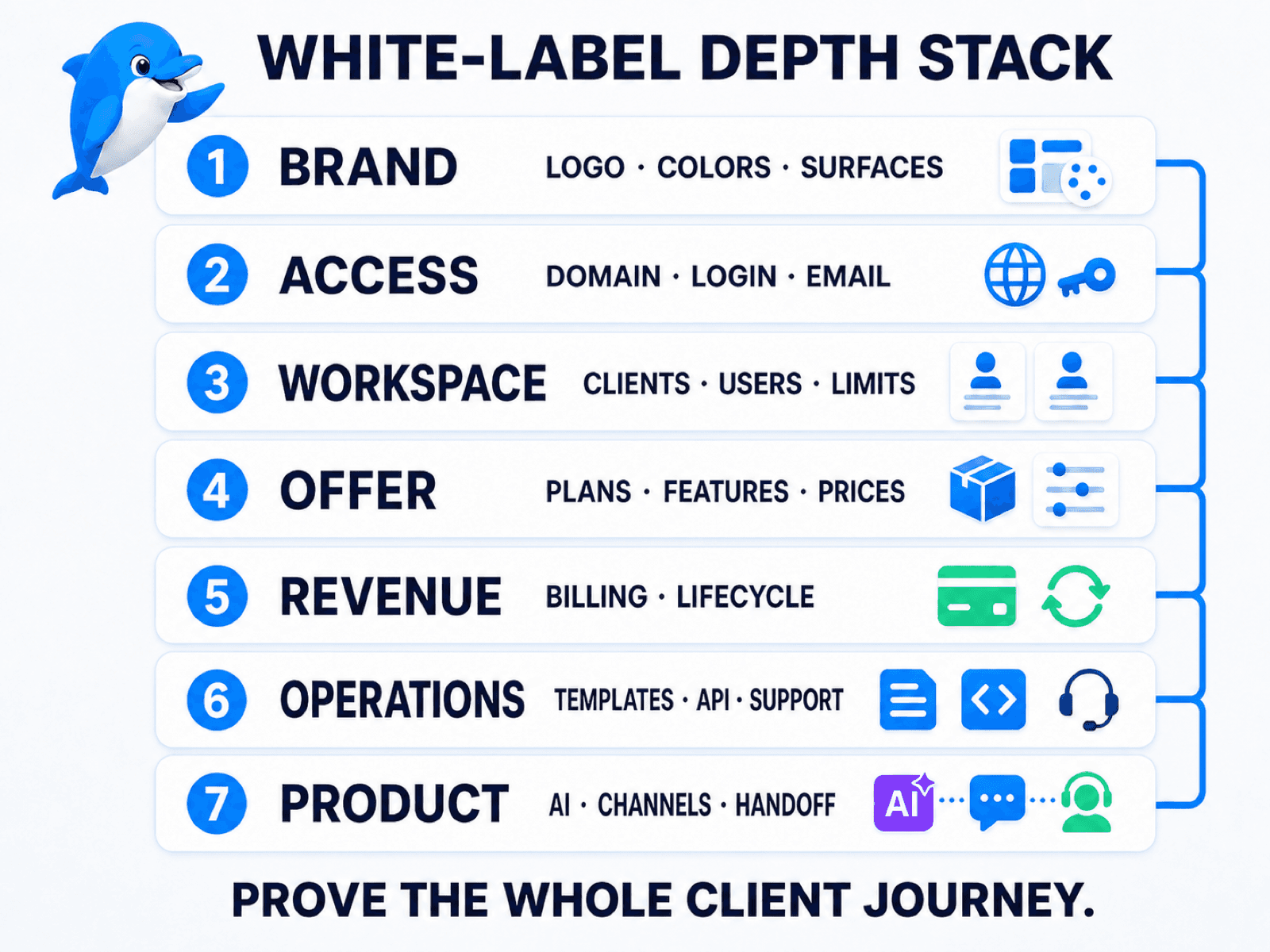
1. Brand
The brand layer covers what the client and the client's customers see. It may include logos, colors, product name, browser title, email identity, chatbot appearance and the removal of the infrastructure provider's branding.
Ask for current screenshots of every important surface—not only the chatbot widget. Check the login page, dashboard, system emails, support links, error messages, billing pages and shared assets.
A provider badge in a rarely used admin screen may be acceptable for a managed service. It may be unacceptable if your sales promise is a completely branded software product. Write down the boundary before you sell it.
2. Access
The access layer is how clients enter and navigate the product. A deeper white-label platform can support the agency's domain, branded login and signup pages, password-reset path, email identity, navigation links and help destinations.
Test the complete access journey in a private browser session:
open the agency domain;
create or invite a test user;
receive the account email;
reset the password;
sign in and sign out;
open the help and support links;
inspect what happens when access fails.
That journey often exposes branding gaps that a dashboard demo misses.
3. Workspace
The workspace layer determines whether the agency can operate multiple clients safely and clearly. Each client should have an understandable home for its users, channels, automations, knowledge, integrations, usage and plan status.
During a trial, verify:
how a workspace is created, suspended and closed;
which users can access it;
how roles and limits are applied;
whether templates can be installed consistently;
how usage, add-ons and plan changes are recorded;
what an agency operator can view when providing support.
Separate workspaces do not by themselves prove legal or technical isolation for a regulated workload. If your clients require specific data residency, security controls or contractual commitments, validate those requirements separately.
4. Offer
The offer layer is the product your agency sells. A white-label provider may let you define client-facing plan names, prices, limits, included features and upgrade paths.
This matters because clients do not buy “access to a chatbot builder.” They buy a business outcome wrapped in a service. A local-service package might include one channel, an appointment template, a defined number of monthly conversations, setup, reporting and support. An ecommerce package may include product questions, order support, human escalation and monthly optimization.
The strongest offer is usually narrower than the platform. Package the workflow, knowledge, integrations and service level required by one client type instead of exposing every feature on day one.
5. Revenue
The revenue layer covers how the client pays, how the agency's plan maps to the provider cost, and what happens after a purchase or billing event.
Verify the successful and unsuccessful paths:
new purchase;
recurring renewal;
upgrade and downgrade;
add-on purchase;
failed payment;
overdue account;
cancellation or pause;
workspace reactivation.
Some platforms provide a native billing connection. Others expose APIs and webhooks so the agency can connect an external checkout. The external route can create more flexibility, but it also creates development, testing and maintenance work.
Revenue is not the same as profit. If a client pays the agency, the agency still has platform costs, messaging or AI provider fees, payment fees, taxes, implementation time and support costs. Model gross margin using the complete delivery cost; never interpret “keep your client revenue” as “keep 100% net profit.”
6. Operations
The operations layer is everything required to serve the second, twentieth and hundredth client without rebuilding the business each time.
Look for reusable templates, repeatable onboarding, workspace provisioning, webhooks, APIs, activity logs, error handling, knowledge and support routes. Then decide who owns each process.
In a partner model, the agency commonly provides first-line support to its clients. The infrastructure provider supports the partner when a reproducible platform issue needs escalation. That division lets the agency own the relationship, but it also means the agency needs documentation, triage rules and an escalation path.
7. Product
The final layer is easy to overlook: is the underlying product good enough to retain the client?
A beautifully branded dashboard cannot rescue an automation that gives weak answers, loses context, cannot reach the required channels or traps customers without human help. Test one complete customer outcome using the same tools the client will buy:
a real channel entry point;
approved AI knowledge and instructions;
deterministic workflow logic;
an external business action;
failure handling;
human handoff with context;
reporting that proves the outcome.
White-label controls make the business resellable. Product depth makes it useful.
Why removing a logo is not enough
These scopes are often described with the same phrase even though they support different agency offers.
Scope | What the client sees | What the agency controls | Typical business model |
|---|---|---|---|
Badge removal | A bot or message without the provider badge | Little or no control over the platform itself | Implementation or campaign service |
Branded experience | Branded widget, bot or selected client-facing surface | Some presentation and delivery controls | Managed service |
White-label platform | Agency domain, login, workspace, plans and support route | Commercial settings and client lifecycle controls | Branded software plus service |
None of these rows is automatically better. Choose the minimum depth that honestly supports your offer.
If clients never log in and your team manages every automation, a vendor-branded operating dashboard may not matter. If clients are buying access to “your platform,” the domain, login, emails, workspace, plan and support path all become part of the promise.
Also separate white label from adjacent terms:
Agency plan may mean multi-client management but not agency branding.
Reseller plan may let you sell licenses but keep the provider visible.
Affiliate program pays a referral commission; the provider owns the product and customer relationship.
Embeddable widget may be brandable while the builder remains vendor-branded.
White-label platform should state exactly which surfaces and lifecycle controls the agency owns.
The label is useful only when the scope is written down.
Agency-plan check: An agency program is not automatically white label. Based on ManyChat's public agency, account, subscription and Partner materials reviewed on August 31, 2026, ManyChat documents agency use, multi-account management and an affiliate program. Those materials do not document a custom-domain, agency-branded reseller platform. In January 2025, a ManyChat community moderator also stated that white-labeling was not offered. Feature availability can change, so confirm the current product directly before treating any agency or Partner plan as white label.
If ManyChat is on your shortlist, use the separate UChat vs ManyChat comparison for channel, workflow, AI and agency-operating differences.
How the white-label agency business model works
A white-label platform gives an agency infrastructure. It does not create the offer, demand or service operation automatically.
The business normally has two financial layers:
Provider cost: partner subscription, client licenses, channel usage, AI usage, add-ons and any external tools.
Client price: the amount the agency charges for software access, setup, integrations, templates, support and ongoing optimization.
The difference between client revenue and direct delivery cost contributes to gross margin. It is not guaranteed profit.
For a useful margin model, include:
platform and workspace costs;
WhatsApp, messaging, model or voice usage where applicable;
payment processing and taxes;
setup and migration time;
template maintenance;
integration monitoring;
first-line support;
client training and reporting;
refunds, failed payments and account recovery;
sales and customer-success costs.
The agency then chooses who charges the client.
Platform-connected billing
The agency connects its billing account, defines client-facing prices and maps purchases to workspace plans or limits. This is usually the simplest path when the provider supports the agency's desired checkout and lifecycle.
Billing still needs an event model. Stripe's subscription webhook guide shows why renewals, payment failures, status changes and cancellations must be handled as asynchronous events. Record event IDs, make repeated delivery safe and keep a manual recovery path when the workspace state and billing state disagree.
External checkout and provisioning
The agency uses its own site, ecommerce system or payment stack, then calls the provider's partner tools to create or update users and workspaces. This can support a more customized sales funnel, but requires technical implementation and careful testing of webhooks, retries, duplicate events and failure states.
Manual managed service
The agency invoices the client and handles workspace changes manually. This can be sensible while validating a niche. It becomes harder to operate as client volume and plan complexity grow.
Do not automate an unproven offer. First sell and deliver a small number of clients, learn which onboarding and support steps repeat, then automate the stable path.
For UChat's current platform plans and usage pricing, use the live pricing page. For partner licenses and add-ons, use the live UChat Partner page instead of relying on a price copied into an evergreen article.
How UChat Partner maps to the seven layers
UChat Partner combines a white-label business layer with UChat's AI and omnichannel automation platform. The important distinction is that the agency can brand and operate a client platform while UChat provides the underlying infrastructure.
Custom domain, login and branding
The public UChat Partner page documents custom-domain and branding controls for the partner platform. UChat's full white-label training covers client-facing surfaces such as login and signup, dashboard branding, support links, knowledge links and other interface settings.
Verify every surface needed by your offer in the current product. Fully branded mobile apps, some integration surfaces or other advanced branded assets may require additional setup, a paid option or separate confirmation.
Client workspaces and access
Partners can manage clients and workspaces, including workspace plans, limits, add-ons and support access. The official Partner Plan demo is a useful starting point for understanding the current operating model.
Build one test workspace before you design your commercial plans. Confirm the creation, invitation, template, permission, plan-change and closure path your team will actually use.
Client-facing plans and prices
UChat's partner material describes a partner cost side and agency-defined client-facing plans and prices. This lets the agency package platform access with its own implementation and service.
Use the current product to confirm which limits and features can be mapped into each package. Keep internal provider costs out of client-facing marketing unless disclosure is part of your commercial model.
The reselling and profit training explains the billing model, but the word “profit” still requires normal cost accounting. Your selling price minus UChat charges is not automatically your net profit.
Billing and workspace lifecycle
UChat documents a Stripe-based billing path and an external-checkout path using Partner capabilities. The right path depends on how much control you need over the sales experience.
Before launch, test purchase, upgrade, downgrade, overdue, cancellation and reactivation behavior. Treat payment and webhook events as operational software: record them, make repeated events safe and provide a manual recovery procedure.
Partner API and lifecycle automation
The UChat Partner sales-funnel automation course covers user and workspace creation plus purchase, renewal, overdue and winback workflows. UChat also publishes a focused walkthrough for creating a workspace through the Partner API.
This means a validated agency offer can move from manual provisioning to a more automated client lifecycle. It does not mean every agency needs custom code on day one. The common setup path remains accessible through the platform; a custom checkout or specialized provisioning flow may need a developer.
Templates, support and knowledge routes
Reusable templates reduce delivery drift. A partner can standardize the core workflow for one niche, then apply client-specific knowledge, integrations, branding and escalation rules.
Branded support and knowledge links help the agency own the client experience. The operating responsibility follows: document what the agency handles, what evidence is required before escalation, and how UChat supports the partner behind the scenes.
AI, channels, Flow Builder, integrations and Live Chat
The client is ultimately paying for an outcome, not for white-label settings. UChat connects the partner layer to:
AI Agents with instructions, knowledge and tools;
supported messaging channels including Instagram, WhatsApp and web chat;
a visual Flow Builder for deterministic logic and actions;
integrations, APIs and webhooks for business systems;
Live Chat for human takeover and conversation operations.
That combination is the seventh layer of the stack: the product underneath the agency brand must complete the work the agency sells.
A real client delivery workflow
Consider an agency selling a branded appointment-and-support automation package to local-service businesses.
1. The client enters through the agency brand
The client opens the agency's custom platform domain, receives a branded account invitation and signs in through the agency login. Help and support links point to the agency's own resources.
2. The agency provisions a separate workspace
An operator creates the workspace manually during validation, or provisions it through the configured partner workflow after the process is stable. The workspace receives the appropriate plan, users and limits.
3. A tested niche template is installed
The agency starts from an appointment-and-support template rather than a blank canvas. The template contains required fields, consent steps, qualification logic, error paths, handoff rules and reporting events.
The operator then adds the client's services, locations, business hours, approved knowledge, calendar or CRM connection and escalation contacts.
4. The client connects the required channels
The client may use Instagram for lead entry, WhatsApp for customer conversations and web chat for site visitors. Connect only the channels included in the purchased package and confirm the current channel requirements separately.
5. AI and workflow logic complete the task
The AI Agent answers approved open questions and classifies intent. Flow Builder collects required information and triggers deterministic actions, such as creating a booking request or updating the CRM.
If the knowledge is missing, an API action fails or the request falls outside the approved scope, the automation stops safely.
6. A human receives the conversation with context
Live Chat receives the customer, the reason for escalation and the fields already collected. The agent should not need to ask the person to repeat the service, location, preferred time and problem.
7. Billing and support follow the agency process
The client pays the agency's package price. The billing path updates the workspace as configured. The agency provides first-line support and escalates reproducible infrastructure issues with the evidence UChat needs.
This complete path is the product. The logo is only one layer.
What should an agency sell on top of the platform?
Avoid selling a generic login with hundreds of unexplained features. Package a defined outcome for a defined customer.
1. Setup plus monthly managed service
The agency charges for discovery, setup, knowledge preparation, channel connection and integration work, then provides ongoing monitoring and optimization.
This model suits clients who want the outcome without operating the platform every day.
2. Branded software access plus support
The client receives access to the agency-branded platform, a defined plan and a support route. The agency may include onboarding, office hours, templates and a monthly service allowance.
This model requires the access, workspace, offer, billing and support layers to be mature.
3. Niche template and integration package
The agency packages repeatable intellectual property: a dental appointment workflow, property-lead qualifier, ecommerce support system or another narrow solution. The value comes from the tested process, knowledge structure and integrations—not from the blank builder.
4. Optimization retainer
After the system is live, the agency reviews unanswered questions, handoff reasons, failed actions and business outcomes. It updates knowledge, logic, prompts and integrations against an agreed scope.
This creates a service tied to measurable improvement without promising a guaranteed revenue result.
You can combine these models, but keep the commercial boundary clear. State what the plan includes, what usage is separate, what support covers and what counts as custom work.
The White-Label Operator Test
Do not choose a platform from a sales deck alone. Run these seven trial tasks using the real path your agency intends to sell.
Open the agency domain. Test login, signup or invitation, password reset, navigation, emails, support links and failure screens.
Create a test client workspace. Add users, assign roles, set a plan and confirm that the client sees only the intended resources.
Apply the brand. Check the platform, bot, emails, knowledge links, support route and any mobile or integration surface included in the offer.
Install one reusable solution. Start from a template, add client knowledge and connect the required channel and business system.
Test the commercial path. Complete checkout or the manual lifecycle, then test upgrade, downgrade, failed payment, cancellation and recovery.
Force a failure and a human handoff. Remove a required answer or make a safe test action fail. Confirm the customer message, internal alert, Live Chat context and operator log.
Close the lifecycle. Pause or close the test workspace, inspect what the client sees, then reactivate or archive it according to your process.
There is no useful universal score. A platform passes when the whole path works for your offer, the gaps are documented, and your team can support it at the expected client volume.
The promise should survive a complete client journey, not just a branded screenshot.
When a white-label platform is the wrong choice
A white-label platform adds control and responsibility. It may be the wrong infrastructure when:
you only need a one-off campaign or a small number of managed automations;
clients will never log in and do not care which dashboard your team uses;
you do not want to own first-line support, billing or client onboarding;
you have not yet validated the niche or outcome people will pay for;
a unique security, data or product requirement justifies a custom build;
the real requirement is a broad CRM, funnel and marketing suite rather than a specialist chatbot and automation platform;
the cost of operating the branded product is higher than the value clients perceive.
In these cases, start with a managed service, a simpler campaign tool, a broader agency suite or a custom architecture that fits the real requirement.
White label should follow a clear offer. It should not be used to create the appearance of a product before the agency knows what customers need.
Frequently asked questions
How is a white-label chatbot platform defined?
A white-label chatbot platform lets an agency deliver chatbot or AI automation under its own brand while using a provider's infrastructure. Depending on the product, white label may include a custom domain, branded login, client workspaces, plans, pricing, billing, support routes and the customer-facing bot.
What is the difference between white label and removing a logo?
Removing a logo changes one visible surface. Platform white label can change the domain, login, dashboard, emails, workspace experience, plans and support path, while also giving the agency commercial and client-lifecycle controls. Always ask for the exact included surfaces.
Can I use my own domain and branding?
UChat Partner publicly documents a custom domain and white-label branding controls. The exact scope depends on the current settings and any advanced options. Test login, dashboard, email, help, support, mobile and integration surfaces required by your offer before launch.
Can an agency charge its own price?
UChat's Partner model allows the agency to define client-facing plans and selling prices while paying the applicable partner and client costs to UChat. The agency should calculate margin after platform, usage, payment, tax, implementation and support costs.
Who pays the platform provider?
In UChat's partner model, the partner has the commercial relationship with UChat and the agency can charge its own clients. Confirm the current partner subscription, client license, usage and add-on structure on the live Partner page.
Do I need developers?
Not for every project. UChat provides no-code tools for common setup, AI Agent and visual workflow paths. A custom checkout, specialized Partner API provisioning or complex external integration may require development and ongoing technical maintenance.
Who supports the agency's clients?
The agency should plan to provide first-line onboarding and support to its clients. UChat supports the partner for platform-level issues. Define what the client can contact you about, what evidence your team collects and when an issue is escalated.
Can I automate client workspace creation and billing?
UChat documents partner workflows for user and workspace creation, Stripe billing and external checkout paths using Partner capabilities. Test every purchase and account-lifecycle state in a safe environment before relying on automation in production.
Is a white-label chatbot platform the same as an affiliate program?
No. An affiliate refers a buyer to another company's product and earns an agreed commission. A white-label partner packages and operates a branded client offer using the provider's infrastructure, usually taking on more responsibility for sales, billing, onboarding and support.
How should an agency choose a white-label chatbot platform?
Choose the platform that passes your complete operating test: brand, access, workspace, offer, revenue, operations and product depth. UChat is a strong fit when an agency wants a custom-domain client platform plus AI Agents, visual workflows, messaging channels, integrations and human handoff. A managed campaign tool, broader CRM suite or custom build may fit a different business model.
Build the operating model before you brand it
The durable white-label offer is not a logo swap. It is a controlled path from sales and client access to workspace provisioning, automation delivery, billing, support and measurable customer outcomes.
Start with one niche, one package and one end-to-end operator test. Document every boundary. Once the manual path works, automate the stable parts.
Explore UChat Partner to review the current white-label capabilities and live commercial model, or book a Partner meeting from that page to discuss the workflow your agency wants to resell.
A white-label chatbot platform lets an agency deliver chatbot and AI automation under its own brand. A complete platform goes beyond removing a logo: it can include the agency's domain and login, separate client workspaces, client-facing plans and prices, billing and provisioning controls, branded support routes, and the underlying AI, workflow, channel and human-handoff capabilities.
White label is not a yes-or-no checkbox. One product may let you remove a badge from a chat widget. Another may let you brand the entire client platform and operate the commercial relationship. Before choosing one, decide which surfaces your clients will see and which parts of the client lifecycle your agency must control.
This guide explains how to evaluate that scope, how the agency business model works, and how UChat Partner maps to a seven-layer white-label operating model.
This guide reflects the public UChat product and training material reviewed on August 31, 2026.
Commercial terms can change; verify the live sources before purchase.
What is a white-label chatbot platform?
A white-label chatbot platform is software an agency can brand, package and deliver to clients as part of its own offer. The agency uses another company for the underlying automation infrastructure, while controlling some or all of the client-facing identity, access, plans, billing, onboarding and support experience.
There are three common ways to build a chatbot agency offer:
Managed service: the agency builds and manages automation inside a vendor-branded account. The client pays for implementation, optimization or support.
Branded experience: the customer sees an agency-branded widget, bot or selected interface, but the operating platform still belongs visibly to the vendor.
White-label platform: the client signs in through the agency's domain, enters a branded workspace and buys a plan defined by the agency. The agency manages the customer relationship and uses the provider as infrastructure.
All three models can be legitimate businesses. The mistake is selling the first as if it were the third.
For example, removing “Powered by” from a message may improve the end-user experience, but it does not automatically give the agency a custom platform domain, branded login, isolated workspaces, plan controls or automated billing. Likewise, a product can offer agency account management without offering an agency white-label platform.
The practical question is not “Does this platform have white label?” It is:
Which parts of the client experience and agency operation can we actually brand, control, test and support?
The seven layers of real white label
The White-Label Depth Stack separates a visual branding feature from a resellable operating system. Use it during every platform demo or trial.
1. Brand
The brand layer covers what the client and the client's customers see. It may include logos, colors, product name, browser title, email identity, chatbot appearance and the removal of the infrastructure provider's branding.
Ask for current screenshots of every important surface—not only the chatbot widget. Check the login page, dashboard, system emails, support links, error messages, billing pages and shared assets.
A provider badge in a rarely used admin screen may be acceptable for a managed service. It may be unacceptable if your sales promise is a completely branded software product. Write down the boundary before you sell it.
2. Access
The access layer is how clients enter and navigate the product. A deeper white-label platform can support the agency's domain, branded login and signup pages, password-reset path, email identity, navigation links and help destinations.
Test the complete access journey in a private browser session:
open the agency domain;
create or invite a test user;
receive the account email;
reset the password;
sign in and sign out;
open the help and support links;
inspect what happens when access fails.
That journey often exposes branding gaps that a dashboard demo misses.
3. Workspace
The workspace layer determines whether the agency can operate multiple clients safely and clearly. Each client should have an understandable home for its users, channels, automations, knowledge, integrations, usage and plan status.
During a trial, verify:
how a workspace is created, suspended and closed;
which users can access it;
how roles and limits are applied;
whether templates can be installed consistently;
how usage, add-ons and plan changes are recorded;
what an agency operator can view when providing support.
Separate workspaces do not by themselves prove legal or technical isolation for a regulated workload. If your clients require specific data residency, security controls or contractual commitments, validate those requirements separately.
4. Offer
The offer layer is the product your agency sells. A white-label provider may let you define client-facing plan names, prices, limits, included features and upgrade paths.
This matters because clients do not buy “access to a chatbot builder.” They buy a business outcome wrapped in a service. A local-service package might include one channel, an appointment template, a defined number of monthly conversations, setup, reporting and support. An ecommerce package may include product questions, order support, human escalation and monthly optimization.
The strongest offer is usually narrower than the platform. Package the workflow, knowledge, integrations and service level required by one client type instead of exposing every feature on day one.
5. Revenue
The revenue layer covers how the client pays, how the agency's plan maps to the provider cost, and what happens after a purchase or billing event.
Verify the successful and unsuccessful paths:
new purchase;
recurring renewal;
upgrade and downgrade;
add-on purchase;
failed payment;
overdue account;
cancellation or pause;
workspace reactivation.
Some platforms provide a native billing connection. Others expose APIs and webhooks so the agency can connect an external checkout. The external route can create more flexibility, but it also creates development, testing and maintenance work.
Revenue is not the same as profit. If a client pays the agency, the agency still has platform costs, messaging or AI provider fees, payment fees, taxes, implementation time and support costs. Model gross margin using the complete delivery cost; never interpret “keep your client revenue” as “keep 100% net profit.”
6. Operations
The operations layer is everything required to serve the second, twentieth and hundredth client without rebuilding the business each time.
Look for reusable templates, repeatable onboarding, workspace provisioning, webhooks, APIs, activity logs, error handling, knowledge and support routes. Then decide who owns each process.
In a partner model, the agency commonly provides first-line support to its clients. The infrastructure provider supports the partner when a reproducible platform issue needs escalation. That division lets the agency own the relationship, but it also means the agency needs documentation, triage rules and an escalation path.
7. Product
The final layer is easy to overlook: is the underlying product good enough to retain the client?
A beautifully branded dashboard cannot rescue an automation that gives weak answers, loses context, cannot reach the required channels or traps customers without human help. Test one complete customer outcome using the same tools the client will buy:
a real channel entry point;
approved AI knowledge and instructions;
deterministic workflow logic;
an external business action;
failure handling;
human handoff with context;
reporting that proves the outcome.
White-label controls make the business resellable. Product depth makes it useful.
Why removing a logo is not enough
These scopes are often described with the same phrase even though they support different agency offers.
Scope | What the client sees | What the agency controls | Typical business model |
|---|---|---|---|
Badge removal | A bot or message without the provider badge | Little or no control over the platform itself | Implementation or campaign service |
Branded experience | Branded widget, bot or selected client-facing surface | Some presentation and delivery controls | Managed service |
White-label platform | Agency domain, login, workspace, plans and support route | Commercial settings and client lifecycle controls | Branded software plus service |
None of these rows is automatically better. Choose the minimum depth that honestly supports your offer.
If clients never log in and your team manages every automation, a vendor-branded operating dashboard may not matter. If clients are buying access to “your platform,” the domain, login, emails, workspace, plan and support path all become part of the promise.
Also separate white label from adjacent terms:
Agency plan may mean multi-client management but not agency branding.
Reseller plan may let you sell licenses but keep the provider visible.
Affiliate program pays a referral commission; the provider owns the product and customer relationship.
Embeddable widget may be brandable while the builder remains vendor-branded.
White-label platform should state exactly which surfaces and lifecycle controls the agency owns.
The label is useful only when the scope is written down.
Agency-plan check: An agency program is not automatically white label. Based on ManyChat's public agency, account, subscription and Partner materials reviewed on August 31, 2026, ManyChat documents agency use, multi-account management and an affiliate program. Those materials do not document a custom-domain, agency-branded reseller platform. In January 2025, a ManyChat community moderator also stated that white-labeling was not offered. Feature availability can change, so confirm the current product directly before treating any agency or Partner plan as white label.
If ManyChat is on your shortlist, use the separate UChat vs ManyChat comparison for channel, workflow, AI and agency-operating differences.
How the white-label agency business model works
A white-label platform gives an agency infrastructure. It does not create the offer, demand or service operation automatically.
The business normally has two financial layers:
Provider cost: partner subscription, client licenses, channel usage, AI usage, add-ons and any external tools.
Client price: the amount the agency charges for software access, setup, integrations, templates, support and ongoing optimization.
The difference between client revenue and direct delivery cost contributes to gross margin. It is not guaranteed profit.
For a useful margin model, include:
platform and workspace costs;
WhatsApp, messaging, model or voice usage where applicable;
payment processing and taxes;
setup and migration time;
template maintenance;
integration monitoring;
first-line support;
client training and reporting;
refunds, failed payments and account recovery;
sales and customer-success costs.
The agency then chooses who charges the client.
Platform-connected billing
The agency connects its billing account, defines client-facing prices and maps purchases to workspace plans or limits. This is usually the simplest path when the provider supports the agency's desired checkout and lifecycle.
Billing still needs an event model. Stripe's subscription webhook guide shows why renewals, payment failures, status changes and cancellations must be handled as asynchronous events. Record event IDs, make repeated delivery safe and keep a manual recovery path when the workspace state and billing state disagree.
External checkout and provisioning
The agency uses its own site, ecommerce system or payment stack, then calls the provider's partner tools to create or update users and workspaces. This can support a more customized sales funnel, but requires technical implementation and careful testing of webhooks, retries, duplicate events and failure states.
Manual managed service
The agency invoices the client and handles workspace changes manually. This can be sensible while validating a niche. It becomes harder to operate as client volume and plan complexity grow.
Do not automate an unproven offer. First sell and deliver a small number of clients, learn which onboarding and support steps repeat, then automate the stable path.
For UChat's current platform plans and usage pricing, use the live pricing page. For partner licenses and add-ons, use the live UChat Partner page instead of relying on a price copied into an evergreen article.
How UChat Partner maps to the seven layers
UChat Partner combines a white-label business layer with UChat's AI and omnichannel automation platform. The important distinction is that the agency can brand and operate a client platform while UChat provides the underlying infrastructure.
Custom domain, login and branding
The public UChat Partner page documents custom-domain and branding controls for the partner platform. UChat's full white-label training covers client-facing surfaces such as login and signup, dashboard branding, support links, knowledge links and other interface settings.
Verify every surface needed by your offer in the current product. Fully branded mobile apps, some integration surfaces or other advanced branded assets may require additional setup, a paid option or separate confirmation.
Client workspaces and access
Partners can manage clients and workspaces, including workspace plans, limits, add-ons and support access. The official Partner Plan demo is a useful starting point for understanding the current operating model.
Build one test workspace before you design your commercial plans. Confirm the creation, invitation, template, permission, plan-change and closure path your team will actually use.
Client-facing plans and prices
UChat's partner material describes a partner cost side and agency-defined client-facing plans and prices. This lets the agency package platform access with its own implementation and service.
Use the current product to confirm which limits and features can be mapped into each package. Keep internal provider costs out of client-facing marketing unless disclosure is part of your commercial model.
The reselling and profit training explains the billing model, but the word “profit” still requires normal cost accounting. Your selling price minus UChat charges is not automatically your net profit.
Billing and workspace lifecycle
UChat documents a Stripe-based billing path and an external-checkout path using Partner capabilities. The right path depends on how much control you need over the sales experience.
Before launch, test purchase, upgrade, downgrade, overdue, cancellation and reactivation behavior. Treat payment and webhook events as operational software: record them, make repeated events safe and provide a manual recovery procedure.
Partner API and lifecycle automation
The UChat Partner sales-funnel automation course covers user and workspace creation plus purchase, renewal, overdue and winback workflows. UChat also publishes a focused walkthrough for creating a workspace through the Partner API.
This means a validated agency offer can move from manual provisioning to a more automated client lifecycle. It does not mean every agency needs custom code on day one. The common setup path remains accessible through the platform; a custom checkout or specialized provisioning flow may need a developer.
Templates, support and knowledge routes
Reusable templates reduce delivery drift. A partner can standardize the core workflow for one niche, then apply client-specific knowledge, integrations, branding and escalation rules.
Branded support and knowledge links help the agency own the client experience. The operating responsibility follows: document what the agency handles, what evidence is required before escalation, and how UChat supports the partner behind the scenes.
AI, channels, Flow Builder, integrations and Live Chat
The client is ultimately paying for an outcome, not for white-label settings. UChat connects the partner layer to:
AI Agents with instructions, knowledge and tools;
supported messaging channels including Instagram, WhatsApp and web chat;
a visual Flow Builder for deterministic logic and actions;
integrations, APIs and webhooks for business systems;
Live Chat for human takeover and conversation operations.
That combination is the seventh layer of the stack: the product underneath the agency brand must complete the work the agency sells.
A real client delivery workflow
Consider an agency selling a branded appointment-and-support automation package to local-service businesses.
1. The client enters through the agency brand
The client opens the agency's custom platform domain, receives a branded account invitation and signs in through the agency login. Help and support links point to the agency's own resources.
2. The agency provisions a separate workspace
An operator creates the workspace manually during validation, or provisions it through the configured partner workflow after the process is stable. The workspace receives the appropriate plan, users and limits.
3. A tested niche template is installed
The agency starts from an appointment-and-support template rather than a blank canvas. The template contains required fields, consent steps, qualification logic, error paths, handoff rules and reporting events.
The operator then adds the client's services, locations, business hours, approved knowledge, calendar or CRM connection and escalation contacts.
4. The client connects the required channels
The client may use Instagram for lead entry, WhatsApp for customer conversations and web chat for site visitors. Connect only the channels included in the purchased package and confirm the current channel requirements separately.
5. AI and workflow logic complete the task
The AI Agent answers approved open questions and classifies intent. Flow Builder collects required information and triggers deterministic actions, such as creating a booking request or updating the CRM.
If the knowledge is missing, an API action fails or the request falls outside the approved scope, the automation stops safely.
6. A human receives the conversation with context
Live Chat receives the customer, the reason for escalation and the fields already collected. The agent should not need to ask the person to repeat the service, location, preferred time and problem.
7. Billing and support follow the agency process
The client pays the agency's package price. The billing path updates the workspace as configured. The agency provides first-line support and escalates reproducible infrastructure issues with the evidence UChat needs.
This complete path is the product. The logo is only one layer.
What should an agency sell on top of the platform?
Avoid selling a generic login with hundreds of unexplained features. Package a defined outcome for a defined customer.
1. Setup plus monthly managed service
The agency charges for discovery, setup, knowledge preparation, channel connection and integration work, then provides ongoing monitoring and optimization.
This model suits clients who want the outcome without operating the platform every day.
2. Branded software access plus support
The client receives access to the agency-branded platform, a defined plan and a support route. The agency may include onboarding, office hours, templates and a monthly service allowance.
This model requires the access, workspace, offer, billing and support layers to be mature.
3. Niche template and integration package
The agency packages repeatable intellectual property: a dental appointment workflow, property-lead qualifier, ecommerce support system or another narrow solution. The value comes from the tested process, knowledge structure and integrations—not from the blank builder.
4. Optimization retainer
After the system is live, the agency reviews unanswered questions, handoff reasons, failed actions and business outcomes. It updates knowledge, logic, prompts and integrations against an agreed scope.
This creates a service tied to measurable improvement without promising a guaranteed revenue result.
You can combine these models, but keep the commercial boundary clear. State what the plan includes, what usage is separate, what support covers and what counts as custom work.
The White-Label Operator Test
Do not choose a platform from a sales deck alone. Run these seven trial tasks using the real path your agency intends to sell.
Open the agency domain. Test login, signup or invitation, password reset, navigation, emails, support links and failure screens.
Create a test client workspace. Add users, assign roles, set a plan and confirm that the client sees only the intended resources.
Apply the brand. Check the platform, bot, emails, knowledge links, support route and any mobile or integration surface included in the offer.
Install one reusable solution. Start from a template, add client knowledge and connect the required channel and business system.
Test the commercial path. Complete checkout or the manual lifecycle, then test upgrade, downgrade, failed payment, cancellation and recovery.
Force a failure and a human handoff. Remove a required answer or make a safe test action fail. Confirm the customer message, internal alert, Live Chat context and operator log.
Close the lifecycle. Pause or close the test workspace, inspect what the client sees, then reactivate or archive it according to your process.
There is no useful universal score. A platform passes when the whole path works for your offer, the gaps are documented, and your team can support it at the expected client volume.
The promise should survive a complete client journey, not just a branded screenshot.
When a white-label platform is the wrong choice
A white-label platform adds control and responsibility. It may be the wrong infrastructure when:
you only need a one-off campaign or a small number of managed automations;
clients will never log in and do not care which dashboard your team uses;
you do not want to own first-line support, billing or client onboarding;
you have not yet validated the niche or outcome people will pay for;
a unique security, data or product requirement justifies a custom build;
the real requirement is a broad CRM, funnel and marketing suite rather than a specialist chatbot and automation platform;
the cost of operating the branded product is higher than the value clients perceive.
In these cases, start with a managed service, a simpler campaign tool, a broader agency suite or a custom architecture that fits the real requirement.
White label should follow a clear offer. It should not be used to create the appearance of a product before the agency knows what customers need.
Frequently asked questions
How is a white-label chatbot platform defined?
A white-label chatbot platform lets an agency deliver chatbot or AI automation under its own brand while using a provider's infrastructure. Depending on the product, white label may include a custom domain, branded login, client workspaces, plans, pricing, billing, support routes and the customer-facing bot.
What is the difference between white label and removing a logo?
Removing a logo changes one visible surface. Platform white label can change the domain, login, dashboard, emails, workspace experience, plans and support path, while also giving the agency commercial and client-lifecycle controls. Always ask for the exact included surfaces.
Can I use my own domain and branding?
UChat Partner publicly documents a custom domain and white-label branding controls. The exact scope depends on the current settings and any advanced options. Test login, dashboard, email, help, support, mobile and integration surfaces required by your offer before launch.
Can an agency charge its own price?
UChat's Partner model allows the agency to define client-facing plans and selling prices while paying the applicable partner and client costs to UChat. The agency should calculate margin after platform, usage, payment, tax, implementation and support costs.
Who pays the platform provider?
In UChat's partner model, the partner has the commercial relationship with UChat and the agency can charge its own clients. Confirm the current partner subscription, client license, usage and add-on structure on the live Partner page.
Do I need developers?
Not for every project. UChat provides no-code tools for common setup, AI Agent and visual workflow paths. A custom checkout, specialized Partner API provisioning or complex external integration may require development and ongoing technical maintenance.
Who supports the agency's clients?
The agency should plan to provide first-line onboarding and support to its clients. UChat supports the partner for platform-level issues. Define what the client can contact you about, what evidence your team collects and when an issue is escalated.
Can I automate client workspace creation and billing?
UChat documents partner workflows for user and workspace creation, Stripe billing and external checkout paths using Partner capabilities. Test every purchase and account-lifecycle state in a safe environment before relying on automation in production.
Is a white-label chatbot platform the same as an affiliate program?
No. An affiliate refers a buyer to another company's product and earns an agreed commission. A white-label partner packages and operates a branded client offer using the provider's infrastructure, usually taking on more responsibility for sales, billing, onboarding and support.
How should an agency choose a white-label chatbot platform?
Choose the platform that passes your complete operating test: brand, access, workspace, offer, revenue, operations and product depth. UChat is a strong fit when an agency wants a custom-domain client platform plus AI Agents, visual workflows, messaging channels, integrations and human handoff. A managed campaign tool, broader CRM suite or custom build may fit a different business model.
Build the operating model before you brand it
The durable white-label offer is not a logo swap. It is a controlled path from sales and client access to workspace provisioning, automation delivery, billing, support and measurable customer outcomes.
Start with one niche, one package and one end-to-end operator test. Document every boundary. Once the manual path works, automate the stable parts.
Explore UChat Partner to review the current white-label capabilities and live commercial model, or book a Partner meeting from that page to discuss the workflow your agency wants to resell.