22 minutes
UChat
Posted by
AI Chatbot for Customer Support: Build a Resolution System
22 minutes
Posted by
UChat

An AI chatbot for customer support is a conversational system that understands customer questions, answers from approved business knowledge, and can use controlled workflows or tools to complete support tasks. A reliable system also verifies each action, stops when it reaches a policy or technical boundary, and transfers the conversation to a human with the relevant context.
That last part matters. A support bot should never say an order was cancelled, an appointment was changed or a refund was approved because its language model produced a plausible sentence. The connected business system must confirm the result. If it cannot, the bot needs a safe failure path.
This guide explains the complete resolution loop, what to look for in an AI support platform, and how UChat AI Agents, Flow Builder, integrations, tickets and Live Chat can work together.
This guide reflects the public UChat product and training material reviewed on August 28, 2026. AI providers, models, tools, channel rules, interfaces and plan terms can change. Verify the linked current sources before launch.
What is an AI chatbot for customer support?
An AI customer service chatbot is software that uses natural-language AI to interpret a support request and respond through a chat channel. Depending on its design, it may answer a question, collect required information, retrieve customer-specific data, call a business workflow, open a ticket or transfer the conversation to a person.
The category includes systems with very different levels of responsibility:
System | What it does well | Main boundary |
|---|---|---|
Scripted chatbot | Menus, fixed questions, deterministic routing and required data capture | Struggles with open-ended language outside designed paths |
AI chatbot | Interprets natural language and produces answers from instructions or knowledge | A fluent answer does not prove a business action happened |
AI support agent | Uses knowledge plus controlled tools, workflows and context to pursue a support outcome | Needs permissions, verification, monitoring and escalation |
Human agent with AI assistance | Keeps a person in control while AI suggests, summarizes or retrieves information | Quality still depends on human review and source accuracy |
These are not mutually exclusive. A strong support workflow combines them.
Use deterministic logic for required consent, identity checks, fields and policy branches. Use AI for language understanding, classification and grounded explanations. Use tools only for allowlisted actions. Use a human when the request is sensitive, exceptional, unclear or unsupported.
A standalone conversation with a general-purpose LLM is not a complete support system. The useful platform has to connect the model to the customer's channel, approved knowledge, business records, actions, failure handling and support team.
The goal is not to make every conversation autonomous. It is to move each request to a verified resolution or a well-prepared human handoff.
What should an AI support platform include?
Evaluate the complete operating path rather than comparing model names alone.
Capability | Why it matters | Proof to request |
|---|---|---|
Channels and customer context | The system must receive a real support request with the permitted identity and conversation data | Test from one real customer channel, not only a builder preview |
Knowledge | Answers should come from maintained business sources rather than model memory alone | Ask one answerable, one stale and one missing-knowledge question |
Instructions and guardrails | The agent needs a defined role, tone, scope and escalation policy | Test a refund, exception or sensitive request it should not finish |
Workflows and tools | Support often requires a lookup, booking, update, notification or ticket | Run one successful action and inspect its inputs and output |
Verification and failure handling | A tool call can time out, reject data or return an unexpected response | Force a safe error and confirm the bot does not invent success |
Human handoff | People need to receive cases AI should not resolve | Confirm assignment, notification and transferred context |
Logs and improvement | The team must be able to reproduce failures and update the system | Trace one conversation from message through knowledge, action and handoff |
The right platform also fits your operating model. A small team may need one AI Agent, web chat and a simple human inbox. An ecommerce operation may need WhatsApp, order data, ticket status and team assignment. An agency may need repeatable templates and separate client workspaces.
Choose the smallest system that can complete the required support loop honestly.
What benefits should an AI support chatbot deliver?
The useful benefits are faster access to approved answers, verified self-service for repeatable tasks, better-prepared human handoffs and a clearer record of where support breaks down. Those benefits are real only when the customer reaches a correct outcome. A high automation or containment rate by itself does not prove better support.
Expected benefit | What good evidence looks like | Warning sign |
|---|---|---|
Faster first response | Defined intents receive a relevant first answer without waiting for a queue | The bot replies quickly but the customer repeats the question |
Consistent policy guidance | Answers trace back to maintained, approved sources | Different wording changes the policy answer |
More self-service completion | The connected system confirms the lookup, booking, update or ticket | The bot reports success without a system result |
Better human handoff | The assigned person receives intent, context, attempted actions and the reason AI stopped | The person must restart the conversation |
Actionable improvement data | Failures can be grouped by knowledge, intent, tool result or escalation reason | The team sees only total chat volume or containment |
Treat these as operating outcomes, not automatic promises from adding an LLM. Knowledge ownership, workflow design, permissions, integrations, human coverage and testing determine whether the benefits appear.
What does an AI customer support chatbot cost?
The total cost is usually a stack rather than one subscription: the chatbot platform, AI-provider usage, channel or telecom fees, integrations, human support time, and ongoing testing and knowledge maintenance. Compare the cost per verified resolution, not only the advertised monthly price or the cost of one model response.
Cost layer | What to check before launch |
|---|---|
Platform and workspace | Included bots, bot users, members, AI features, Live Chat, CRM/tickets and plan limits |
AI provider | Model pricing, input and output usage, media processing, tool calls and retry behavior |
Customer channel | WhatsApp, SMS, voice or other provider fees, message rules and regional requirements |
Business systems | CRM, ecommerce, calendar, helpdesk, webhook or custom API access and implementation |
Human operations | Handoff coverage, review time, exception handling and agent training |
Maintenance | Knowledge refresh, regression tests, monitoring, security review and workflow changes |
UChat's current pricing page documents its plan structure and notes that phone-based channels and connected AI providers can add usage charges. Because those terms and third-party rates can change, use the live pricing and provider pages for a real budget instead of copying a fixed total from an article.
The Support Resolution Loop
Use this seven-stage framework before building prompts or selecting a model.
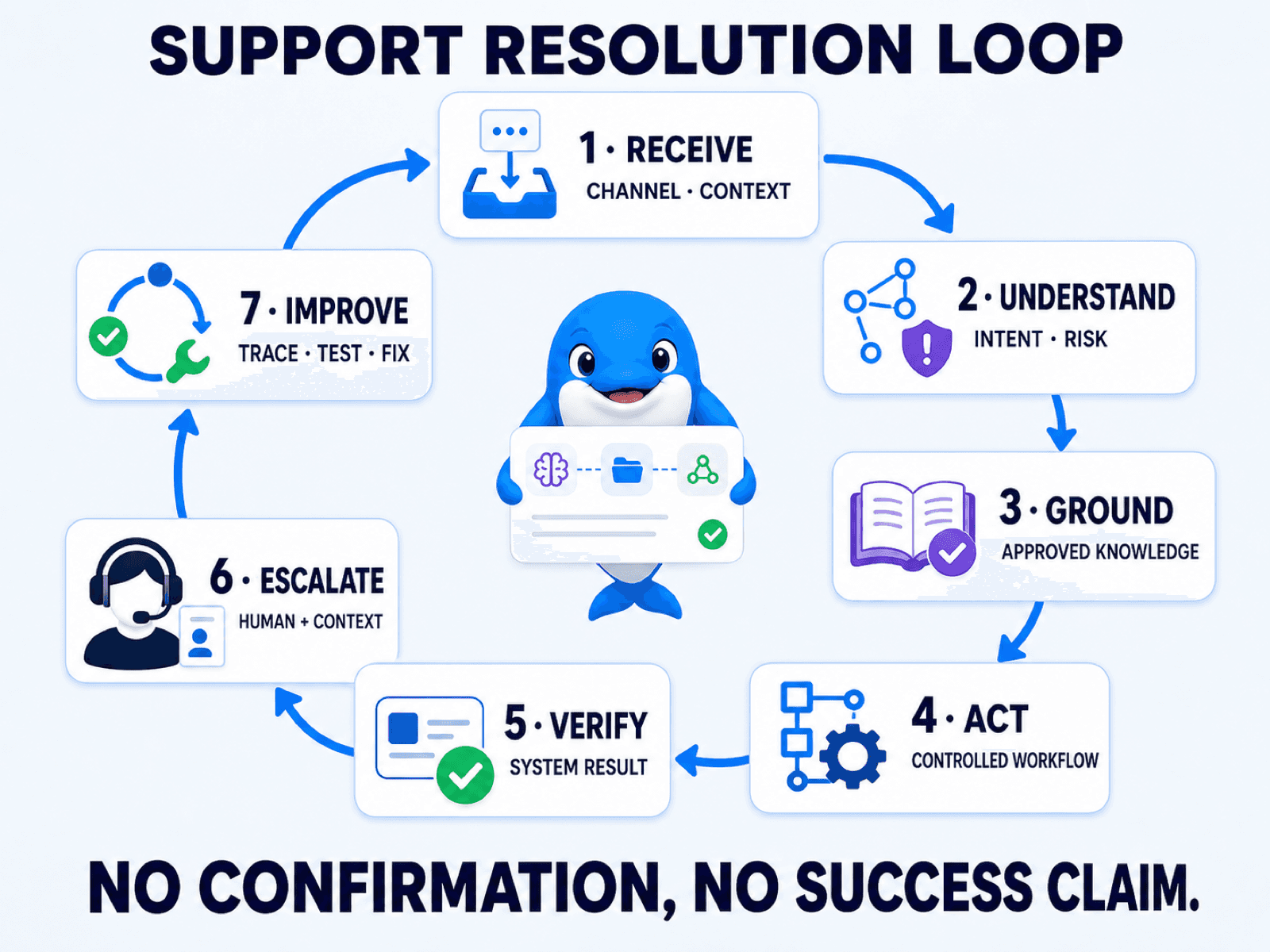
1. Receive
Identify where the request started and which context is trustworthy.
Record the channel, conversation, available customer identity, language and source event. Do not assume every channel provides the same fields or follow-up permissions. Apply the channel's rules and your normal privacy controls.
The initial question is not only “What did the customer type?” It is “Who or what does this conversation represent, and which data may this workflow use?”
2. Understand
Determine the customer's intent, required entities, urgency and risk.
A request such as “Where is it?” is not useful without context. The system may need to identify whether “it” is an order, appointment, application or support ticket, then collect the minimum required identifier.
Design a low-confidence path. If the message could describe two different intents, ask a concise clarification or hand it to a person instead of making a consequential guess.
3. Ground
Select the approved source that can answer the question.
General policy may come from a maintained knowledge base. Customer-specific status should come from the relevant order, booking, CRM or ticket system. Current external information may require an approved tool.
Grounding is a process, not a guarantee. A file can be outdated, retrieval can miss the right passage, and a provider can return an incomplete result. Every knowledge source needs an owner, refresh process and no-answer behavior.
UChat's current AI Agent page documents a Business Knowledge Hub, while official training also demonstrates AI Knowledge Base and scoped tool patterns in AI Agents 2.0. Provider and model requirements can differ, so verify the current setup before relying on a specific tool.
4. Act
Call a deterministic workflow or allowlisted tool only after the required inputs and permission are present.
Examples include retrieving an order, checking a booking slot, creating a ticket, updating a CRM field or notifying a support team. The AI can decide when a defined function is relevant, while the workflow controls the exact action, inputs and output mapping.
Do not give the agent a broad action simply because the API supports it. Define which operation is allowed, which fields it may use, and which cases require human approval. This follows the practical controls in OWASP's guidance on excessive agency: limit functionality, permissions and autonomy, and require human approval for high-impact actions.
5. Verify
Read the business system's response before telling the customer the task is complete.
For an order lookup, verification may mean a successful response containing the expected order and current status. For a booking, it may mean the calendar confirms the event. For a ticket, it may mean the ticket system returns a valid record identifier.
Build explicit branches for:
success with expected data;
success with incomplete or unexpected data;
validation error;
permission or authentication error;
provider timeout;
duplicate request;
system unavailable.
The error message to the customer should be useful without exposing internal implementation details.
6. Escalate
Stop AI replies and transfer the conversation when policy, confidence, data or system state requires a person.
A useful handoff package can include:
customer intent and urgency;
identifiers collected under the business's rules;
relevant policy or knowledge source;
actions attempted;
verified result or error category;
reason for escalation;
the next decision the human needs to make.
UChat's human live-support training demonstrates issue capture, parameter checks, agent notification and human takeover. UChat also documents a Stop AI Agent action that can prevent further AI replies before another flow continues.
Test the order of stop or pause, assignment and notification in the current interface. A handoff is not complete if nobody owns the conversation.
7. Improve
Review what the system could not resolve, what humans corrected and where tools failed.
Do not improve the bot from anecdotes alone. Group conversations by intent, knowledge gap, action result, handoff reason and human correction. Turn recurring failures into a new test case before changing prompts, knowledge or workflow logic.
UChat's AI Agent troubleshooting lesson shows how message data, function calls, field updates and the live conversation can help locate a failure. Keep any review process free of unnecessary customer data and never publish private logs.
How UChat maps to the Support Resolution Loop
UChat combines the conversational AI layer with visual workflows, multiple customer channels, integrations and human support operations.
AI Agent role, knowledge and boundaries
A UChat AI Agent can be configured with a voice, skills, constraints and business knowledge. The current AI Agent feature page also describes model choice, data capture, tool use and primary, secondary and handoff agent roles.
Use those controls to define the support role narrowly:
which intents the agent may handle;
which sources it should use;
which information it must collect;
which claims or actions are forbidden;
when it should clarify;
when it must stop and escalate.
Primary, secondary and handoff AI roles are useful for routing between specializations. They are not the same as handing a case to a human support agent. Configure the human path separately.
AI Functions and Flow Builder
UChat AI Functions training demonstrates how an agent can collect inputs and invoke a workflow. The visual Flow Builder supplies the deterministic layer around the AI: conditions, fields, actions, integrations and error branches.
This separation is valuable for support. Let AI understand “I need to change tomorrow's appointment,” but let the workflow enforce required identity, date, availability, provider response and confirmation rules.
The function description should tell the AI when to request the action. The workflow should decide what actually happens.
For a structured WhatsApp data-collection path, the WhatsApp Flows guide shows how a form-like experience can feed submitted data into the next automation step. The same verification rule still applies after submission.
Channels and integrations
UChat supports customer conversations across messaging and web channels. The same support design can often be reused, but each channel has different message formats, permissions and provider requirements.
UChat integrations cover AI providers, CRM, ecommerce, calendars, webhooks, external live-chat systems and custom paths. Confirm the exact current integration and access method required by your system.
Avoid forcing one generic response into every channel. A long web-chat answer may need shorter steps in WhatsApp. A media input may be supported by one model or channel path and unavailable in another.
If WhatsApp is the first support channel, use the WhatsApp chatbot platform guide to check the channel-specific setup, ownership and workflow requirements around the support design.
Human Live Chat
UChat Live Chat gives teams an operating space for assigned conversations, statuses, notes and customer context. It can also transfer to supported external support tools where configured.
The handoff design should answer:
What stops the AI?
Who receives the conversation?
How are they notified?
What context do they see?
What tells the customer what happens next?
What closes or returns the conversation to automation?
A human who receives only “customer needs help” has not received a useful handoff.
Teams comparing an AI-and-inbox operating model with a support-first product can use the UChat vs Intercom guide as a separate buyer-fit comparison. This article keeps its focus on designing the support-resolution system itself.
Tickets and support operations
Some requests need work after the live conversation. UChat's current CRM and ticket page documents ticket/list workflows, assignment, status and Live Chat integration. The Ticket course covers the current setup in more detail.
Use a ticket when the case needs an owner, status, follow-up or supporting information beyond the active chat. Do not add a ticket to every answered FAQ; that creates operational noise.
Ticket features and plan terms can change, and a flexible in-platform ticket workflow is not automatically a replacement for every enterprise helpdesk requirement.
AI assistance for human agents
Automation is not the only place to use AI. UChat's AI Live Chat Assistant training documents reply suggestions that a human agent can review, edit and send.
This model works well for sensitive or complex queues because the person remains in control while AI helps retrieve or shape a response. The suggestion still depends on configured knowledge and requires human judgment.
A complete AI order-support workflow
Consider an ecommerce customer asking, “Where is my order?” through WhatsApp or web chat.
Step 1: Receive the request
The channel passes the message and permitted conversation context into UChat. The workflow records the channel and begins the order-support path.
Step 2: Understand the intent
The AI Agent classifies the request as order status. If the wording could refer to a return, missing delivery or order change, it asks a short clarifying question.
Step 3: Collect the minimum required identifier
The agent requests the order identifier or other approved value required by the business. Do not ask for sensitive data simply because the customer is in a familiar channel. Follow the business's authentication and privacy process.
Step 4: Ground policy and retrieve live data
Approved knowledge can explain general delivery times or next steps. Customer-specific status comes from the connected order system through the configured integration, webhook or API workflow.
The knowledge answer and live record play different roles. The bot should not infer today's order status from a policy page.
Step 5: Verify the result
The workflow checks that the external response succeeded and returned the expected order and status fields. It maps only the data intended for the customer.
If the order is in transit, the agent can explain the verified status and the next supported step. If the record is missing, the response is incomplete or the provider times out, the system enters a failure branch.
Step 6: Escalate exceptions
A refund request, identity problem, disputed delivery, missing order or failed action may require a person. The workflow stops the AI, assigns or routes the conversation, and sends the human:
order identifier;
recognized intent;
policy source used;
lookup attempted;
result or error category;
customer's latest request;
handoff reason.
The customer receives an honest message such as: “I couldn't verify the order status, so I’m passing the order reference and the error to our support team.”
Step 7: Close the learning loop
The human resolves the case and records the appropriate status or closing note. The team reviews whether the problem came from missing knowledge, unclear intent, authentication, integration failure, policy exception or another category.
That result becomes a test. The next change should improve the exact failing layer instead of adding more prompt text at random.
Which support use cases should you automate first?
Start with frequent tasks that have clear sources, outcomes and escalation paths.
Use case | Value | Main risk | Recommended starting control |
|---|---|---|---|
FAQ and policy navigation | Fast access to repeated information | Stale or missing knowledge | Approved source, visible owner and no-answer route |
Order, appointment or ticket status | Reduces repetitive lookups | Wrong identity or unverified data | Required identifier plus external-system confirmation |
Intent triage and ticket creation | Routes work to the right team | Misclassification or noisy tickets | Confidence threshold, required fields and human review path |
Appointment or service request | Moves the customer toward an outcome | Claiming a booking that failed | Availability lookup and explicit provider confirmation |
Product or account guidance | Helps customers navigate known steps | Sensitive account action or outdated instructions | Read-only guidance first; escalate account changes |
Human-agent assistance | Helps people reply with consistent knowledge | Blindly sending a poor suggestion | Human review and editable draft |
Refund, account-access or safety exception | High customer impact | Policy, financial, privacy or safety error | Human-led or tightly controlled approval workflow |
The easiest FAQ is not always the best first project. Choose an intent with enough volume to matter and a result you can verify.
How to build your first AI support agent
1. Choose one intent and success event
Pick one job such as “return verified order status” or “create a complete support ticket.” Define success in the business system, not as “the AI sent a response.”
2. Define allowed and forbidden outcomes
Write down what the agent may answer, collect and initiate. List the policy exceptions and sensitive requests it must not complete.
3. Prepare approved knowledge
Remove duplicates and outdated versions. Give each source an owner and review date. Test questions whose answers are clearly present, partially present and absent.
4. Build actions and error paths
Create the deterministic lookup, update or ticket workflow. Validate inputs, permissions and response structure. Add branches for timeouts, missing records and provider errors.
5. Configure the AI Agent
Set its role, tone, scope, knowledge, functions and escalation instructions. Choose the current provider and model for the task instead of assuming the largest model is always better.
UChat's AI Agent course and agent-creation lesson cover the current product setup after the operating design is ready.
6. Build the human context package
Decide which fields, attempted actions, results and handoff reason a person needs. Assign the conversation before sending a notification, and confirm that automation no longer continues over the human.
7. Test normal, missing and hostile cases
Test real customer language, typos, multiple messages, unclear requests, missing knowledge, duplicate submissions, tool errors, policy exceptions and direct requests for a person.
8. Launch narrowly
Start with one channel, intent and team. Review early conversations frequently. Expand only when verified resolution, failure handling and handoff work consistently for the defined scope.
The AI Support Launch Test
Run these seven pass/fail scenarios before exposing the workflow broadly. This is consistent with the NIST AI Risk Management Framework Core, which calls for defined scope and human oversight, documented test and evaluation methods, deployment-context testing, production monitoring and safe failure beyond known limits.
Clear answer: ask a question whose approved answer exists. Confirm the response is accurate, relevant and based on the current source.
Missing knowledge: ask for information that is absent or intentionally restricted. The agent should say it cannot verify the answer and use the configured next step.
Successful action: run a safe test lookup or action. Confirm the external system changed or returned the expected result before the bot reports success.
Failed action: simulate a timeout, permission error or unexpected response. Confirm the customer sees an honest fallback and the team can inspect the failure.
Policy exception: request a discount, refund or account exception the AI cannot approve. Confirm it does not negotiate outside scope.
Human takeover: ask for a person or trigger an escalation condition. Confirm the AI stops, ownership is assigned, the person is notified and context arrives.
Ambiguous or multi-part input: send corrections, repeated messages and two requests together. Confirm the system clarifies, preserves relevant context or escalates without looping.
A launch passes only when every scenario has an expected result, an observable trace and an owner for failures.
Metrics that reveal support quality
Do not optimize only for containment. A conversation can stay inside the bot because the customer gave up.
Useful measures include:
verified task completion: the business system confirms the intended result;
unresolved or repeated question rate: the customer asks again or returns for the same issue;
handoff reason: why AI stopped and whether the category was correct;
context-transfer quality: whether the human had to collect information again;
tool failure and timeout rate: integrations that block resolution;
human correction or rework: answers or actions the team had to repair;
time to human response after handoff: measured from assignment or escalation;
customer feedback: collected through the actual support process;
provider and workflow cost per completed case: where the data is available and attributable.
Review metrics by intent. A single overall automation rate can hide one excellent FAQ flow and one harmful account-support flow.
When an AI support chatbot is the wrong choice
Do not launch or expand AI automation when:
the knowledge is missing, contradictory or has no owner;
the business has no human escalation team;
the external system cannot verify the promised action;
the workload is mostly rare, sensitive or policy-exception cases;
identity, authentication or privacy requirements are unresolved;
the support volume does not justify knowledge, integration and monitoring work;
a search page, structured form or improved human queue solves the problem more simply;
the organization cannot review failures and change the workflow safely.
In these cases, start with human-agent assistance, better self-service content, deterministic routing or a narrow read-only lookup.
Frequently asked questions
How is an AI chatbot for customer support defined?
It is a conversational system that uses AI to understand support questions and respond from configured instructions or knowledge. A more capable support agent can also call controlled workflows, retrieve customer-specific data, create tickets and transfer cases to people.
What is the difference between a support chatbot and an AI agent?
A scripted support chatbot follows predefined paths. An AI chatbot can interpret and generate natural-language responses. An AI agent adds controlled goals, tools or workflows that can complete tasks. In practice, a reliable support system combines deterministic flows, AI and human escalation.
Can AI replace customer support agents?
AI can handle defined questions and tasks, help people draft responses and prepare escalations. It should not be treated as a blanket replacement for human judgment, especially for sensitive, exceptional, disputed or high-value cases.
How do I stop an AI chatbot from hallucinating?
You cannot guarantee that a language model will never produce a wrong answer. Reduce risk with approved knowledge, narrow instructions, deterministic actions, source and freshness controls, no-answer behavior, external verification, human escalation, logs and repeated testing.
Can an AI support agent update orders or appointments?
It can request an allowlisted action through a connected workflow or tool when the platform and business system support it. The workflow must validate identity and inputs, and the agent should report success only after the external order or calendar system confirms the result.
How does human handoff work?
The workflow detects a trigger such as low confidence, policy exception, failed action or customer request. It stops or pauses AI, assigns or routes the conversation, notifies the intended person and transfers the useful context. The exact UChat setup is covered in its current Live Chat and human-support training.
Which channels can an AI support chatbot use?
UChat supports AI and workflows across multiple messaging, web and other communication channels. Choose the channels your customers use, then confirm each channel's current permissions, message formats, provider requirements and costs.
Do I need developers?
Not for every UChat support workflow. AI Agent and Flow Builder provide no-code paths for common setup. Custom APIs, authentication, complex data mapping, external support systems and specialized security requirements may require technical work.
How should I test an AI customer service chatbot?
Test a correct answer, missing knowledge, successful action, failed action, policy exception, human takeover and ambiguous input. Confirm the outcome in the connected system and inspect the handoff or error trace—not only the visible reply.
Which AI chatbot platform is best for customer support?
The best fit can receive the required channels and context, ground answers in maintained knowledge, run controlled actions, verify results, transfer to people and expose enough evidence to improve the system. UChat is a strong fit when those needs span AI Agents, visual workflows, integrations, tickets and Live Chat.
Build for verified resolution
Customer-support AI earns trust when it knows what it can answer, what it can do and when it must stop.
Start with one repeated intent. Build the complete path from customer message to knowledge, action, verification and human handoff. Test failure as carefully as success. Then use real support evidence to decide what to expand.
Explore UChat AI Agents or start with the current AI Agent training course to build the first controlled support workflow.
An AI chatbot for customer support is a conversational system that understands customer questions, answers from approved business knowledge, and can use controlled workflows or tools to complete support tasks. A reliable system also verifies each action, stops when it reaches a policy or technical boundary, and transfers the conversation to a human with the relevant context.
That last part matters. A support bot should never say an order was cancelled, an appointment was changed or a refund was approved because its language model produced a plausible sentence. The connected business system must confirm the result. If it cannot, the bot needs a safe failure path.
This guide explains the complete resolution loop, what to look for in an AI support platform, and how UChat AI Agents, Flow Builder, integrations, tickets and Live Chat can work together.
This guide reflects the public UChat product and training material reviewed on August 28, 2026. AI providers, models, tools, channel rules, interfaces and plan terms can change. Verify the linked current sources before launch.
What is an AI chatbot for customer support?
An AI customer service chatbot is software that uses natural-language AI to interpret a support request and respond through a chat channel. Depending on its design, it may answer a question, collect required information, retrieve customer-specific data, call a business workflow, open a ticket or transfer the conversation to a person.
The category includes systems with very different levels of responsibility:
System | What it does well | Main boundary |
|---|---|---|
Scripted chatbot | Menus, fixed questions, deterministic routing and required data capture | Struggles with open-ended language outside designed paths |
AI chatbot | Interprets natural language and produces answers from instructions or knowledge | A fluent answer does not prove a business action happened |
AI support agent | Uses knowledge plus controlled tools, workflows and context to pursue a support outcome | Needs permissions, verification, monitoring and escalation |
Human agent with AI assistance | Keeps a person in control while AI suggests, summarizes or retrieves information | Quality still depends on human review and source accuracy |
These are not mutually exclusive. A strong support workflow combines them.
Use deterministic logic for required consent, identity checks, fields and policy branches. Use AI for language understanding, classification and grounded explanations. Use tools only for allowlisted actions. Use a human when the request is sensitive, exceptional, unclear or unsupported.
A standalone conversation with a general-purpose LLM is not a complete support system. The useful platform has to connect the model to the customer's channel, approved knowledge, business records, actions, failure handling and support team.
The goal is not to make every conversation autonomous. It is to move each request to a verified resolution or a well-prepared human handoff.
What should an AI support platform include?
Evaluate the complete operating path rather than comparing model names alone.
Capability | Why it matters | Proof to request |
|---|---|---|
Channels and customer context | The system must receive a real support request with the permitted identity and conversation data | Test from one real customer channel, not only a builder preview |
Knowledge | Answers should come from maintained business sources rather than model memory alone | Ask one answerable, one stale and one missing-knowledge question |
Instructions and guardrails | The agent needs a defined role, tone, scope and escalation policy | Test a refund, exception or sensitive request it should not finish |
Workflows and tools | Support often requires a lookup, booking, update, notification or ticket | Run one successful action and inspect its inputs and output |
Verification and failure handling | A tool call can time out, reject data or return an unexpected response | Force a safe error and confirm the bot does not invent success |
Human handoff | People need to receive cases AI should not resolve | Confirm assignment, notification and transferred context |
Logs and improvement | The team must be able to reproduce failures and update the system | Trace one conversation from message through knowledge, action and handoff |
The right platform also fits your operating model. A small team may need one AI Agent, web chat and a simple human inbox. An ecommerce operation may need WhatsApp, order data, ticket status and team assignment. An agency may need repeatable templates and separate client workspaces.
Choose the smallest system that can complete the required support loop honestly.
What benefits should an AI support chatbot deliver?
The useful benefits are faster access to approved answers, verified self-service for repeatable tasks, better-prepared human handoffs and a clearer record of where support breaks down. Those benefits are real only when the customer reaches a correct outcome. A high automation or containment rate by itself does not prove better support.
Expected benefit | What good evidence looks like | Warning sign |
|---|---|---|
Faster first response | Defined intents receive a relevant first answer without waiting for a queue | The bot replies quickly but the customer repeats the question |
Consistent policy guidance | Answers trace back to maintained, approved sources | Different wording changes the policy answer |
More self-service completion | The connected system confirms the lookup, booking, update or ticket | The bot reports success without a system result |
Better human handoff | The assigned person receives intent, context, attempted actions and the reason AI stopped | The person must restart the conversation |
Actionable improvement data | Failures can be grouped by knowledge, intent, tool result or escalation reason | The team sees only total chat volume or containment |
Treat these as operating outcomes, not automatic promises from adding an LLM. Knowledge ownership, workflow design, permissions, integrations, human coverage and testing determine whether the benefits appear.
What does an AI customer support chatbot cost?
The total cost is usually a stack rather than one subscription: the chatbot platform, AI-provider usage, channel or telecom fees, integrations, human support time, and ongoing testing and knowledge maintenance. Compare the cost per verified resolution, not only the advertised monthly price or the cost of one model response.
Cost layer | What to check before launch |
|---|---|
Platform and workspace | Included bots, bot users, members, AI features, Live Chat, CRM/tickets and plan limits |
AI provider | Model pricing, input and output usage, media processing, tool calls and retry behavior |
Customer channel | WhatsApp, SMS, voice or other provider fees, message rules and regional requirements |
Business systems | CRM, ecommerce, calendar, helpdesk, webhook or custom API access and implementation |
Human operations | Handoff coverage, review time, exception handling and agent training |
Maintenance | Knowledge refresh, regression tests, monitoring, security review and workflow changes |
UChat's current pricing page documents its plan structure and notes that phone-based channels and connected AI providers can add usage charges. Because those terms and third-party rates can change, use the live pricing and provider pages for a real budget instead of copying a fixed total from an article.
The Support Resolution Loop
Use this seven-stage framework before building prompts or selecting a model.
1. Receive
Identify where the request started and which context is trustworthy.
Record the channel, conversation, available customer identity, language and source event. Do not assume every channel provides the same fields or follow-up permissions. Apply the channel's rules and your normal privacy controls.
The initial question is not only “What did the customer type?” It is “Who or what does this conversation represent, and which data may this workflow use?”
2. Understand
Determine the customer's intent, required entities, urgency and risk.
A request such as “Where is it?” is not useful without context. The system may need to identify whether “it” is an order, appointment, application or support ticket, then collect the minimum required identifier.
Design a low-confidence path. If the message could describe two different intents, ask a concise clarification or hand it to a person instead of making a consequential guess.
3. Ground
Select the approved source that can answer the question.
General policy may come from a maintained knowledge base. Customer-specific status should come from the relevant order, booking, CRM or ticket system. Current external information may require an approved tool.
Grounding is a process, not a guarantee. A file can be outdated, retrieval can miss the right passage, and a provider can return an incomplete result. Every knowledge source needs an owner, refresh process and no-answer behavior.
UChat's current AI Agent page documents a Business Knowledge Hub, while official training also demonstrates AI Knowledge Base and scoped tool patterns in AI Agents 2.0. Provider and model requirements can differ, so verify the current setup before relying on a specific tool.
4. Act
Call a deterministic workflow or allowlisted tool only after the required inputs and permission are present.
Examples include retrieving an order, checking a booking slot, creating a ticket, updating a CRM field or notifying a support team. The AI can decide when a defined function is relevant, while the workflow controls the exact action, inputs and output mapping.
Do not give the agent a broad action simply because the API supports it. Define which operation is allowed, which fields it may use, and which cases require human approval. This follows the practical controls in OWASP's guidance on excessive agency: limit functionality, permissions and autonomy, and require human approval for high-impact actions.
5. Verify
Read the business system's response before telling the customer the task is complete.
For an order lookup, verification may mean a successful response containing the expected order and current status. For a booking, it may mean the calendar confirms the event. For a ticket, it may mean the ticket system returns a valid record identifier.
Build explicit branches for:
success with expected data;
success with incomplete or unexpected data;
validation error;
permission or authentication error;
provider timeout;
duplicate request;
system unavailable.
The error message to the customer should be useful without exposing internal implementation details.
6. Escalate
Stop AI replies and transfer the conversation when policy, confidence, data or system state requires a person.
A useful handoff package can include:
customer intent and urgency;
identifiers collected under the business's rules;
relevant policy or knowledge source;
actions attempted;
verified result or error category;
reason for escalation;
the next decision the human needs to make.
UChat's human live-support training demonstrates issue capture, parameter checks, agent notification and human takeover. UChat also documents a Stop AI Agent action that can prevent further AI replies before another flow continues.
Test the order of stop or pause, assignment and notification in the current interface. A handoff is not complete if nobody owns the conversation.
7. Improve
Review what the system could not resolve, what humans corrected and where tools failed.
Do not improve the bot from anecdotes alone. Group conversations by intent, knowledge gap, action result, handoff reason and human correction. Turn recurring failures into a new test case before changing prompts, knowledge or workflow logic.
UChat's AI Agent troubleshooting lesson shows how message data, function calls, field updates and the live conversation can help locate a failure. Keep any review process free of unnecessary customer data and never publish private logs.
How UChat maps to the Support Resolution Loop
UChat combines the conversational AI layer with visual workflows, multiple customer channels, integrations and human support operations.
AI Agent role, knowledge and boundaries
A UChat AI Agent can be configured with a voice, skills, constraints and business knowledge. The current AI Agent feature page also describes model choice, data capture, tool use and primary, secondary and handoff agent roles.
Use those controls to define the support role narrowly:
which intents the agent may handle;
which sources it should use;
which information it must collect;
which claims or actions are forbidden;
when it should clarify;
when it must stop and escalate.
Primary, secondary and handoff AI roles are useful for routing between specializations. They are not the same as handing a case to a human support agent. Configure the human path separately.
AI Functions and Flow Builder
UChat AI Functions training demonstrates how an agent can collect inputs and invoke a workflow. The visual Flow Builder supplies the deterministic layer around the AI: conditions, fields, actions, integrations and error branches.
This separation is valuable for support. Let AI understand “I need to change tomorrow's appointment,” but let the workflow enforce required identity, date, availability, provider response and confirmation rules.
The function description should tell the AI when to request the action. The workflow should decide what actually happens.
For a structured WhatsApp data-collection path, the WhatsApp Flows guide shows how a form-like experience can feed submitted data into the next automation step. The same verification rule still applies after submission.
Channels and integrations
UChat supports customer conversations across messaging and web channels. The same support design can often be reused, but each channel has different message formats, permissions and provider requirements.
UChat integrations cover AI providers, CRM, ecommerce, calendars, webhooks, external live-chat systems and custom paths. Confirm the exact current integration and access method required by your system.
Avoid forcing one generic response into every channel. A long web-chat answer may need shorter steps in WhatsApp. A media input may be supported by one model or channel path and unavailable in another.
If WhatsApp is the first support channel, use the WhatsApp chatbot platform guide to check the channel-specific setup, ownership and workflow requirements around the support design.
Human Live Chat
UChat Live Chat gives teams an operating space for assigned conversations, statuses, notes and customer context. It can also transfer to supported external support tools where configured.
The handoff design should answer:
What stops the AI?
Who receives the conversation?
How are they notified?
What context do they see?
What tells the customer what happens next?
What closes or returns the conversation to automation?
A human who receives only “customer needs help” has not received a useful handoff.
Teams comparing an AI-and-inbox operating model with a support-first product can use the UChat vs Intercom guide as a separate buyer-fit comparison. This article keeps its focus on designing the support-resolution system itself.
Tickets and support operations
Some requests need work after the live conversation. UChat's current CRM and ticket page documents ticket/list workflows, assignment, status and Live Chat integration. The Ticket course covers the current setup in more detail.
Use a ticket when the case needs an owner, status, follow-up or supporting information beyond the active chat. Do not add a ticket to every answered FAQ; that creates operational noise.
Ticket features and plan terms can change, and a flexible in-platform ticket workflow is not automatically a replacement for every enterprise helpdesk requirement.
AI assistance for human agents
Automation is not the only place to use AI. UChat's AI Live Chat Assistant training documents reply suggestions that a human agent can review, edit and send.
This model works well for sensitive or complex queues because the person remains in control while AI helps retrieve or shape a response. The suggestion still depends on configured knowledge and requires human judgment.
A complete AI order-support workflow
Consider an ecommerce customer asking, “Where is my order?” through WhatsApp or web chat.
Step 1: Receive the request
The channel passes the message and permitted conversation context into UChat. The workflow records the channel and begins the order-support path.
Step 2: Understand the intent
The AI Agent classifies the request as order status. If the wording could refer to a return, missing delivery or order change, it asks a short clarifying question.
Step 3: Collect the minimum required identifier
The agent requests the order identifier or other approved value required by the business. Do not ask for sensitive data simply because the customer is in a familiar channel. Follow the business's authentication and privacy process.
Step 4: Ground policy and retrieve live data
Approved knowledge can explain general delivery times or next steps. Customer-specific status comes from the connected order system through the configured integration, webhook or API workflow.
The knowledge answer and live record play different roles. The bot should not infer today's order status from a policy page.
Step 5: Verify the result
The workflow checks that the external response succeeded and returned the expected order and status fields. It maps only the data intended for the customer.
If the order is in transit, the agent can explain the verified status and the next supported step. If the record is missing, the response is incomplete or the provider times out, the system enters a failure branch.
Step 6: Escalate exceptions
A refund request, identity problem, disputed delivery, missing order or failed action may require a person. The workflow stops the AI, assigns or routes the conversation, and sends the human:
order identifier;
recognized intent;
policy source used;
lookup attempted;
result or error category;
customer's latest request;
handoff reason.
The customer receives an honest message such as: “I couldn't verify the order status, so I’m passing the order reference and the error to our support team.”
Step 7: Close the learning loop
The human resolves the case and records the appropriate status or closing note. The team reviews whether the problem came from missing knowledge, unclear intent, authentication, integration failure, policy exception or another category.
That result becomes a test. The next change should improve the exact failing layer instead of adding more prompt text at random.
Which support use cases should you automate first?
Start with frequent tasks that have clear sources, outcomes and escalation paths.
Use case | Value | Main risk | Recommended starting control |
|---|---|---|---|
FAQ and policy navigation | Fast access to repeated information | Stale or missing knowledge | Approved source, visible owner and no-answer route |
Order, appointment or ticket status | Reduces repetitive lookups | Wrong identity or unverified data | Required identifier plus external-system confirmation |
Intent triage and ticket creation | Routes work to the right team | Misclassification or noisy tickets | Confidence threshold, required fields and human review path |
Appointment or service request | Moves the customer toward an outcome | Claiming a booking that failed | Availability lookup and explicit provider confirmation |
Product or account guidance | Helps customers navigate known steps | Sensitive account action or outdated instructions | Read-only guidance first; escalate account changes |
Human-agent assistance | Helps people reply with consistent knowledge | Blindly sending a poor suggestion | Human review and editable draft |
Refund, account-access or safety exception | High customer impact | Policy, financial, privacy or safety error | Human-led or tightly controlled approval workflow |
The easiest FAQ is not always the best first project. Choose an intent with enough volume to matter and a result you can verify.
How to build your first AI support agent
1. Choose one intent and success event
Pick one job such as “return verified order status” or “create a complete support ticket.” Define success in the business system, not as “the AI sent a response.”
2. Define allowed and forbidden outcomes
Write down what the agent may answer, collect and initiate. List the policy exceptions and sensitive requests it must not complete.
3. Prepare approved knowledge
Remove duplicates and outdated versions. Give each source an owner and review date. Test questions whose answers are clearly present, partially present and absent.
4. Build actions and error paths
Create the deterministic lookup, update or ticket workflow. Validate inputs, permissions and response structure. Add branches for timeouts, missing records and provider errors.
5. Configure the AI Agent
Set its role, tone, scope, knowledge, functions and escalation instructions. Choose the current provider and model for the task instead of assuming the largest model is always better.
UChat's AI Agent course and agent-creation lesson cover the current product setup after the operating design is ready.
6. Build the human context package
Decide which fields, attempted actions, results and handoff reason a person needs. Assign the conversation before sending a notification, and confirm that automation no longer continues over the human.
7. Test normal, missing and hostile cases
Test real customer language, typos, multiple messages, unclear requests, missing knowledge, duplicate submissions, tool errors, policy exceptions and direct requests for a person.
8. Launch narrowly
Start with one channel, intent and team. Review early conversations frequently. Expand only when verified resolution, failure handling and handoff work consistently for the defined scope.
The AI Support Launch Test
Run these seven pass/fail scenarios before exposing the workflow broadly. This is consistent with the NIST AI Risk Management Framework Core, which calls for defined scope and human oversight, documented test and evaluation methods, deployment-context testing, production monitoring and safe failure beyond known limits.
Clear answer: ask a question whose approved answer exists. Confirm the response is accurate, relevant and based on the current source.
Missing knowledge: ask for information that is absent or intentionally restricted. The agent should say it cannot verify the answer and use the configured next step.
Successful action: run a safe test lookup or action. Confirm the external system changed or returned the expected result before the bot reports success.
Failed action: simulate a timeout, permission error or unexpected response. Confirm the customer sees an honest fallback and the team can inspect the failure.
Policy exception: request a discount, refund or account exception the AI cannot approve. Confirm it does not negotiate outside scope.
Human takeover: ask for a person or trigger an escalation condition. Confirm the AI stops, ownership is assigned, the person is notified and context arrives.
Ambiguous or multi-part input: send corrections, repeated messages and two requests together. Confirm the system clarifies, preserves relevant context or escalates without looping.
A launch passes only when every scenario has an expected result, an observable trace and an owner for failures.
Metrics that reveal support quality
Do not optimize only for containment. A conversation can stay inside the bot because the customer gave up.
Useful measures include:
verified task completion: the business system confirms the intended result;
unresolved or repeated question rate: the customer asks again or returns for the same issue;
handoff reason: why AI stopped and whether the category was correct;
context-transfer quality: whether the human had to collect information again;
tool failure and timeout rate: integrations that block resolution;
human correction or rework: answers or actions the team had to repair;
time to human response after handoff: measured from assignment or escalation;
customer feedback: collected through the actual support process;
provider and workflow cost per completed case: where the data is available and attributable.
Review metrics by intent. A single overall automation rate can hide one excellent FAQ flow and one harmful account-support flow.
When an AI support chatbot is the wrong choice
Do not launch or expand AI automation when:
the knowledge is missing, contradictory or has no owner;
the business has no human escalation team;
the external system cannot verify the promised action;
the workload is mostly rare, sensitive or policy-exception cases;
identity, authentication or privacy requirements are unresolved;
the support volume does not justify knowledge, integration and monitoring work;
a search page, structured form or improved human queue solves the problem more simply;
the organization cannot review failures and change the workflow safely.
In these cases, start with human-agent assistance, better self-service content, deterministic routing or a narrow read-only lookup.
Frequently asked questions
How is an AI chatbot for customer support defined?
It is a conversational system that uses AI to understand support questions and respond from configured instructions or knowledge. A more capable support agent can also call controlled workflows, retrieve customer-specific data, create tickets and transfer cases to people.
What is the difference between a support chatbot and an AI agent?
A scripted support chatbot follows predefined paths. An AI chatbot can interpret and generate natural-language responses. An AI agent adds controlled goals, tools or workflows that can complete tasks. In practice, a reliable support system combines deterministic flows, AI and human escalation.
Can AI replace customer support agents?
AI can handle defined questions and tasks, help people draft responses and prepare escalations. It should not be treated as a blanket replacement for human judgment, especially for sensitive, exceptional, disputed or high-value cases.
How do I stop an AI chatbot from hallucinating?
You cannot guarantee that a language model will never produce a wrong answer. Reduce risk with approved knowledge, narrow instructions, deterministic actions, source and freshness controls, no-answer behavior, external verification, human escalation, logs and repeated testing.
Can an AI support agent update orders or appointments?
It can request an allowlisted action through a connected workflow or tool when the platform and business system support it. The workflow must validate identity and inputs, and the agent should report success only after the external order or calendar system confirms the result.
How does human handoff work?
The workflow detects a trigger such as low confidence, policy exception, failed action or customer request. It stops or pauses AI, assigns or routes the conversation, notifies the intended person and transfers the useful context. The exact UChat setup is covered in its current Live Chat and human-support training.
Which channels can an AI support chatbot use?
UChat supports AI and workflows across multiple messaging, web and other communication channels. Choose the channels your customers use, then confirm each channel's current permissions, message formats, provider requirements and costs.
Do I need developers?
Not for every UChat support workflow. AI Agent and Flow Builder provide no-code paths for common setup. Custom APIs, authentication, complex data mapping, external support systems and specialized security requirements may require technical work.
How should I test an AI customer service chatbot?
Test a correct answer, missing knowledge, successful action, failed action, policy exception, human takeover and ambiguous input. Confirm the outcome in the connected system and inspect the handoff or error trace—not only the visible reply.
Which AI chatbot platform is best for customer support?
The best fit can receive the required channels and context, ground answers in maintained knowledge, run controlled actions, verify results, transfer to people and expose enough evidence to improve the system. UChat is a strong fit when those needs span AI Agents, visual workflows, integrations, tickets and Live Chat.
Build for verified resolution
Customer-support AI earns trust when it knows what it can answer, what it can do and when it must stop.
Start with one repeated intent. Build the complete path from customer message to knowledge, action, verification and human handoff. Test failure as carefully as success. Then use real support evidence to decide what to expand.
Explore UChat AI Agents or start with the current AI Agent training course to build the first controlled support workflow.